

Closed (cannot reproduce)
Project:
Views (for Drupal 7)
Version:
7.x-3.0-alpha1
Component:
User interface
Priority:
Normal
Category:
Bug report
Assigned:
Unassigned
Reporter:
Created:
15 Mar 2011 at 22:09 UTC
Updated:
22 Mar 2012 at 15:36 UTC
Jump to comment: Most recent file


Comments
Comment #1
merlinofchaos commentedI am unable to reproduce this behavior. An empty view does not show, with or without a title.
Note: If you're using a field api field, please be sure that the view is truly empty. Empty does not mean "No visible fields", empty means "No rows returned". It's possible to have rows with no visible results. Views can't tell that is the case, and therefore you have blocks that you think are empty, but are in fact not empty in Views' eyes.
Comment #2
danepowell commentedJust FYI, I solved the problem by adding a filter for "Fields: field_files - fid (not empty)" - apparently, if a File field is "empty", it's not really "empty"? Doesn't make sense to me, but anyway, it fixed the problem.
Comment #3
merlinofchaos commentedRemember, just because fields are empty that does not mean that no results were returned. Nodes with empty fields are still nodes, even if none of the fields you selected contain data.
Comment #4
danepowell commentedDoh, of course... thanks for taking the time to explain it
Comment #5
knalstaaf commented#2 worked for me as well, thanks for sharing! Had to set the operator of that field to "Is not empty (NOT NULL)".
My case (in Filter Criteria):
Content: YouFieldName:fid (not empty)EDIT: Doesn't work for my jQfx Views Galleria. It places its thumbs about 3 times (multiple rows of the same thumbs).
Comment #6
fxarte commentedYou need to go to your Contextual filter options and way down and inside the more option group, check "exclude".
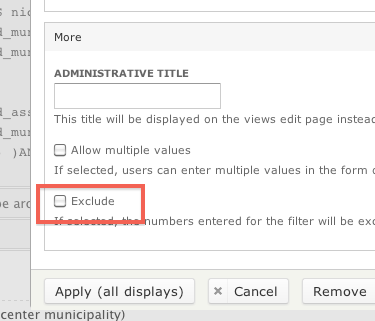
This will change the query views build from:
to