

Active
Project:
Slickgrid
Version:
6.x-1.x-dev
Component:
User interface
Priority:
Normal
Category:
Support request
Assigned:
Unassigned
Reporter:
Created:
16 Mar 2011 at 00:44 UTC
Updated:
18 Mar 2012 at 00:55 UTC
Jump to comment: Most recent file

Comments
Comment #1
ben_scott commentedIt sounds like there's a javascript error stopping the grid from rendering. What browser are you using? And could you post here any errors you get when you view that page & I'll investigate further.
Thanks,
Ben
Comment #2
daigo75 commentedI actually don't have anything blocking JavaScript; besides, I thought that SlickGrid would degrade gracefully if JavaScript is disabled? I'll have to check.
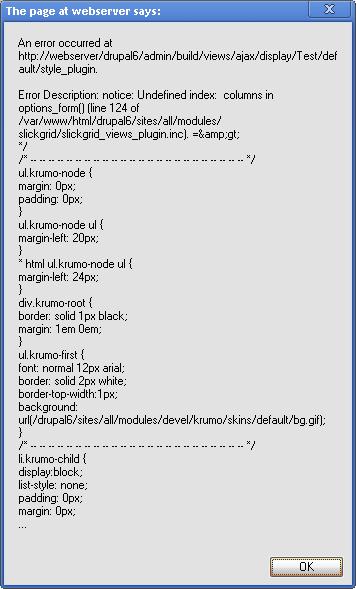
Anyway, I attached an error that appears when I try to use the grid. I created a view names Test, and just added one field of type Node:Title. No filters, arguments or anything. When I try to save it, the attached popup appears (Chrome).
Comment #3
robinl commentedHi Ben,
Although I did have this working on my site I have been doing other changes and now I am seeing this same blank screen within views preview and wherever I try to display the slickgrid view. Not sure what has changed....I am now using the latest slickgrid dev version. Is it sensitive to what version of JQuery is installed within Drupal? I assumed not as it has it's own 1.8 files.
Thanks
Robin
Comment #4
jordan.schmitt commentedBen
I have a custom table and have it exposed using xxxx.views.inc". I am having difficulty getting slickgrid to display my data. When I switch the format to "table" all is well. Any guidance would be appreciated. In addition, I used slickgrid on a couple of proof of concept views and it worked perfectly. It looks awesome.
Regards.
Comment #5
ben_scott commentedHi -
Slickgrid breaks if there's duplicate nids in the output - so try setting the view to distinct. In the latest release I've added better error handling so if this is the problem you'll get an error message rather than just failing. I think that should fix it - if not, let me know & I'll investigate further.
Cheers,
Ben
Comment #6
doublejosh commentedI've set mine to distinct to no avail.
Tried with and without title grouping. Also removed exposed filters just in case.
Nothing.
Comment #7
ben_scott commentedAre there any javascript errors?
Comment #8
doublejosh commentedWhop, sorry about my useless complaint... and the error was my fault due to a floating filterbox that's not present in this view.
Comment #9
vivek_shri commentedI am also getting the same error when I am trying to use slickgrid 7 for view display. In firebug I am getting a js error, "Slick.Data is undefined"
Comment #10
semiautomata commentedI'd encourage everyone who is getting a blank canvas where the grid is to ensure that they have followed the instructions in the README.txt, which must be done in addition to installing the module:
Unless you pull up your javascript console, you may not know that this was the problem.
Comment #11
msimanga commentedDon't have detailed errors logs but Slickgrid works fine when I create a view from a single content type. When I create a view using two or more content types that includes a relationship based on nodereference fields allowing multiple values, Slickgrid produces no output.
Comment #12
mautumn commentedSame here as #11 - i.e. when using a relationship. I have tried using the latest 6.x.dev version of the Drupal module and both 1.4.b2 & 1.4.3 of the SlickGrid js libraries. I'm using latest 6.3.dev Views.
When I use a relationship with the view I get the follow js error message :-
"Error: uncaught exception: Each data element must implement a unique 'id' property"
Is it a problem of two (or more) keys making up a unique id in a relationship? Obviously the parent id repeats for each child id... Was this coded for?
Great pity. This looks very promising...
Comment #13
izarco commented+1
Comment #14
doublejosh commentedBe sure to always rule out general javascript conflicts and errors (that's what brought me to this thread).
Comment #15
xbrianx commentedCan you install the plugins after you install the module.. I am still getting a blank screen. Also it could be helpful to include the readme on the main module page as i install plugins using d7 installations and never even knew there was a readme until further research as to why i am getting a blank screen.
Btw I am still getting a blank screen after installing the plugins to the libraries directory
Comment #16
herd45 commentedSame as #15 but for D6