

Closed (fixed)
Project:
Wysiwyg
Version:
6.x-2.3
Component:
Editor - TinyMCE
Priority:
Normal
Category:
Bug report
Assigned:
Unassigned
Reporter:
Created:
16 Mar 2011 at 15:59 UTC
Updated:
2 Apr 2011 at 19:12 UTC
Jump to comment: Most recent file

Comments
Comment #1
ishmael-sanchez commentedI had a similar issue but I never got it working. It's a pretty vanilla Drupal 6.20 site I tried Tinymce, CKeditor, and Nicedit with no luck.
For tinymce: I got an error on tinymce-3.js line 15 tinymce is not defined (tried TinyMCE 3.2.7, TinyMCE 3.3.9, TinyMCE 3.4)
For ckeditor: I got an error on ckeditor-3.0js line 36 CKEDITOR is not defined (tried CKEditor 3.5.2.6450)
For nicedit: I got an error on nicedit.js line 9 nicEditor is not defined (tried Nicedit .09)
tried installing the dev version and 2.1 and I changed themes (Garland and Bluemarine) but nothing. Any suggestions?
Comment #2
rgraves commentedI also had TinyMCE working for version 3.x and now that I've upgraded to 3.4, it's gone. I tried deleting the profile for the input type and recreating it. No luck.
I also tried removing 3.4 and going to 3.3.9.3 (the latest 3.3.x version) and it's also not working. Went back to the version I had originally (3.2.4.1) and it worked. So something appears to be messing up with the newer versions.
Comment #3
rgraves commentedUPDATE: I was running WYSIWYG 6.x-2.2. I upgraded to 6.x-2.3 and TinyMCE is now displaying properly.
Comment #4
twod@ishmael-sanchez, rgraves, Wysiwyg 2.1 and 2.2 are old by now. 6.x-2.3 (and 7.x-2.0) detects TinyMCE 3.4 and 3.3.x just fine. Check the installation instructions on admin/settings/wysiwyg to know whether Wysiwyg has recognized that the editor is installed at all, or if it just can't figure out the version. If a version number is listed, the library was most likely successfully installed.
Judgind by the errors ishmael-sanchez listed, the editors are not found/loaded at all and should be listed as "not installed" or "version not detected".
@seanr, are you sure you're really running 6.x-2.3? Does admin/settings/wysiwyg list a version number for TinyMCE in the installation instructions?
Comment #5
ishmael-sanchez commentedThanks TwoD I was able to get it working using 6.x-2.3. Previously I recall not having to explicitly set the button/plugins on the profiles, but after doing that it worked.
Comment #6
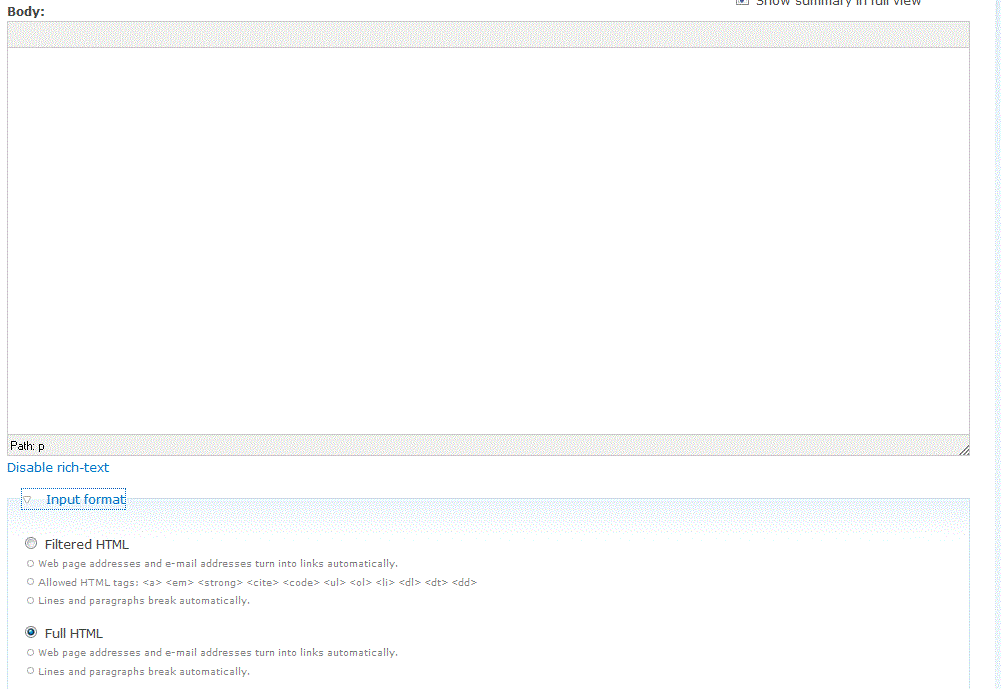
safwan commentedIt still does not work on fresh installation of wysiwyg latest 6.x 2.3 and Tinymce 3.4, it detects right but does not show up
screenshot attached
Comment #7
safwan commentedComment #8
safwan commentedSame is true for 3.3.93 version of tinymce with latest wysiwyg
Comment #9
drupalina commentedI was editing my nodes just fine for 2 years. Then suddenly today TinyMCE (3.2.7) WYSIWYG just stopped displaying on the body field of my Page content type. For all other content types, it shows ok, but not for my pages. And the funnes thing is that I didn't do anything - just installed "admin links" and "fast toggle" modules. But even uninstalling and removing those modules didn't correct the problem. (I'm guttered because Page content type is the main content type on my website)
Comment #10
ishmael-sanchez commented@safwan try going into the WYSIWYG profile and enabled the buttons manually that fixed it for me. Your screenshot resembled my issue.
Comment #11
iaugur commentedReviewing the enabled buttons list in the profile fixed it for me too
Comment #12
lucascaro commentedJust for the record, I had the same issue with tinymce 3.4, updated to the new wysiwyg module and it still wasn't worgking (it worked in my local server but it didn't in the production server).
The trick was to check the permissions on the recently downloaded tinymce folder. It had 700 by default and I needed 755 to allow the web server to read the files inside.
I hope this helps someone.
Cheers.
Comment #13
twod@safwan uin #6. Wysiwyg and TinyMCE are working perfectly fine, you just need to enable some buttons.
@lucascaro, yes, everyone must have read access to the editor files since they need to be downloaded to the client. Good catch checking the permissions on them, many overlook it or assume they are set correctly by default but that depends a lot on the host.
@drupalina, that sounds like a different issue, please file a new support request if flushing all caches doesn't help. If you're using a special page template for that content type you will also need to make sure it prints the $closure variable before the end of the body tag. It's common for themes to miss this.
To anyone else with the problem seen in the screenshot in #6: If you recently updated Wysiwyg from 2.1 or earlier, please see my reply in #1100900: It's imposing buttons over others and the issues linked to from there. We no longer support using the default toolbar layouts.
Comment #14
twodWhoops, forgot to change status.
Comment #15
achtonFWIW, I had the same issue after upgrading to TinyMCE 3.4 and my problem was partly the directory permissions as mentioned in #12, and also that I had replaced the tiny_mce directory, thus deleting the downloaded translations I had installed (and enabled ). I had to redownload them and after this it worked.
Strangely, Firebug did not enlighten me on this problem, but the JS console in Chrome helped me out, however.
Comment #16
candelas commentedthanks very much for your module.
i have check permisions and put the folders on the right place but i dont get the tinymice to work.
with firebug i found that it fails because it doesnt found this file
i downloaded today version 3.4.1 and it has not a themes folder.
i looked into other site were it works and it has not neither.
any tips, please? thanks :)
edit: i went to the tinymce page and go to the custom download and select the themes. now it works :)
Comment #17
candelas commented