

Closed (fixed)
Project:
Field Group
Version:
7.x-1.0-rc2
Component:
Miscellaneous
Priority:
Critical
Category:
Bug report
Assigned:
Unassigned
Reporter:
Created:
16 Mar 2011 at 18:23 UTC
Updated:
2 Jun 2011 at 20:01 UTC
Jump to comment: Most recent file




Comments
Comment #1
bryancasler commentedI ran update.php, but it said no updates were available. Not sure what could have caused this then. Probably a fringe case.
Comment #2
Stalski commentedFrom rc1 or from dev?
There was no update hook needed. The main difference is that the data is now ctools driven. Do you have ctools enabled?
- Edit - Zuuperman and I tested it from a dev and rc1 and they are in the field_group table and still working. Do you see them in the field_group table?
Comment #3
bryancasler commentedI went from a Dev to RC1
Restoring to a previous database, but retaining the upgraded module files seems to have resolved this. Unfortunately I did that before seeing your request to look in my DB.
Comment #4
aanjaneyam commentedI concur. I have the same problem. I upgraded drom DEV to RC2. It works if I download and apply git snapshot from 2 days ago. In my case I can see a 2-3 random field groups (instead of 20-25) but they are all messed up. Essentially its all broken. I think its a worthy candidate for Critical.
Comment #5
aanjaneyam commentedThe problem seem to be on manage fields/node form and not on the display side. Or may be the display might also break on new nodes created after the upgrade. The field groups are there on the manage fields page but not showing up (along with attached fields) on the node form.
Comment #6
aanjaneyam commentedIt doesn't seem to affect fieldset field group type. (it may be wrong in somebody else's case)
Comment #7
Stalski commentedThis is indeed reasonably critical. I 'll check this now but i don't have that problem.
The only difference maybe is that your fieldgroups are in features. Is this the case?
Comment #8
Stalski commented#1095396: field_group_features_export_options declared twice indicates that the features file was not deleted. My mistake. That will the the reason if you guys are using features and left that file there too. But this might be another issue, just FYI.
Comment #9
aanjaneyam commentedThis does not seem to be a feature problem. I say so because in one installation I have features installed and one without and both have Identical content type. One originally content type built without feature and I used feature to export this original set up to be installed in other. The problem affects both installations. As said earlier the problem goes if download and apply git snapshot from 2 days ago (When #1086450: Cannot see red star on some field groups even required fields are set to 1 was fixed.
Comment #10
bigsyke commentedSame issue, dev to rc2. Now all my fields are missing when associated with any field groups
Comment #11
Stalski commentedHey everyone. This critical bug should be fixed in dev right of now.
There were a few problems with the migration to the ctools driven features support and the bulk exporter. All that would be fixed.
There was also a problem with name of the default hook. That is changed (only this once) and it will stay like that.
Because of the importance of this bug, i will give a guideance to save your existing features and groups. I tried it out on a online_application field/field_group feature module i received in this issue queue. The example is for a module called "online_application" and is just an example
so after you have the dev code:
Can you guys test it again and hopefully it is working for everyone again.
Sorry for all the inconvenience and i hope the fix helps.
regards,
Stalski
Comment #12
aanjaneyam commentedHi. The guide is for field_group involving features. What about field_group installation which does not involve features. Will the new dev version fix it without doing any thing.
Add ctools hook in the online_application.features.inc > what doe this step involve.
Thanks
Comment #13
Stalski commentedThe upgrade steps if you don't have features modules installed, should be only the first step:
All other steps is to fix existing features field_groups.
So it should work as soon as you run update and cache is cleared. It works for me, but all feedback will be greatfull.
Comment #14
aanjaneyam commentedAdd ctools hook in the online_application.features.inc > what does this step involve.
Comment #15
Stalski commentedIf you would have a module named "online_application" or whatever, then this features driven module will need the ctools hook from now on, as field_group now depends on it.
For people who want to save their old features (to recreate new ones in the new format), i wrote this scenario down to alter the older featured module so that the field_groups in it would be recognized.
This ctools hook specific is the code like this in online_application.features.inc:
Comment #16
aanjaneyam commented@stalski. It was myself who originally created the original online_application and subsequently uploaded its feature export for testing a previous (red asterisk bug in issue #1086450: Cannot see red star on some field groups even required fields are set to 1). Since you already have the updated/corrected feature export may I PLEASE request you to upload a copy of the same. This would save me some time and possibility of doing mistakes. Actually I have to quickly implement this form in a site. I was just about to put the form online when this field_group issue came to light. Thanks in advance.
Comment #17
Stalski commentedOk, coming up
Comment #18
aanjaneyam commentedit is the online_application-7.x-2.x version (uploaded by me) which is complete and has every field , field group and ds settings.
Comment #19
Stalski commented@amsri: This is not the recreated version, but the version i received from you and altered untill i saw the field_groups again.
(you will still need to run the update hook if you didn't already(maybe lowering the update hook again in the system table of field_group again))
It's best for you to re-export it again when you got it working.
Comment #20
aanjaneyam commentedWell I tried your suggested steps and cleared caches but it doesn't work. I have hattched the module with the amendment suggested by you I don't know where I am doing wrong. I shall be grateful if you could have look at the amendments.
Comment #21
Stalski commented@amsri: The ctools hook is not there for field_group. It was only added by ctools itself for ds. So that step is missing. i altered the hook into:
I did not see the field_groups but with the changed ctools_api hook, it works here.
Comment #22
aanjaneyam commentedI donn't know why it doesn't work for me. I tried several times. I copied and pasted the ctools hook suggested by you in online_application.features.inc (of the file uploaded in previous post.). It may be because initially after the feature export of online_application I manually added a few more fields and fields group to the feature. I am worried that I may have to do all the content type all over again.
Comment #23
Stalski commentedMaybe you need to delete the field_groups from the db table (bundle=online_application) all together.
Comment #24
aanjaneyam commentedHi again. I have now deleted the entire database and restored it to a date two weeks ago. Now my site is back to a state as if I never had online_application feature installed. So my site is back to Square 1 and I have only the previously exported feature module file uploaded in #20 above. If I reinstall the online_application feature and follow the path suggested in #11 above will it be possible to have online_application back (complete with all its setup as feature contains them). This way I will be saved from the very very lengthy task of recreating the form content type. (of course I will have to reinstall all the dependencies again)
Comment #25
Stalski commentedI guess yes. The most importanting things is that ctools is not the export api and the default hook has changed names.
I don't understand why it is not working for you previously. I can only imagine you did not clear the field_groups (deleted), so it takes it from code again. Clearing cache would always load the new or altered default.
Comment #26
Stalski commentedAnd if it really did not work, you should just remove the field_groups from your feature export module. As long as you don't loose your field and display settings. The field groups themselves is not that much of work.
Comment #27
aanjaneyam commentedThanks a lot for reply. I am so grateful. I will try. Is it ok if I just first amend the feature module as per your instruction in #11 and then upload the module file and enable the feature. If it works then I will recreate the working feature and reinstall the recreated module.
Comment #28
Stalski commentedYes. Make sure you uninstall your features module first. Make sure all field_groups for that bundle are out of the database and indeed follow instructions in #11, with the difference of Display suite being there too.
In fact it is simple, they should be loaded from code and not the database anymore as ctools will see them as default.
Tip: you can always dsm (devel module) in the code to see what goes wrong.
Comment #29
aanjaneyam commentedIt just doesn't work for me. I have almost given up on this issue. Which ever way I enable my feature module. The field groups do not (and attached fields) do not show up on node/add/online_application. After applying your steps in #11 (with ctools hook adjustment in #21) the field groups are shown on manage fields page and default display but not on node add or edit. I also have a new problem 3 fields (not field groups) are not getting created even though they are part of export. As said earlier that I deleted and restored database so the database tables were clean in terms of any field_groups or fields or anything from online_application module.
I think I will have to recreate the content type as I cannot experiment much on my production site where I was implementing the form when this issue occurred. I have a set up without features (but it has partially complete online application which I think was tested by you as it my my first upload on drupal.org). The second upload was complete and elaborate. I hope that things will work when I complete the partially complete online application on the other set up and export to install it on production setup.
Comment #30
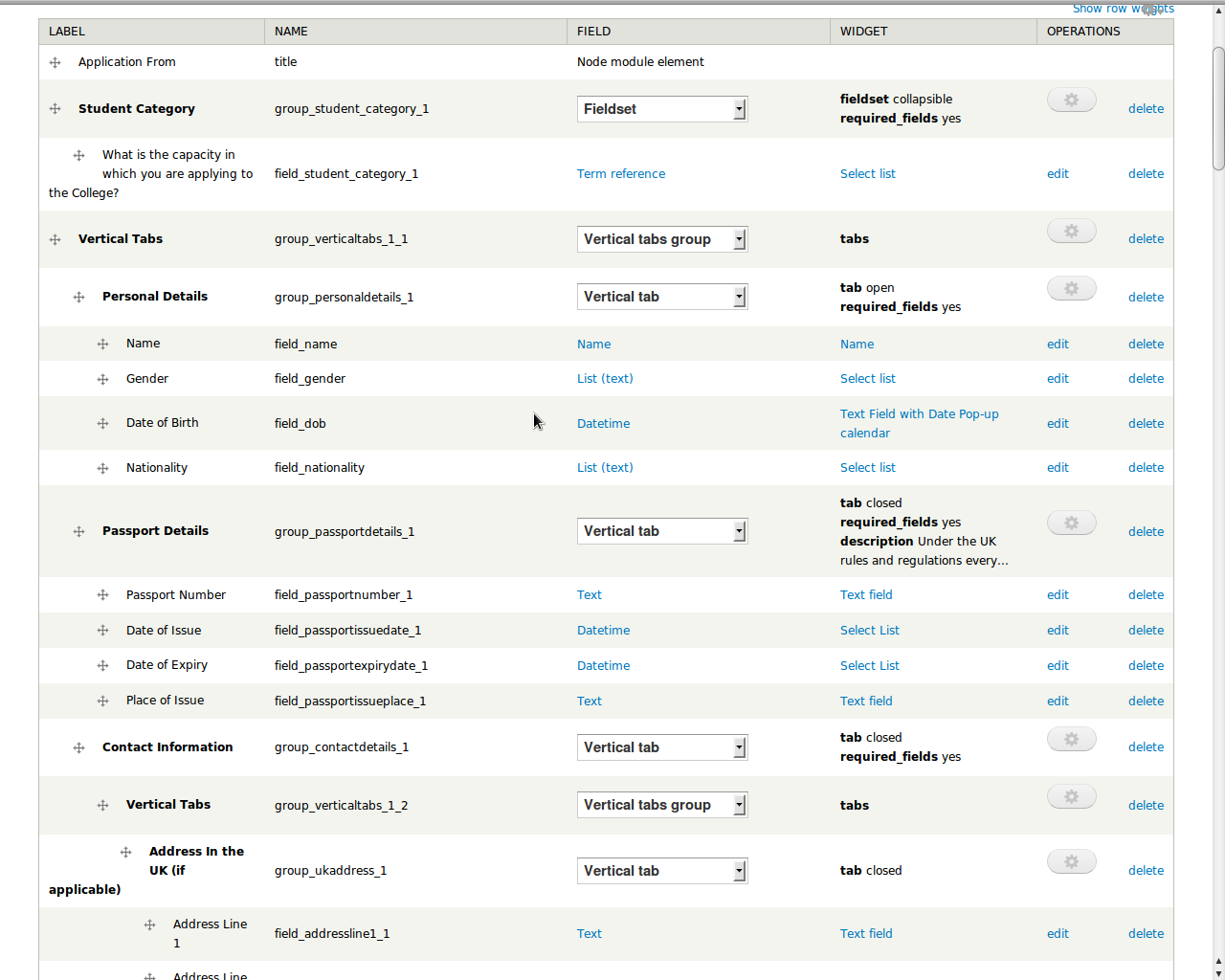
omercioglu commentedSame issue here also. But just discovered that a new field("identifier") has been added to the field_group table and this field was empty. I created a new field group, and filled in the rest of the empty fields by hand. Please see the attachment.
Comment #31
Stalski commented@omercioglu: That should work too. So running update created the new field, but did not populate the new identifier field? That shoul happen in one and the same update session.
Comment #32
omercioglu commentedMost likely it's the case you describe but "how" i do not know. If you want more info for anything else i will gladly help.
Comment #33
Stalski commented@omercioglu Did you manage to get it working then?
Comment #34
aanjaneyam commentedFor me the problems left to be sorted are:
The following fields not getting created:
Fields under Student Category, TOEFL Details and Supporting Documents not getting created. (I have restored the database so teling of memory)
and the other problem is the field_groups and attached fields not showing on /node/add/online-application. Only 3 field groups are shown (Contact information with no fields attached, work experience with its field shown and Criminal Conviction)
Comment #35
omercioglu commentedYes. Except for the #1099824: field_group_fields_nest does not nest groups correctly case for states it's working. By the way i also had to set 'parent_name' for 'group_event_info' to 'group_news' by hand, but it seems to work with or without setting anyway.
Comment #36
Stalski commented@amsri: you said field again. That is not the fault of field group i persume?
It could be that field group and it's children are not shown on frontend, but we are talking backend (fields / manage screen overview) i hope.
I am beginning to think you have another problem. If fields are not behaving normal ... this is a very different case.
Comment #37
aanjaneyam commentedI am now working on the install without feature module and the field_groups (and attached fields) are not showing there either. THEY ARE SOWING ON MANAGE FIELDS AND MANAGE DISPLAY BUT NOT ON NODE/ADD/ONLINE-APPLICATION. I have re exported the content type which does not involve features for you to see. I have also attached screenshots of the pages. I am running latest DEV version (20 March 2011).
I have cleared caches several times. In fact I also truncated cache tables using phpmyadmin.
I also cleared browser cache.
I don't thing there is any problem with core field module or Field API. It was all working before this issue emerged after upgrading to RC 2. As said above I tried reverting and it worked (I did not try it again).
NOTE: Just now I discovered that there is a problem with features and latest DEV of views so I am unable to export content type at the moment. But will do so asap.
Comment #38
aanjaneyam commentedOne more thing. I added and deleted few field groups in the content type of the install mentioned in #37 above. (and also clicked save several times in anticipation that it will pick up.
Comment #39
aanjaneyam commentedSome more input.
If I Shift some vertical tabs away from vertical tab groups i.e. remove the nesting of these vertical tabs then these shifted tabs (standing on their own are visible. In other words vertical tabs nested under vertical tab groups are invisible.
Comment #40
omercioglu commentedI guess you are useing node form columns, it may be interfering with field groups.
Comment #41
Stalski commented@amsri: i see the problem now you explained it better. I see fields, but indeed not in all the field groups. I missed that somehow as i always look at fields. I don't think this has anything to do with the upgrade path to ctools.
This seems a different bug and i will see what other updated things in field group could cause this.
Comment #42
aanjaneyam commentedWell for me this always the problem. When ctools stuff was introduced the field groups did not disappear from manage fields or manage display. It was the node add form where the field disappeared. If you see all my posts above I have said possibly a couple of times that I can see fields and field groups on manage fields but not not on node form. May be it is possible (though remote) that it is somehow preventing the clean reinstall of mu online_application feature (i.e. some fields attached to field groups are not getting created- I may be wrong).
Comment #43
aanjaneyam commentedI only saw the problem (for the first time) of field disappearing on manage fields page when I tried to reinstall feature module after database restore. But the when I applied your your fix in #11 the field groups appeared on manage fields and manage display pages but never appeared on node form.
Comment #44
Stalski commentedFound the problem. There was an error in my update procedure and script. The identifier was not the same as ctools expects it:
But then again, that was not the problem :p . This specific case had me discover a larger bug in field_group that involves nesting. there is anohter issue still open that explains this as well.
So here is what you happened and what you can do about it:
Steps to fix it:
I hope that will be the end of this and rc3 can be thrown out :)
Comment #45
aanjaneyam commented@stalski you mean to say the code suggested in #44 above should be put in place of the earlier code suggested in #11.
So the steps I would take with respect to my original online_application feature modules are:
1. Get the latest field_group snaphot from git.
2. Run update.php.
2. In my original online_application module (on my local computer) Rename online_application.features.field_group.inc => online_application.field_group.inc
3. Then add the following ctools hook in the online_application.features.inc .
4. Rename default hook from hook_field_group_default_field_groups to hook_field_group_info.
5. Place the following piece of code under the array before the return (in file online_application.field_group.inc):
6. FTP upload the so amended feature module folder to the server.
7. Enable the feature module
8. Clear the cache.
9. If it works recreate/re-export the feature module and download it to the local computer.
10. Upload the recreated feature module overwriting the module files hacked above.
11 Run update.php again and clear cache.
I hope I am clear and detailed in my steps. Please correct me if there is anything wrong.
Comment #46
Stalski commentedFrom very initial point: yes
The explanation i gave is from the point where we took your specific export to the next level. You have the choice. But the steps all together seems good.
Comment #47
aanjaneyam commentedOne more thing in online_application.field_group.inc will the last line of the code be return $groups; instead of return $field_groups;
Comment #48
Stalski commentedyes
Comment #49
aanjaneyam commentedI tested it and as far as field_group is concerned it seems to be working. There seems to be a problem in my feature export and many exported fields are not getting created upon install. But it does not seem to be connected to field_group. All the field group which have fields attached to them (i.e. the fields which were created and attached during module install) are showing. The field groups whose attached fields were not created during module install are not showing but they still show on manage fields page. I will try to find out with my limited skills as to what is wrong with my features module and why some fields are not getting created. Else I will turn to the install with online application implemented without using features and re export it. Thanks a lot for cooperation. BTW is the new DEV coming out today.
Comment #50
Stalski commentedYes. I am very glad it works.
Comment #51
Stalski commented