Closed (fixed)
Project:
OpenLayers Proximity
Version:
6.x-2.x-dev
Component:
User interface
Priority:
Normal
Category:
Support request
Assigned:
Unassigned
Reporter:
Created:
21 Mar 2011 at 10:51 UTC
Updated:
14 Jun 2011 at 11:41 UTC


Hi
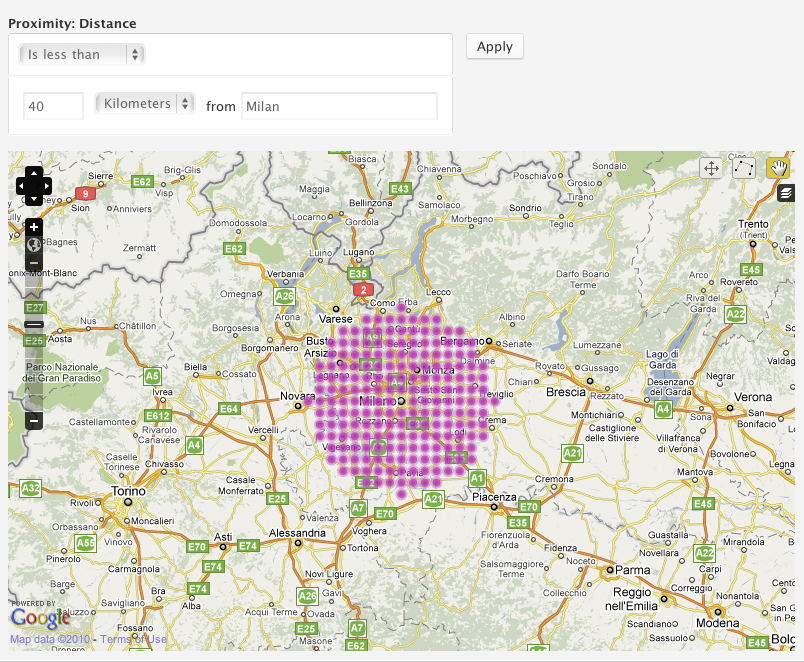
I have set up an openlayers proximity filter but it is giving me too many choices. I would like just one choice as is shown on http://drupal.org/files/images/openlayers_proximity_lt_40.png
At the moment I have the same as the uploaded example. Does anyone have an explanation on how to achieve this as I have gone through various configurations and nothing works.
If you need extra info just let me know.
Jimmel
| Comment | File | Size | Author |
|---|---|---|---|
| openlayers.jpg | 49.12 KB | Jimmel |


Comments
Comment #1
Jimmel commentedOk after some experimentation I am going to place a quick tutorial on how to set up openlayers and proximity. This will not go into the details of how drupal and views etc works, you should have an idea of this already. It just gives the basic setting that you might need when using openlayers.
1.Download and enable the openlayers module including the proximity and geocoder modules.
2.Create a content and insert a content field with these settings
Label: Anyname Field: anyname Type: Openlayers wkt Form element: openlayers geocoder. You can use the default setting on the next window. Experiment with them later.
3.Create some content for the content type you made.
4.Create view1 as a node. Use openlayer as the style and give it a field. Also choose wkt openlayers whenever it gives you the choice.
5.Add a display using openlayers data.
6.Place a proximity filter as great circle in the filter box. Expose the filter. Make sure that the force single option is not clicked (it wont work if it is).
7.Create a preset in openlayers. Most of the defaults will do. In layers and styles enable overlay layers. Click save. Experiment with the defaults later.
8.Create another view as a node, lets call it view2 and choose openlayers in style. Add a page display and set up your page path and menu. In the styles options choose the preset you made in openlayers. If you don't then the default preset will be set up and your content won't be seen.
9. Put a proximity filter in using the view1 filter settings. Save.
10.Go to the map and enter your filter imputs and it should work ok.
Very handy module.
Jimmel
Comment #2
Jimmel commentedJust an added comment.
It seems that openlayers will not show a marker if it is used with fck editor. Switch to plain text when choosing a location on the map. Could be an issue with other wysiwyg editor aswell.
Comment #3
Jimmel commented