I have basic workbench access and workflow set up on a site, but I'm having issues with permissions and creating menu items.
For instance, using the default museum model if you have the different sections and and admin goes in and creates a "header" page for each section
then the exhibit staff want's to go in and add sub pages under their default page they can. Their new page will only be editable by other people in their section, which is great, however if they want that item to display in a menu, they can put that item anywhere on the site. They can put it in the library section if they want to.
The same thing happens when using Book, the exhibit staff can create a child page under any section.
Using either book or menu block is there a way to restrict where the exhibit staff can place their sub pages, so that it would create a menu item (or a sub page) without it giving them access to put the page anywhere?


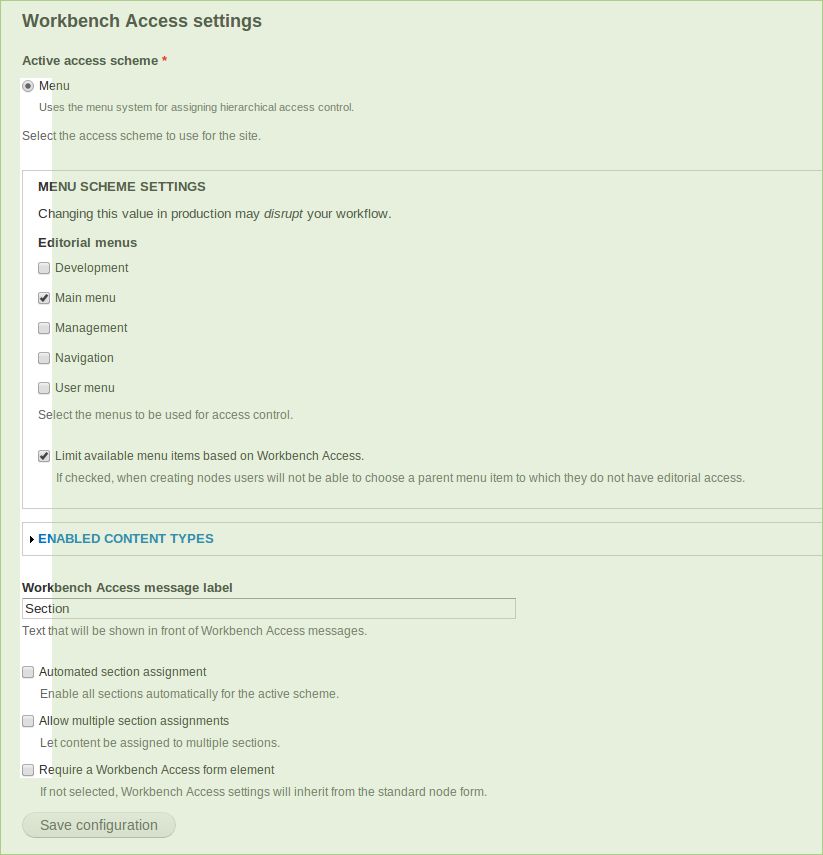
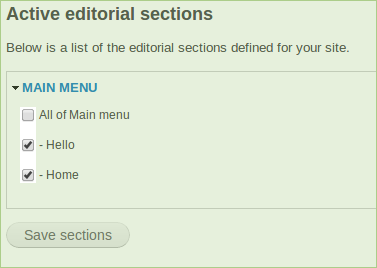


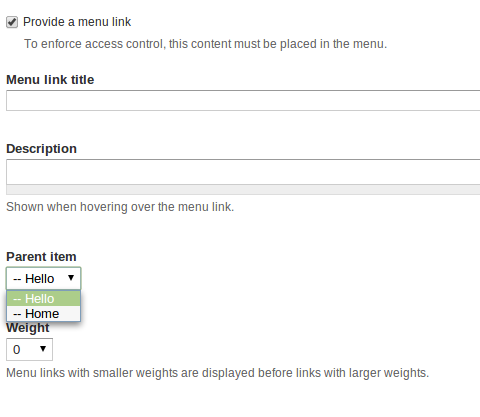


Comments
Comment #1
agentrickardNot yet. It requires some form trickery.
This will come in when we integrate native form support for Menus. Books are not currently supported.
Changing title for menu and moving to proper queue.
Comment #2
agentrickardIf you need to code a quick solution, I can give you some pointers.
Comment #3
angramify commentedSure, any pointers would be greatly appreciated.
Comment #4
agentrickardIt's a hook_form_alter() on the node form, targeting the elements you're after (menu or book). Then you would remove any options not found in $user->workbench_access.
See book_outline_form() and menu_form_node_form_alter().
The trick is that sometimes the item will be assigned outside the user's sections, in which case it is my standard to convert the form element into a #value and print a message instead.
Comment #5
angramify commentedI've tried but can't seem to get anything working, thanks for the suggestion though.
I think we're going to have to wait until menu's are supported in workbench
Comment #6
agentrickardYes, it's a bit of a nasty problem.
Comment #7
Jean Gionet commented+subscribing
I need to restrict menu access per "section" or an access area a user can create content in.
and/or have the ability for each "section" to have their own menu. is this possible?
Comment #8
angramify commentedthat sounds exactly like what I need. I tried creating a custom module to get this feature working, but wasn't able to get anything solid.
Comment #9
devin carlson commentedThis functionality is exactly what I need. It would keep content properly located and would not require an admin to manually create the website's menu.
Having previously used organic groups with OG menu, having this feature in workbench would greatly simplify a lot of site setup.
I'm still not up to speed with D7 development so are there any ideas on the amount of time or funds required to implement this?
Comment #10
agentrickardThis is likely a 16-hour task.
I should point out, though, that even in D7, the menu system doesn't scale very well. Putting more than 500 nodes in the menu system can really eat RAM when you clear cache.
Comment #11
angramify commentedIs there a better way to manage a large scale site without having a giant menu?
If each content creator needs their own section and each section needs a way to navigate through their content...is there a way to do that without a menu?
If this is a project you're willing to work on, I'm willing to help in any way that I can.
Comment #12
agentrickardThere are a variety of possible solutions. Most dealing with taxonomy.
Comment #13
David Svensson commentedsubscribing
Comment #14
David Svensson commentedsubscribing
Comment #15
agentrickardTitle change.
Comment #16
agentrickardWow. Handling this for taxonomy is going to be a mess. Split these into two issues.
Comment #17
agentrickardSee #1187424: Default taxonomy form support
Comment #18
agentrickardAnd a patch for menu, which probably needs a lot of work.
Problem is that most users can't edit menu items.
This patch requires #1187424: Default taxonomy form support to function.
Comment #19
agentrickardComment #20
kevincrafts commentedSubscribing...
Comment #21
Wappie08 commentedHi agentrickard, I just tried your patch from #18 (thanks!) but it doesn't work: the function is not called. I think the name of the form alter is wrong (why use 'default' ?), and also it's workbench_access_menu and not menu_workbench_access
Even when I fixed the name the function was not called (I don't know why).. So I made my own module and put the form_alter function in it, now it worked..
but then I ended up with an empty menu..
I'm trying an other idea but I do not know which drupal function to use (maybe someone can help):
edit: now a working example, only for main-menu.
sources:
http://stackoverflow.com/questions/1841961/drupal-menu-system-outputting...
http://api.drupal.org/api/drupal/includes--menu.inc/function/menu_tree_a...
Code much open for improvement, any help appreciated!
Greets Wappie
Comment #22
agentrickardDid you apply both patches and clear the cache?
Comment #23
Wappie08 commentedyes think so, I created something myself, see edited post above!
Comment #24
agentrickardWell, it needs lots of work. And I'm going on vacation...
Comment #25
TimG1 commentedSubscribing.
Comment #26
rakun commentedSubscribing
Comment #27
fearlsgroove commentedI'm not sure this should be tied to the taxonomy solution. Not even sure the taxonomy solution is ideal, and I'm happy to post thoughts there based on feedback here. It may also be that my use case is different than what's described in this issue. Basically I want to control editorial access via the menu, but I don't necessarily want to require that a menu item be created for content to fall within an editorial section.
The archive attached is a standalone module that does exactly this with no dependencies:It limits available menu options to those to which a user has access based on their editorial sections. It just the form alter logic ripped from the last patch on this issue and stuffed in a standalone module and works on the current release versions of Workbench and WA (1.1 and 1.0 respectively).
Comment #28
agentrickardThat description sounds like what Workbench Access already does in menu mode without this patch or your new code.
Or are you also limiting what menu choices the user has?
Comment #29
fearlsgroove commentedYes the menu is limited to what menu items the user has access via WA. The idea being that assigning editorial section shouldn't necessarily be the same thing as assigning an actual menu link, but it's a reasonable use case to limit available menu parents to the workbench access links and their children.
Comment #30
agentrickardI'd like to see that reworked as a patch to the main module then.
Comment #31
fearlsgroove commentedOK here it is as a patch. There's a new checkbox on the settings page, menu fieldset to limit menu options. When creating/editing a node, a form alter strips out any menu items to which the user does not have access or are not the current parent item of the node.
Comment #32
fearlsgroove commentedI missed a few things porting it into a patch -- allowed children were being stripped incorrectly and the "current default" didn't handle the case where there wasn't an existing menu entry (i.e. a new node). Also there was code copied over from the taxonomy access form_alter function that (I'm fairly certain) serves no purpose for this module.
Comment #33
agentrickardThanks. I am on vacation and will review when I get back.
Comment #34
agentrickardThanks. I am on vacation and will review when I get back.
Comment #35
agentrickardUpdated patch to latest version. Some changes and questions.
The attached patch will not work.
Comment #36
agentrickardThere are also issues to resolve when creating a new menu item without having the "auto-create new sections" setting turned on. In those cases, the code would have to walk up the tree to find the nearest parent section.
Comment #37
dave reidAssigning for review on Saturday and Sunday.
Comment #38
jenlamptonLatest patch won't apply to latest dev cleanly. I have the use case where the "auto-create new sections" setting is not turned on, happy to help test that.
Comment #39
jenlamptonFor some reason the patch above worked when I did a drush dl, but when I did a git pull it failed. rerolled for 7.x-1.x git branch
Comment #40
dave reid@jenlampton: Looks like your patch in #39 included some of the breadcrumb changes from another issue?
Comment #41
jeremiahtre.in commented@jenlampton I'm seeing the option, "Limit available menu items based on Workbench Access"; however, the patch doesn't seem to be working past that. Users are still seeing menus they shouldn't.
Any suggestions? Did it work for you?
Thanks!
jtreinau
Comment #42
Taxoman commentedIMO, this feature would be important to many projects.
(For future reference: it appears that #1187424: Default taxonomy form support only partially dealt with the taxonomy challenges?)
Comment #43
agentrickardThis is also a release blocker.
Comment #44
mbosma commentedJust posted a work-around solution for automatic menu based sections here:
http://drupal.org/node/1777098
It automatically adds nodes to the menu section the node generates. You don't need to modify Workbench Access module at all, it uses the Rules module to add the connection in the database.
Comment #45
agentrickardThat is not a sufficient solution. We need to do this without Rules.
Comment #46
fearlsgroove commentedAttached patch is working for me on a production site. Whether or not the *default_form_alter gets called is dependent on whether or not require a workbench section is selected, which didn't work for my use case. I DO want to require a section, but also need to alter the entire form to adjust the available menu entries. I've changed workbench_access_form_alter to always call the *_default_form_alter.
Interdiff vs 38 also attached.
Comment #47
agentrickardFails for me.
Comment #48
agentrickardThis version cleans up that error.
Comment #49
agentrickardComment #50
agentrickardActually, we can't store the column information in the form element. That needs to be present when saving programatically.
Comment #51
agentrickardFixed that bit.
Comment #52
fearlsgroove commentedErrors are gone and the menu is filtered work when "Require a Workbench Access form element" is not selected, however this doesn't work when "Require .." is selected, which is a use case I'm looking to support. Basically I'd like to make it possible to alter the node form to limit the menu regardless of whether I'm using a dedicated form element OR the core menu form element to specify the section.
Maybe a secondary hook that provides that opportunity to plugins without being dependent on whether custom forms are enabled?
Comment #53
fearlsgroove commentedThis seems to work. Adds a separate hook from the node form/element hook allowing the plugins to edit the node form regardless. Basically we want to filter the menu element if present regardless of whether it's used as the access control element.
Comment #55
fearlsgroove commentedNot sure how that whitespace nastiness snuck in there ...
Comment #57
agentrickardIf using the supplied Workbench form element, items should be pre-filtered. I'll take a look.
Comment #58
agentrickard@fearlsgroove
I just re-read your comment in #52 and I reject your premise. Please do not derail this patch by trying to include that functionality. What you want should go in your own custom code.
The choice that this module makes is deliberate:
1) Use an access control widget that is independent of the source heirarchy widget.
2) Use the source hierarchy widget as access control.
In case #1, we do not interfere with form element #2. The project launched only with support for case #1 because that was _much_ easier to support. Now that we have case #2, I expect most people to stop using case #1 entirely, which means that your use case is nor supported.
Re-posting the patch from #51, which is the patch to review.
Comment #59
fearlsgroove commentedOK .. in that case your patch seems to work fine for that use. I'll filter the menu in custom code as I had been. I didn't look at it as hijacking, since that was what I was trying to describe in #27, and you seemed to indicate you'd like to include that. I think I misunderstood the purpose of the setting from the get go.
[Edit] Couple minor things in
menu_workbench_access_default_form_alteris redundant since
$optionsis passed in as a parameter.Also,
$activeisn't used anymore, and you could probably put... below the variable_get check just to avoid running unneeded code.
Comment #60
agentrickardMakes sense.
Comment #61
agentrickardFixed up that part.
Comment #62
agentrickardSigh. Last patch left in a debug.
Comment #63
hass commentedUse double quotes in this case to suround the string and remove the backslash on the single quote, please.
Comment #64
fearlsgroove commented$menu_optionswill have to be$optionsComment #65
agentrickardHeh. It's was incorrectly used in that string.
Comment #66
jbylsma commentedMenu items are different than taxonomy because a new section can be populated and assigned at the same time. The current code doesn't work when creating a new menu item because the $node->workbench_access population happens during hook_node_presave (where the mlid for the new item should go) and the menu item is created during hook_node_insert.
This can be worked around by moving workbench_access_node_presave's logic into workbench_access_node_insert (or just calling presave during the insert) but I'm not sure if that will cause other issues.
Another issue: if "Require a Workbench Access form element" is disabled, shouldn't the menu selection be required? The attached patch makes that required.
Comment #67
agentrickardI need more detail on point one. It seems to work fine when not using the Workbench Access form element, and when using that element, I don't plan to support on-the-fly creation.
I also disagree with forcing menu assignment. There are really two separate use-cases here:
- Use a Workbench Access form element. In this case, the assumption is that admins control the menus and no one else can really see them, so they are forced to select a predefined section when assigning content.
- Use a menu form element. In this case, the assumption is that all nodes go in the menu. Nodes that are not in a menu require super-admin privileges to edit. Making menu required in this case seem to be over-reaching.
Comment #68
jbylsma commentedThe question lies in the on-the-fly creation. Here's the use case I'm considering:
This breaks the "all nodes go into the menu" assumption by allowing a user to create a node without a section (menu item). If the user is given "administer menu and menu items," the user still has the option not to create a menu item, even though the list of menu items has been restricted. If menu items are required to determine section placement, doesn't on-the-fly creation support become necessary for requiring a menu items?
It seems like the most straightforward way to enforce this is requiring menu, but I had no considered a super-admin creating a node without a menu.
Comment #69
agentrickardRight, it's a tricky problem. I see this as a choice the admin / site builder has to make. IMO, in most cases, Menu-based permissions should use the Workbench Access form element, not the native form.
But then, I don't like using menus for access control, because Drupal has memory problems when using large menus.
What we need to verify here is whether creating a new menu item while using default form support actually assigns the node to the proper section. I thought that the patch in 65 did that.
We probably need to write some real tests for this behavior, though for once I am reluctant to hold up the patch in order to do so.
Comment #70
jbylsma commentedThe more I mess with menus for access, the more I agree with you.
During a node creation with the default form support, the section is not applied. The $data array, populated during workbench_access_node_presave and used to populate $node->workbench_access, generates a menu item skeleton (see screenshot). This is because the menu item doesn't actually exist yet; that happens during menu_node_insert.
However, it does work when you update a node, because the menu item already exists and workbench_access_node_presave generates $node->workbench_access as expected.
That's where my hack idea of re-running workbench_access_node_presave during the insert hook came from. It works, but it feels all wrong. I'm not sure if there is a better option, beyond maybe creating a hook within the access scheme include to allow for extra processing during _insert (menu_workbench_access_node_insert?).
Comment #71
agentrickardHere's a new version that does two things:
1) Ensures that the presave function only fires when $node->nid is populated. Since that value is present during hook_node_insert(), we can safely call the function then without recursion. (Assuming the testbot agrees).
2) Makes the assumption that new content will be in the menu by auto-selecting "Provide a menu link". Also adds a description to help users understand. By we don't make adding to menu required here.
One point to consider:
* At the moment, if the user has no assigned sections, we hide the menu form completely. Should we continue to do so? The easy answer is "yes".
Comment #72
jbylsma commentedThis looks great. I'll check it out in more detail later today and respond.
Comment #73
jbylsma commentedFunctionality looks great except for one tweak: having the $node->nid check before filtering options resulted in the default menu item being selected (which would probably be "Main Menu" or something unwanted). Putting it after the filter fixed that. Patch attached.
I think hiding the menu form is a toss up leaning toward "yes." If a user has no assigned sections and doesn't have bypass content access control, they aren't able to make any content, which is good. If a user has no assigned sections and "bypass content access control," you are probably in "odd permissions" territory and preventing further "weirdness" by hiding the menu is probably the right decision.
My concern over whether or not to require menu items comes down to a permission issue. If a user doesn't create a menu item, WA with menu element will give it a pass on permissions, which will then open it up to anybody with "update all" and "delete all" capabilities. I'm not too hung up on it because:
A) non menu-item nodes will probably be visually distinct from menu-based nodes on a "themed" site
B) nodes not governed by their menu items aren't going to become "renegade sections" (they'd need a menu item for that)
C) it's easy to create a helper module to have that functionality if an admin really wants it
I think its good to go!
Comment #74
azarzag commentedPatch #73 seems to do the trick as long as "Automated section assignment" is selected, and "Require a Workbench Access form element" is not.
Thanks
Comment #75
agentrickardThe second part of that ("Require a Workbench Access form element" is not.) is correct behavior.
What goes wrong if "Automated section assignment" is not selected? I suppose new menu items aren't placed under access control.
So is that a bug or a documentation issue?
Comment #76
redndahead commentedI'm trying #73 out and it seems I must be missing something. Here are some screenshots of my settings:
You can see that the tuser role is only applied to the Hello menu. But when I create new content as that user I can select the Home menu as an available parent. Is this expected? I would expect it to hide the Home menu item. Side note: The administrator sees the same thing in the drop down. In other words there isn't a way for me as an admin to assign content as a sibling to one of those menu items unless I make all of main-menu a section.
Comment #77
jbylsma commented@redndahead, check out #1422868: Menu hierarchy - permissions descendancy, the latest patch in there might solve your issue.
Comment #78
agentrickardThose two issues are definitely linked. However, with Menus, you should also enable the "Automated section assignment" option, because I don't think we have been able to make it work with selective section configuration.
This issue is a release blocker, so we have to judge how important the "skip sections" piece is in this configuration.
My gut tells me that if you want skip-sections, you need to decouple Menus from its native form and use the provided form element. That gives site admins greater control over menu settings, while assuming that normal site editors cannot actually assign content to the menu system.
Comment #79
hass commentedHow about committing this now and create a release. I think there is a large number of issues fixed in DEV that helps a lot of people with other issues, too. We may never find an day to fix all remaining issues :-).
Comment #80
agentrickardThat's about where I'm at, yes. Menu handling is the only real blocker.
Comment #81
redndahead commentedHere is a screencast showing what I'm seeing when I apply the patch in #73 and the patch in #1422868: Menu hierarchy - permissions descendancy
http://youtu.be/rPD31mdWOE8
It's still not working for me. Is there something else I'm missing?
Comment #82
agentrickardThe plan is to commit this as is, and then focus testing over in #1422868: Menu hierarchy - permissions descendancy, which is where the real problem seems to lie.
Comment #83
agentrickardPushed this patch, with passing tests.
The issues reported in #81 are being handling in #1422868: Menu hierarchy - permissions descendancy as the permission error has nothing to do with this form.
Thanks all!
Comment #84
Leeteq commentedGreat! So now we can haz 1.1? :-)
Ref. #1780470: Create release 7.x-1.1
Edit:
Ooops, too fast, scratch that, the "real" 1.1 release blocker is now probably the following one, sorry about the unnecessary noise....
#1422868: Menu hierarchy - permissions descendancy