

Closed (outdated)
Project:
Views Autocomplete Filters
Version:
6.x-3.x-dev
Component:
Code
Priority:
Normal
Category:
Task
Assigned:
Unassigned
Reporter:
Created:
23 Mar 2011 at 11:46 UTC
Updated:
17 Apr 2020 at 17:40 UTC
Jump to comment: Most recent, Most recent file

Comments
Comment #1
vasikenot yet
Comment #2
khan2ims commentedAny chance to get it sooner for views3?
Comment #3
sketman commentedThe same here. I thing this is a great addition to the Views, but I cant get it work on Views 6.x-3.0-alpha3, with filters exposed as block...
Comment #4
airb commentedsubscribe
Comment #5
khan2ims commentedPlease read this http://drupal.org/node/1116080
Thanks to Merlin!
Comment #6
airb commentedi don't understand. can you please explain how that helps in this situation? thx!
Comment #7
sachbearbeiter commentedsubscribe
Comment #8
SchwebDesign commentedSubscribing, i'm very much in need of this module's compatability with Views 3 as well. I'd be willing to pay someone to implement this and contribute as a patch. Anyone?
Comment #9
heydemo commentedAttached a version that works for Views 3. Thanks to SchwebDesign for sponsoring.
Comment #10
heydemo commentedWRONG ATTACHMENT ABOVE - use this one. Note - you will need to go into the view and select the Views Autocomplete Exposed form filter to get this to work.
Comment #11
epawel commentedThank you! Is there any easy way to make it to work in D7?
Comment #12
AndyThornton commentedI can confirm that the patch in #10 works for me. My use-case involves using a node reference and filtering on that.
Comment #13
vasike#10 commited: http://drupalcode.org/project/views_autocomplete_filters.git/commit/80e44a7
thanks a lot for it.
i consider this done, so the next issues should be posted within the new branch/
Comment #15
liquidcms commentedsorry to reopen... but i don't see this as an option on any of my exposed filters.
i have tried the tar from #10 and the latest 3.x-dev (which wasn't the same as the tar; even though #13 says its committed)
and i have Views 6.x-3.0-rc3 and no luck.
Comment #16
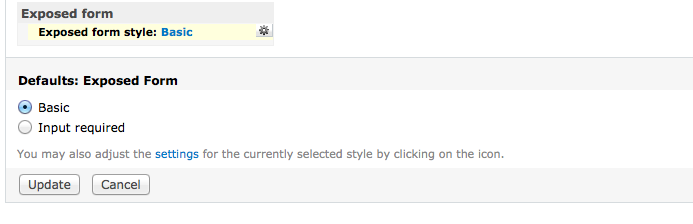
SchwebDesign commentedLiquidcms, rather than looking for options under the exposed filters, did you try looking under "Exposed form":
Comment #17
liquidcms commentedahhh.. ok.. i see it now... seems like a pretty odd UI for this.. doesn't this prevent using other filter enhancement modules such as better exposed filters? i mean would someone want autocomplete for one field and checkboxes for another?
Comment #18
liquidcms commentedbut still doesn't do anything...
perhaps just confusion with your releases? as i dont think latest -dev is latest and so maybe doesn't have this patch? will go back and try other revs
Comment #19
SchwebDesign commentedLiquidcms, i've always wondered the same thing (your question in #17). I think i recall some sort of module that allowed combining exposed form styles... but for the life of me i can not find/remember it now. Perhaps a module like this: http://drupal.org/project/aef Advanced Exposed Forms would allow for working around this?
Comment #20
liquidcms commentedtried on a very basic view on the same site and this is working; so some conflict within the more complex view that i have.. will try to track it down.
Comment #21
liquidcms commentedrelated node titles don't work with the Views 3 version. I'll likely look at providing a patch but possibly won't be until next week).
Comment #22
liquidcms commentedComment #23
Anonymous (not verified) commentedHey liquidcms - Thanks for your help on this! Any update?
Comment #24
liquidcms commentedsorry nope.. never did get back to this.. so many projects on the go; not even sure now where it was i needed this..
Comment #25
avner commented#10 worked for me
in the "Exposed form" section choose "Views Autocomplete Filters" and then choose which field will have the autocomplete behavior in the exposed filter's settings
Note: that the autocomplete will search with in the DB only so if you have a select box which gets its data by code the autocomplete will not work yet
Comment #26
Nick Robillard commented#10 mostly works for me. However, I noticed an issue where "User: Name" autocomplete does not return anything. I also tried adding a "Node: Author" relationship and using it but still nothing. (I'm user 1 so user access shouldn't be a problem)
Comment #27
Anonymous (not verified) commentedI've tried everything... I've exhausted every possible combination of parameters and have tested so many different types of views that I cannot possibly list them all here. I would love to get this working on a consistent basis for Views 3, and then maybe even Drupal 7. Does anyone more competent than myself have the same goal? Are there any other ways to get this working, even with another module?
Comment #28
Makku01 commentedI would totally love to see this working on Views 3. No sucess in trying the above patches...
Comment #29
jeebsuk commentedThe patched version from #10 on this issue works to a degree, though I could not get it working with node reference fields, it worked with "simple fields" such as node title.
The current latest dev version of 6.x-3.x does not work at all as far as I can tell.
Comment #30
steinmb commentedMore descriptive title
Comment #31
steinmb commentedChecked out from git and tested in latest D6 release, but unable to make it work. Time for some debugging.
Comment #32
gillisig commentedI almost got #10 working, except when I search for something it always gives me "The *keyword* return no results, please try something else"
I got a very basic view setup, start by adding a "node:title" field, then i add an exposed "node: title" filter, then I choose "Exposed form style: Views Autocomplete Filters" and in its settings I choose "Enable autocomplete for title" shouldn't it work now and give me some results??
Any help will be greatly appreciated, thanks!
Comment #33
steinmb commented@s2sz could you attach a patch so we all could see and try help out?
Comment #34
BIGREDPAUL commentedPatch 10 did give me the option for using auto complete again but I'm also getting 'no results' when I use it.
Funny thing is it fixed any exposed filters I had made back when I was using views 2 but I can't make new ones.
Edit: Double checked that I had the value to auto search for in place in the view and it's there.
Moving on now to test if creating the view without any other exposed filters makes a difference. Have tried having the filter exclusive to a filter group.
Edit2: Ok so no I couldn't get that working but I got around it by cloning the display I had made using views 2 that was working and then just changed things up so I got the display I needed. If you would like me to paste the view details here to see what makes it work then let me know. ( I can't tell from the code what makes it work cause I don't know code)
Comment #35
colan