

 Come together with the global Drupal community in Rotterdam, 28 Sept – 1 Oct 2026. Sessions, contribution, connection, and Early Bird savings until 8 June.
I am looking around trying to set permissions for a cck type field. Where is the CCK Field Permissions admin? Any help is appreciated. The module has not readme file or any other documentation that would help understand the purpose of it.
| Comment | File | Size | Author |
|---|---|---|---|
| #5 | menu.gif | 3.2 KB | hectorplus |
| #4 | cck_field_perm.gif | 11.7 KB | hectorplus |


Comments
Comment #1
arthurf commentedyou can enable the field permissions in admin/settings/cck_field_perms. On this page, you see the following text:
There are links in this text to the admin/user/access which is where you can control who has access to these fields. I have also added a readme file which has some of this information
Comment #2
hectorplus commentedadmin/settings/cck_field_permsI dont have this link. I am using drupal 5. The readme text you posted is not in the module itself. Do i have to delete the cck_field_perm once i upload the module? I am lost here.
Comment #3
arthurf commentedIf you don't have that link, you probably haven't enabled the module. The readme file which you requested is in CVS. See:
http://cvs.drupal.org/viewcvs/drupal/contributions/modules/cck_field_per...
Comment #4
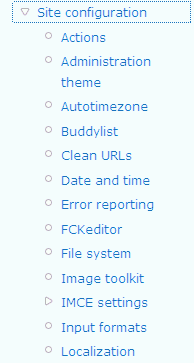
hectorplus commentedThe module is enabled as seen in the attached file. Did i miss a step?
Comment #5
hectorplus commentedThis is the menu where it suppose to be, i guess. See the attached picture.
Comment #6
arthurf commentedCan you try the latest version? This should solve your issues.
Comment #7
hectorplus commentedThe latest version i have is 5.x 1.4. Still no changes. I am stuck here.Its not working form me. Thanks for all your help.
Comment #8
arthurf commentedYou have to:
1) enabled the module
2) select the content type that you want to enable the field perms on
3) select the fields that you are enabling the field perms on
4) go to admin > user > access to set the permissions for those fields
Comment #9
libkuman commentedUnfortunately at this time it seems like you have to be logged in as user with uid =1. We were having the same troubles as above until we logged in as this user. At the very least this should be mentioned in the documentation if not fixed as a bug.
Comment #10
hectorplus commentedNewest version of CCK has been improved and has an option of disabling a field. I never go the cck field permision to work. My needs have been met with the latest CCK.
Thanks you, i am glad you got it working. never thought to log in as user 1.
Comment #11
mrtoner commentedThird-party modules such as Moxie and Taxonomy Theme (which I use) have an additional access control, Administer , which is not present in CCK Field Permissions. Without this permission it is impossible for users other than User 1 to access the settings page (http://example.com/admin/settings/cck_field_perms) for this module, even if the user is given every other permission including administer site configuration.
Comment #12
mrtoner commentedThis will make a little more sense:
Third-party modules such as Moxie and Taxonomy Theme (which I use) have an additional access control, Administer <module>, which is not present in CCK Field Permissions. Without this permission it is impossible for users other than User 1 to access the settings page (http://example.com/admin/settings/cck_field_perms) for this module, even if the user is given every other permission including administer site configuration.
Comment #13
advosuzi commented+1 for this bug. must be user 1 to access module settings
Comment #14
arthurf commented5.1.5 should fix this issue, please update to this version.
Comment #15
arthurf commentedComment #16
kevin_ffvl commentedon cck_field_perms-4.7.x-dev 25 march, you have a spelling mistake
user_access('administer cck field permisions')is to be replaced by :
user_access('administer cck field permissions')that way, everything goes well without logging as "god".
Comment #17
colanI'm unfixing this one as it's still broken in 4.7. That missing "s" needs to be put in there.
Comment #18
colanActually, I think that this should be a bug, but I'm not totally sure what the official difference is.