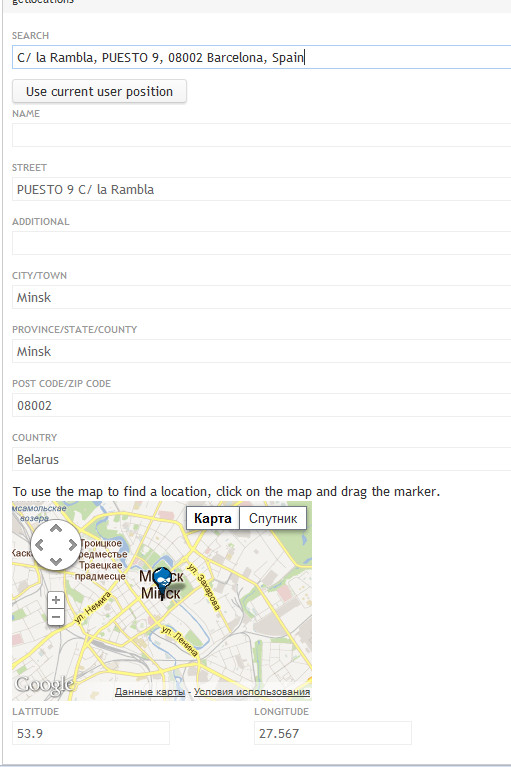
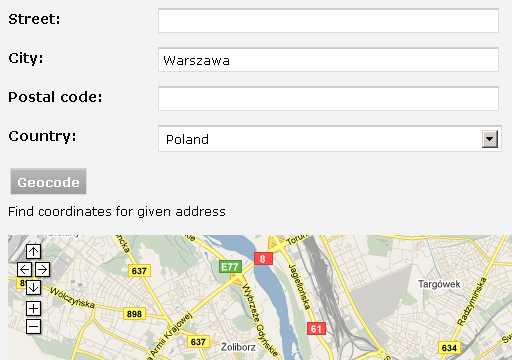
I am working on project, which uses ajax geocoding based on location module. Idea is very simple - there is a button named "Geocode" on every location form, which send Ajax request to location.module. Location form is updated (latitude, longitude and gmap marker) when given address is properly geocoded. There is no depedency on specific geocoder (i.e. Google geocoder). It means, that we can use own geocoders based, for example, on postal codes. It is possible since location.module provide its own API described in location_API.txt. There was some attempts in the past, which did nearly the same but send requests directly to Google Geocoder #165040: [master]Improve UI for entering and geocoding of locations In my opinion, method based on location API is better since it is more flexible. Please, look at attached screenshots - it is self explained, I think. Soon, I will send the patch for testing.





Comments
Comment #1
kndrFeatures:
* Geocoder button is automatically hidden when selected country has no geocoder
* System throbber is used by default but this could be changed
* User can be asked for confirmation, when coordinates would be changed
* Gmap could be zoomed to given level when geocoder changes coordinates
* There is possibility to set title and description of button
* Ajax geocoding works with CCK, Gmap locpick and multiple locations
* Ajax geocoding checks internal token, which makes external querying more difficult
How to use?
1) Apply patch
2) Enable geocoders for countries on "Geocoding options" tab
3) Enable ajax geocoding on "Geocoding options" tab
I am sorry for my English. Please, check comments and code since there could be some mistakes.
Comment #2
pkej commentedMight I chime in? I think people should be trusted to be able to write the name of a country correctly. A drop down with 150+ choices is hardly user friendly. I think the better solution would be an autocomplete field. Apart from that I like that there is a button there. It signals a purpose and you'd expect a result on the map at once.
I haven't tried this patch, was actually searching for something completely different, but I always like to take a look at UI.
Comment #3
kndrI agree that drop-down with 150+ options isn't very user friendly but it is not the scope of this improvement. I am working on project, where this problem doesn't exists. We have only 2 countries on the list :) Patch #1 could be usefull for futher improvements and could be base for other contributions. First of all, Drupal community should test this patch and then maintainer can consider to commit it. Small steps approach is the best, in my opinion.
Comment #4
doree commentedWorks like charm, even with Hungarian locations.
At first I applied the patch on the stable version of location - wasnt a good idea :)
but: cross-hairs started to appear on my maps. is it related?
Comment #5
kndrVery strange. I don't suppose, that this patch could be responsible for cross-hairs. I have no idea what can cause this behavior.
Comment #6
opisubscribing (and gonna try to work on it, because your screenshots are exactly what i'm looking for!)
Comment #7
TimelessDomain commented@kndr - any chance that you could make a similar patch for d7? Thanks
Comment #8
kndr@TimelessDomain Unfortunatelly no. I am not using D7 now, sorry.
Comment #9
Sinovchi commentedI'm using this patch in a production site. works wery well.
Comment #10
dgastudio commentedvery useful!
but, can somebody port it to d7 please?
Comment #11
mautumn commentedI really like this feature. What version of location should the patch be applied to? I have tried the latest dev (as of 20th August 2011) but got loads of errors :-
@kndr have I got to apply your patch (#1) to the latest stable release of 2010-Jul-06 - or do you have any plans to commit your changes to dev head?
Thanks for all your tremendous work on this very valuable module.
Comment #12
kndr@GlossyIbis, patch is old, indeed. It could be applied to 3.x-dev version from 2011-02-25. I have to recreate this patch for the latest dev version in some days. Maybe this week.
Comment #13
mautumn commentedThat would be great. I look forward to it. Many thanks in advance.
Comment #14
kndrHere is a patch #1 for the latest dev (2011-08-27)
Comment #15
mautumn commented@kndr thanks very much for this new patch. It works beautifully and is a tremendous addition to the core module.
Just a couple of comments for those who are new to this module and for whom some things might not be obvious:
1. I could not get the unix patch command to work :-
however I could get git to work :-
2. This functionality requires the AJAX module installed and configured. Specifically ajax events for the content type that holds the location data must be configured on the ajax administration page (admin/settings/ajax).
3. On the admin/settings/location/geocoding page the "Enable ajax geocoding" option must be checked. This puts a "Geocode" button on the node form below the address input fields. When the user presses this button, and after a little pause while ajax does it's magic, the map gets centred on the user-entered location and a pin is added.
Thanks once again for this great module and additional functionality and patch.
One tiny suggestion: I think this sub-module could be even better if there was an option to automatically geocode the address after a complete address has been entered - e.g. after a street name, province, country, and the postcode have been entered?
Comment #16
kndr@GlossyIbis, thanks for your testing and feedback.
ad 1. I use patch -p0 < location-1106464-1-6x3x20110827-D6.patch without any problem. I've put a patch file inside /sites/all/modules directory.
ad 2. This functionality doesn't require ajax module. It depends only on location module.
As you can see, there is no interest about this feature from module maintainer. I think, first of all, this patch (as is) should be reviewed and accepted by module maintainer. Then we can talk about next functionalities.
Comment #17
mautumn commentedHi @kndr
1. I tried patching from /sites/all/modules/patches directory (because I like to keep modules directory clean). Not sure why it didn't work. Not worth worrying about. Most people will do as you did.
2. My mistake. Thanks.
3. I don't understand why there is no interest in this feature. I am very particular about UI and am very keen to make things as intuitive and simple as possible for users - and this strikes me as a very necessary and desirable feature! Hopefully it will be put into the core module to avoid future patch changes.
Keep up the good work...
Comment #18
slucas commentedI've tried your patch.
The idea is very fine, as this functionnality exist with openlayer, especially the wtk cck widget, that allow a real time geocoding experience.
Thought i've got problem with the installation :
- I don't like this module being dependent on enabling in ajax settings as Glossylbys point out, the content type where the cck location field or the node location is enabled. I don't like because it force to use the ajax submit option for all the node, and because ajax has for me a lot of issues with ajax/jquery other parts (with cck tabs for example)
- Secondly the ajax geocoding fail for me, it does'nt ouput any error message. How to debug it ?
- Finally as other says, I think the auto geocoding without even clicking on geocode would be great, it's this way the geocoder works with openlayer cck widget.
Other thing that is not related directly to this patch, in the geocoding settings page, we need to choose a geocoding system for all countries that mostly is google map.
Why there is not a default geocoding provider option ?
Thanks
Comment #19
vlooivlerke commentedI manually pached the module, but the geocoding button does not work
I also dont get any errors
Comment #20
dgastudio commenteduse getlocations. works perfectly.
Comment #21
vlooivlerke commentedGet Locations module does not offer an Ajax Find Address button that makes use of location Fields in a Node creation form to find the user location on a map before he saves the location node.
That is what this patch is supposed to do. It builds an ajax button in the node creation form to geocode your location fields before you save the node.
Or am I missing something?
Comment #22
dgastudio commentedvlooivlerke, u are missing getlocations fields module.
it's adds a new field type "getlocations" with support for geocoding and use of smart_ip
look attached screenshots.
Comment #23
dgastudio commentedone more.
Comment #24
vlooivlerke commentedI don't see it for D6 views 3 :(
Thanks for the effort
Your module is great and I will upgrade to 7 one day.
Comment #25
summit commentedHi,
I added this patch manually to the latest location.dev (and added the location_geocode.js, location_geocode.css). I see the button and admin settings.
But when I click on it...nothing happens.
I have PHP 5.3 and latest gmap and location 6 dev.
If anyone wants to have the .rar of this patched latest location with geocoding button fine by me. Just send me a PM.
It would be great if someone would get it working with latest dev. Can I send it to someone to look into it?
I also found http://www.thecarneyeffect.co.uk/parse-json-google-geocoding-api-results... but I am not a programmer to use it..
Greetings, Martijn
Comment #26
vlooivlerke commentedI have also manually patched the D6 module and get exact same results.
Looks like Google Map API 3 is better in geocoding, but gmap.module has not been upgraded to a working 3 version yet.
Comment #27
manez commentedWas having trouble getting it to work too (click the button and nothing happened), until I stopped forcing the Country to default in Collection Settings for the form, and set it to "Allow" instead. Works like a charm now.
Comment #28
JCB commentedI have tested this and can confirm the patch at #14 works as expected.
Comment #29
summit commentedHi, what version of the module are you using. Can you winzip your version for me to see if I made a mistake? Thanks. Greetings, Martijn
Comment #30
JCB commentedHi Martijn,
I used the dev version (below information of the .info file).
; Information added by drupal.org packaging script on 2012-09-03
version = "6.x-3.2+1-dev"
core = "6.x"
project = "location"
datestamp = "1346676284"
I also attached my patched version of the module which seems to be working.
Comment #31
marcoBauli commentedconfirm that #30 works fine. Had to set Country collection setting to Allow too. Thanks!
Comment #32
nelslynn commentedwhen clicking the Geocode button.
Using Drupal 6.28, Gmap 6.x-2.0-beta1+11-dev, and the location module in #30.
Comment #33
JCB commentedHi Nelslynn,
This is probably due to Google maps API not working anymore.
I have disabled the modules on my site (refer to #30) since 8 March 2013, due to Google switching off API V2 and now only support API V3.
Here is a post which might be related:
http://drupal.org/node/547418
I have not had time to try and get this working on API V3.
Please let me know if you find a workable solution.
Regards,
JC Booysen
Comment #34
littleneo commentedthis could help
Comment #35
podarokall feature requests should be against latest 7.x-3.x-dev and after that - backport to 6.x-3.x
Comment #36
podarok#14: location-1106464-1-6x3x20110827-D6.patch queued for re-testing.
Comment #38
JCB commentedHi Guys,
I am looking for some assistance please.
I just updated my modules in order to run on Google maps API v3.
6.x-3.2+1-dev --> 6.x-3.3-beta3
I applied the same patch as I did previously (6.x-3.2+1-dev) (see #30); however, it doesn't seem to work on the latest version (6.x-3.3-beta3).
Receiving error:
I had a look with firebug's "Net" Console and can see that the data is being sent to Google correctly; and the correct geocoded data is being returned correctly including the latitude & longitude; however the map and the latitude/longitude is NOT being updated (just shows the above error).
I have attached my patched version of the 6.x-3.3-beta3 location module
Will you guys please have a look and see if you can find a solution/fix?
P.S. I used the below version of gmap
Comment #39
vlooivlerke commentedUpdated my modules in order to run on Google maps API v3 too.
Used latest dev of both modules.
Did a manual patch.
Get the same results as #JCB
I think it could be an ajax problem, it lacks the correct path to the throbber and ajax to populate the fields.
Comment #40
JCB commentedOk... so after some google searching it turns out that the variables have changed.
So I changed in location_geocode.js
This removed the "GLatLng is not defined" error and resulted in another error "GEvent is not defined".
After another google search it turns out this variable also changed
So I changed in location_geocode.js
This solves both errors; however the map still doesn't update as expected.
Unfortunately this is where my skills leave me hanging...
Anybody have any ideas on how to go further?
Comment #41
vlooivlerke commentedNormal node geocodeing does not work in this zip release. Geocoding has changed in V3 and was fixed in latest dev.
Let me explain, if you would simply create an node with address and press save, the address does not get geocoded. This is the basic geocoding that the location module has offered for years now. With the new V3 it got broken but is fixed now. If this patch should run on the latest dev it should work, with #JBC patch
Thanks
Comment #42
JCB commentedHi Vlooivlerke,
I am not sure I am understanding you correctly; however, please see below what I did & are struggling with.
Geocoding worked for old v2 as well as v3 (when you save a node).
This thread is not for when you save a node; however, when you are on the node create/edit page (without saving). Therefore, it is "via Ajax".
I upgraded to the latest dev release and applied the patch, and geocoding works fine when I save a node; however, the "via Ajax" is not working.
I am receiving errors as indicated in #38 & #40.
Any advice how to go about getting the geocoding to work via ajax?
Comment #43
JCB commentedHi Guys,
I am willing to pay someone to fix this.
I can confirm that I applied the latest patch to the latest dev version and receive errors.
Patch Used:
https://drupal.org/files/location-1106464-1-6x3x20110827-D6.patch
Version applied to:
6.x-3.x-dev tar.gz (1.63 MB) | zip (1.79 MB) 2013-Mar-27 Notes
Errors Received (also mentioned in #40):
Error: ReferenceError: GLatLng is not defined
Source file: http://www.sitename.co.za/sites/sitename.co.za/modules/location/location...
Line: 76
Let me know.
Comment #44
juantoyoshi commentedHi,
After upgrading location and gmap to the latest dev, applying #14 patch and updating variables to V3, ajax geocoding works only when “Use a Google Map to set latitude and longitude” is not enabled (Latitude/Longitude fields are correctly filled when clicking Geocode only if I’m not using a map to set the location).
But, if the option “Use a Google Map to...” is enabled, Latitude/Longitude fields remain empty when selecting Geocode and the map does not get updated (throbber appears, nothing happens).
However, (with the map option enabled) if I manually fill Lat/Lng fields, the map gets immediately updated and viceversa (selecting a location on the map updates Lat/Lng fields).
I’ve been struggling with this issue for days now, so if someone is interested, I will gladly reward to whom might help solve this issue.
Thank you!
Comment #45
legolasboClosing support tickets that have been inactive for over a year to clean up the issue queue. Please reopen if this is still an issue.