

Closed (fixed)
Project:
Danland
Version:
7.x-1.0
Component:
Code
Priority:
Normal
Category:
Support request
Assigned:
Unassigned
Reporter:
Created:
28 Mar 2011 at 18:29 UTC
Updated:
12 Jun 2015 at 17:04 UTC
Jump to comment: Most recent, Most recent file


Comments
Comment #1
Deepika.chavan commentedHi,
While searching I got - http://mrtextminer.wordpress.com/2010/12/13/drupal-7-rc2-how-to-create-a...
Remove the following code from new page--front.tpl.php file.
Please clear cached data (here- admin/config/development/performance)
Hth!!
Rgrds,
Deepika Chavan.
Comment #2
calbert commentedI followed the steps,
copied page.tpl.php to --front.tpl.php
Commented out the above code, and flushed all cache and the front page still shows the title.
P.S. It was a pain in the ass vim'ing a -- file had to dig around for that ..
Comment #3
calbert commentedI just tried to change the footer, from DANLAND to CHRIS ROCKS just to test this --front.tpl.php and that didn't change as well .. so it would seem that this --front.tpl.php is not working
Comment #4
calbert commentedAny updates to this at all??
Comment #5
Deepika.chavan commentedHi,
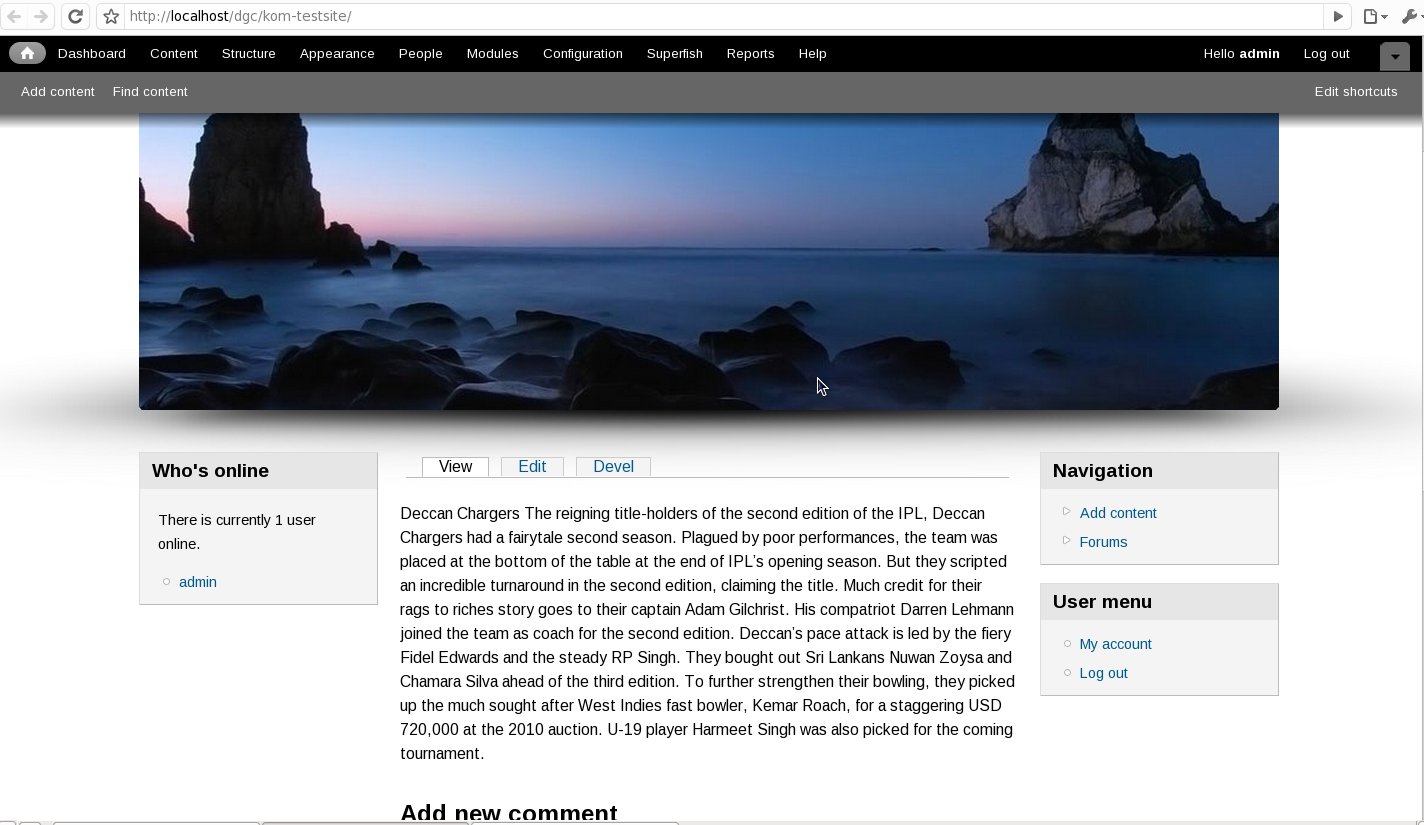
Have you copied the page.tpl.php file to "page--front.tpl.php", just wanted to confirm because you have written "--front.tp.php" in above post. I apologies if I have mistaken something. Because I tried the same thing on my local site and successfully removed the title from the home page. Please check the attachments. Do not comment the code just remove it from there.
HTH !!
Rgrds,
Deepika Chavan.
Comment #6
Deepika.chavan commentedPlease check the attachments..
Comment #7
calbert commentedYes,
You got me 1/2 way there, I changed the page * my mistake * from --front.tpl.php to page--front.tpl.php
and I noticed the footer changed to "testing Front page"..text I added in, I then removed the code
above code .. but the page I have promoted to front page still has it's title..
Comment #8
Deepika.chavan commentedHi,
If you can see the footer changes only on front page, that means its picking up your file only for front page. But after removing the code(Title related code) It should not display the title on your front page. Have you clear the cached data? please don't mind just wanted to confirm.
Rgrds,
Deepika Chavan.
Comment #9
calbert commentedYes, I've flushed all cached data many times, I re-checked to make sure the code above was removed. I can give you a code dump , maybe I missed something. You can see where I changed the danpro footer to TESTING 2 and that code shows up on the front page.
Comment #10
Deepika.chavan commentedHi,
Your code is right, I don't know why it is still showing the title on front page. Lets try something else.
1. Replace the following code in page--front.tpl.php file
by this code
Note: I have added class "front-page-title".
2. Remove the ';' from line of code
;stylesheets[all][] = local.csswhich is there in 'danland.info' file. Save the file.3. Rename 'local_sample.css' file to local.css.
4. Add following css code in local.css file.
5. Clear the cached data.
Hope this helps !!
Rgrds,
Deepika chavan.
Comment #11
calbert commentedI've circled back around to this and it still won't remove it from the front page. I am unsure what to do. I tried all the code modes
Comment #12
biman commentedd7 (garland):
in page.tpl.php
Replace the following code:
By:
d6 (cti_flex - zen based theme):
in node.tpl.php
Replace the following code:
By:
Comment #14
jpjanze commentedThanks all and specifically biman, this was exactly what I needed.
Cheers!
Jon Paul
Comment #15
tanitani commentedMaybe you could use http://drupal.org/project/exclude_node_title. It takes care of it with as granularity as you want. Although in your case you solved it, however, you had to edit the the code directly, which you will have to maintain...
Comment #16
jayshapiro commentedThank you tanitani - After lots of searching and far to much php/css code suggestions - this module is all I needed in the first place. THANKS!
Comment #17
Leeteq commentedIntroducing a whole new dependency on an extra module just to fix an issue with the front page, seems like overkill.
As an alternative to edit the main theme css file, if Danland was based on AdaptiveTheme (theme base), then it would be trivial to enable one of its features called "custom CSS", to add css overrides directly in the theme admin settings to get rid of the title ONLY on the front page, without having to edit/change the theme css file (which means you have to keep track of those change across each theme version update...).
Also without the side effect of adding extra, (in this case) unnecessary, modules and features such as letting you hide specific titles on each/specific node(s), which is strictly speaking not the need for solving the issue in this case.
Here is a code example that goes either in such a css override function, or in your main theme css file:
.front h1#page-title { display: none; }
It turns off the display of any H1 titles that appears as page titles (only) on the front page.