

By darksniperx on
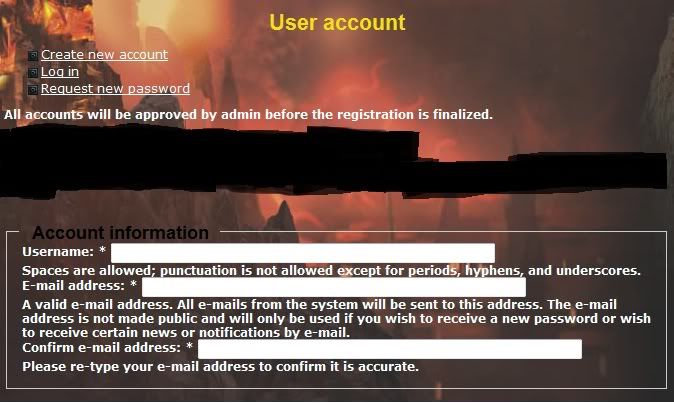
Here is a screenshot of my current registration page.
http://i877.photobucket.com/albums/ab335/darksniperx2/reg.jpg
The infomarmation is hard for users to read. Plus I have added custom fields for more registration.
I have looked at this: http://stackoverflow.com/questions/3386885/overriding-the-user-registrat...
And it will not work too well, since if I have to add or remove extra information fields, the reg page wont work correctly.
Is there a simpler way to space things out, and add more borders. To make the registration page more user friendly.
Thank you!

Comments
dats css styling problem
you can add some padding or margin to those div class :)
add this to ur css file
change the size as u want
~
Hey,
That seems to work.
Is there a way in css, to drop the input box to the next line. And put a border around each 3 sections. For example: {username, field, comment}
try this
~
Thank you very much!