In addition to the issue filed here, there is a difference in the way IE renders dimensionally restricted block elements compared to Firefox, that may or may not cause problems:
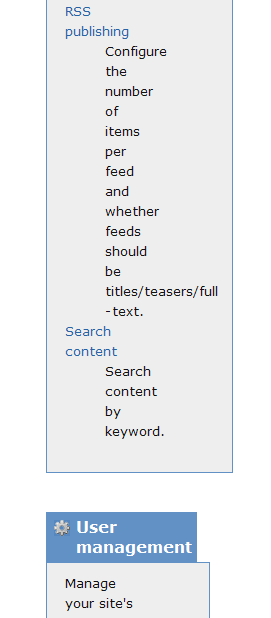
In the attached screenshot, one of the columns in the admin page contains a long unbreakable string: "titles/teaser/full". In firefox, this text will extend beyond the edge of the containing box, as the latter respects the dimensions it has been restricted to. In IE however, the containing box expands to incorporate the long unbreakable content. This could cause the next column to drop below as it has no space anymore to float next to the first one.
There are more details on this behaviour at www.positioniseverything.net, where it is called the expanding box bug.


Comments
Comment #1
kdebaas commentedAnd here is a screenshot of the same area, as rendered by Firefox.
Comment #2
johnalbinThe default overflow for
<div>s isoverflow: visible;. Unfortunately, IE6 doesn’t implement the default or even the ability to dooverflow: visible;. See http://www.howtocreate.co.uk/wrongWithIE/?chapter=overflow%3Avisible%3BThere are two work-arounds:
_overflow: hidden; _overflow-y: visible;. This will allow the sidebar to stretch vertically, but not horizontally. And it cuts off any extra-long content. It’s not a great solution, but it’s the only one I know of.Comment #3
johnalbinI love Holly n' John. It looks like
word-wrap: break-word;(which is in the CSS3 spec) might be a good supplement to work-around #2.Comment #4
johnalbinComment #5
johnalbinApparently, oversized content in the squeeze div (main content area) still causes layout breakage in IE6. It is fixed in the sidebars.
Comment #6
hgmichna commentedI keep having this problem too with Zen on IE6. Just tested with IE5 for fun, and Zen fails miserably on that version across the board. The problem is always that the main content is pushed underneath the left side bar. I don't have a right side bar.
Longing for a table solution, rather than divs, which are simply unreliable on older browsers. Zen would be absolutely stable, reliable, nice, and beautiful in a table. I know, I know ...
Is there really no way to make Zen stable on all, particularly on older platforms? I consider this a big problem.
Hans-Georg
Comment #7
johnalbinApplied the proposed solution to 5.x-1.x-dev.
In IE7 and other modern browsers, wide content now flows past the edge of the containing div without breaking the columns.
In IE6, wide content is cut-off at the edge of the containing div. This is the only known work-around, as far as I know (without reverting to a table-based layout; egads!) So in IE6, we choose from the lesser of two evils: break the layout or cut-off the wide content.
Comment #8
johnalbinHans-Georg, regarding IE5, please see: http://drupal.org/node/196223
Comment #9
hgmichna commentedThanks for the link. Just for fun I tested the current Zen theme, slightly modified, on Internet Explorer 5.0. It doesn't work at all, doesn't display the left sidebar, for example, and only part of the content.
Then I looked at the access statistics and found that IE 5.0, intermediate versions, and IE 5.5 constitute only a tiny proportion of the user base on my web sites, less than 1%.
I think it is time to abandon support for Internet Explorer versions before 6. Can't support everything.
I would like it, if Drupal could somehow discover such old versions, as well as limited devices like handhelds, and fall back to an idiot-proof theme that always works, but it may not be worth the trouble.
Hans-Georg
Comment #10
(not verified) commentedAutomatically closed -- issue fixed for two weeks with no activity.
Comment #11
johnalbinThis has not been fixed in Zen Classic.
Comment #12
johnalbinThe bug is in the layout method used in Zen Classic. It uses the same method as Garland.
However, I looked at Garland and it does not experience this bug. So I looked at Garland’s CSS and found the fix.
Fixed! Finally!
Comment #13
hgmichna commentedzen/layout.css already contains the following block:
How about adding #main? Thus:
By the way, #page #container #main seems to be nonsense. #main alone is enough. The id attribute has to have a unique value anyway, so there can be no other #main.
I always get the shivers when I see something like that, because the suspicion arises that somebody doesn't know what he's doing. I hope I'm mistaken. Or should it have been: #page, #container, #main with commas in between? I couldn't find #main in the Garland CSS files as of Drupal 5.6.
Hans-Georg
Comment #14
johnalbinFrom Garland’s fix-ie.css:
I translated that directly to the div names used in Zen. But you are correct that #main works just as well, so I've made that change.
However, I can't add #main to the rule you mentioned because there is no #main div in Zen. Only in Zen Classic. So I'm keeping it in zen_classic/ie.css.
Comment #15
hgmichna commentedSorry, my mistake. I'm still using an older version of Zen, I think, 0.7. (Big upgrade of everything including Drupal 6 and Zen planned for April.)
I'm not an expert on cross-browser programming, so I don't know what the leading underscore means (overflow versus _overflow). I only notice that your last code sample doesn't have it and hope it works as expected.
Hans-Georg (http://winhlp.com/, http://elephanttrust.org/ and others)
Comment #16
johnalbinRegarding the underscore before the CSS property name, take a look at the comments in the ie.css file in the latest Zen.
Comment #17
hgmichna commentedAh, thanks!
Comment #18
Anonymous (not verified) commentedAutomatically closed -- issue fixed for two weeks with no activity.