

Closed (works as designed)
Project:
User protect
Version:
7.x-1.0
Component:
Documentation
Priority:
Normal
Category:
Support request
Assigned:
Unassigned
Reporter:
Created:
29 Mar 2011 at 14:30 UTC
Updated:
3 Nov 2012 at 20:00 UTC
Jump to comment: Most recent file


Comments
Comment #1
hunmonk commentedplease describe the exact userprotect settings and steps to take to reproduce this problem.
Comment #2
Webgrafic commentedI tried several options but always with the same result. First I have protected the user 1 in admin/config/people/userprotect, but all admin can modify user1 and the user1 can not modify itself.
Then I created a new role for admin and tried to assign the role admin1 to user1 and the role admin2 to the other, I protected the role admin1 with the same result.
Then I tried other combinations that I can not remember, but all with the same result.
Comment #3
hunmonk commentedi notice you've reported this against an alpha release. please upgrade to the official 7.x release and try again.
Comment #4
Webgrafic commentedI am using the latest release
Comment #5
hunmonk commentedgreat, now if you could please include a complete list of all userprotect settings for the situation you say is not working...
Comment #7
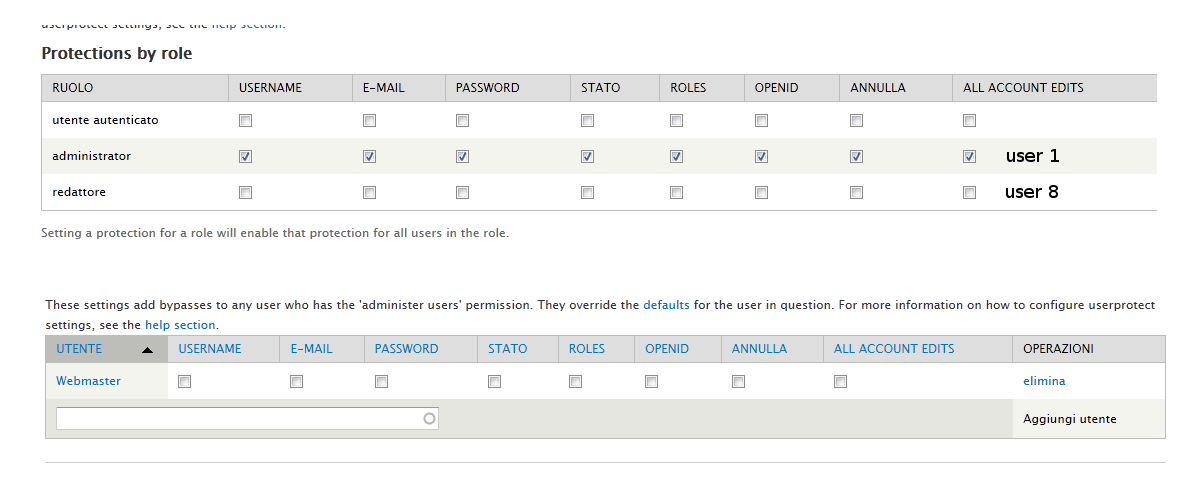
Webgrafic commentedSee attached image
Comment #8
hunmonk commentedthe attachment does not include any of the role-based protection settings, or the administrator bypass settings. also, i need to know what roles both users have.
Comment #9
Webgrafic commentedUser 1 has the administrator role, User 2 has the redattore role. See attached image.
Comment #10
hunmonk commentedi've tested this scenario locally, and cannot reproduce the problem for the situation you describe. i'm easily able to configure things such that user 1 is protected.
i suggest you re-read the help carefully, and start with a completely fresh configuration. there are a *lot* of settings in this module, so you need to be thorough. from what you've sent i'm guessing that there are default administrator bypasses turned on that are allowing all admins to edit any user, including user 1 (of course i can't verify that, because you never included those settings). also, you have all bypasses explicitly turned off for user 1, which is why they can't edit themselves.
another possibility is a conflict with another module, but that is pretty unlikely. you should always start by disabling all other contrib modules to isolate an issue.
this is all i can do for you. good luck getting it to work.
Comment #11
carl.brown commentedThanks for this hunmonk - it solved the problem for me. Although I must confess I didn't fully understand what you meant when I read it - it wasn't until I poked around, solved the problem and then came back here that I realised what I did was exactly what you'd suggested!
For anyone else suffering from stupid disease who is experiencing a similar problem (as in site administrators/editors can still edit user/1's details) then this is what I did...
Say you have three roles: SuperAdmin (user/1), Moderator (user/2), Authenticated user/3+).
- SuperAdmin should be able to do everything (This works out of the box).
- Moderator needs to be able to view and edit all users (including other Moderators) but NOT SuperAdmin.
- Authenticated should only be able to edit their own accounts.
1. At "admin/people/permissions/list", give the 'Administer users' and 'View user profiles' permissions to Moderators.
2. At "admin/config/people/userprotect", confirm that the SuperAdmin is protected.
3. (Optional) If there is another role, say Administrator, which is supposed to have the same permissions as the SuperAdmin (because your site has has more than one 'main' administrator, for example), then make sure that role is protected at "admin/config/people/userprotect/protected_roles" so that all users of that role are protected.
4. _The important bit_ EDIT THE DEFAULTS! At "admin/config/people/userprotect/protection_defaults" make sure that you uncheck the relevant options under "Administrator bypass defaults". Without this last step, anyone who has the permission "Administer Users" set (from step 1) will still be able to edit user/1 or indeed any other SuperAdmin-type roles.
Hope this helps anyone else out there that gets stuck configuring the module.
Thanks again hunmonk - it works lovely now :) and your replies to bugs in the issue queue have been most entertaining to read. Clearly many people don't read your documentation before posting on here! ;) Must get to be a real p.i.t.a!
Comment #12
gianfrasoft commentedGreat post, carl.brown. Thank you!
Comment #13
Dropper commentedThank you! Just saved my day!
Comment #14
marktheshark commented#11 was great, thanks.
However, the help mentions that the bypass defaults are overridden by the "per-user administrator bypass settings".
I had the defaults set to all checkboxes, but admin / user 1 was supposedly protected by having all checkboxes off for this user in the per user bypass settings.
Shouldn't this mean that user admins (users with the 'administer users' permission) should normally not be able to edit the admin?