Hello,
I have setup the following URL Alias in my Drupal 6.20 setup by using the following URL Aliases module:
search/apachesolr_search?filters=tid:249 pointing to /hotels
Unfortunately however if i go to
www.domain.com/hotels the result i expect are not loading.
If i do this:
www.domain.com/search/apachesolr_search?filters=tid:249 the results appear as expected.
In addition, if i go to Administration and try to add a Menu Item in my Primary Navigation links by setting the menu path to hotels I get the following error:
The path '/apachesolr_search' is either invalid or you do not have access to it.
Please advise what to do.


Comments
Comment #1
arekanderu commentedIt seems that the error i am getting is related with the ?filters=tid:249 I am trying to add in my url alias. If i make a search/apachesolr_search/hotels alias it works just fine but thats not the query i am trying to build.
Comment #2
pwolanin commentedI think the short answer is that won't work. I don't think you can include a query string in a path alias.
Instead, define new page callbacks via hook_menu.
e.g. see: http://sf2010.drupal.org/conference/sessions/apache-solr-search-mastery
Comment #3
pwolanin commentedComment #4
arekanderu commentedI don't understand why would they put such a limitation to the menu system.
Anyway, this is a problem [in combination with apache solr] which I think others probably have too, to define a search query and provide it as a menu link that is. If anyone has already solved this please share with us.
Thank you for your answer, I will have a look at the link.
Comment #5
pwolanin commentedThe path aliases system is separate from the menu system.
You can define your saved search as a menu link, but it will be with the full query string exposed.
Comment #6
arekanderu commentedI removed the alias and i tried to add a menu item in primary navigation and i got the error mentioned on topic. More specifically i tried to add the following path:
search/apachesolr_search?filters=tid:249
Unless you meant something else...
Comment #7
arekanderu commentedWould someone be kind enough to check post #6 since this wasn't actually fixed? Is this a problem of the drupal menu system or related with the apache solr module?
Comment #8
jpmckinney commentedComment #9
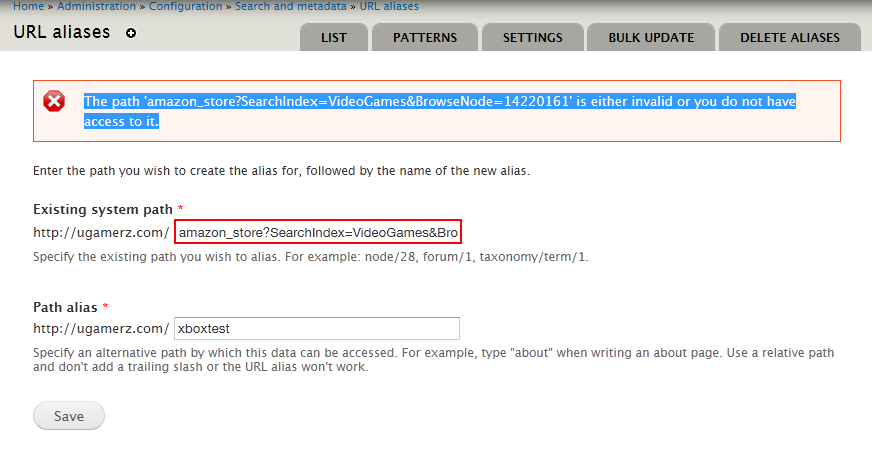
krymp commentedI am having the same issue too on drupal 7 when trying to create an alias here for:
amazon_store?SearchIndex=VideoGames&BrowseNode=14220161
I get this error message: The path 'amazon_store?SearchIndex=VideoGames&BrowseNode=14220161' is either invalid or you do not have access to it.
I am attaching a screenshot.
Comment #10
pwolanin commentedI've just confirmed this on 6 and 7 core. Looks like a core bug to me. Sure query string parsing should be supported from the link add form.
Comment #11
pwolanin commentedI enter "search/site/ex?fq[]=uid:9" the error message is: "The path '/site/ex' is either invalid or you do not have access to it."
chx suggests this is possibly a bug or quirk of parse_url() or an incorrect use of it in Drupal core and if we want to use it here, we might need to switch parsing methods, or possibly append a fake protocol/host in front to work around this problem.
Comment #12
pwolanin commentedok, so this patch is from ChX. I can confirm it solves the main bug, which is that Drupal paths + a query string with a colon ":" are mis-parsed.
It needs code comments and a regression test, but setting CNR for initial testbot pass.
I also see that when I save a link like "search/site/ex?fq[]=uid:9", and go to edit it again, it's presented as urlencoded in the form like "search/site/ex?fq%5B%5D=uid%3A9". Then, if I save again parts of it are double-encoded.
Comment #13
pwolanin commentedComment #14
kscheirer#12: 1112256-url-parse-12.patch queued for re-testing.
Comment #24
quietone commentedI tested this on 9.3.x and was not able to reproduce this error. I created menu links to
and both worked just fine, no errors.
Therefore, closing as cannot reproduce. If you are experiencing this problem reopen the issue, by setting the status to 'Active', and provide complete steps to reproduce the issue (starting from "Install Drupal core").
Thanks!