

Active
Project:
XML sitemap
Version:
6.x-2.x-dev
Component:
xmlsitemap.module
Priority:
Major
Category:
Bug report
Assigned:
Unassigned
Reporter:
Created:
1 Apr 2011 at 12:59 UTC
Updated:
7 Apr 2011 at 11:25 UTC
Jump to comment: Most recent, Most recent file


Comments
Comment #1
Anonymous (not verified) commentedI think this is related to #920062: XMLWriter::openUri(): Unable to resolve file path as returned from xmlsitemap_sitemap_get_file., can you confirm please?
Comment #2
kumarangopi commentedEarnie:
Thanks for the reply. But I am not able to understand about the post in that link. Can you kindly elaborate on what might be the issue?
Comment #3
Anonymous (not verified) commentedSure, you're operating in a Windows environment and the issue I pointed to is a Windows only issue. The issue points out that on a Windows environment the files directory isn't correctly found and leads to errors relating to generating and viewing /sitemap.xml.
Comment #4
kumarangopi commentedEarnie:
Webserver is located in Linux server. Did you thought that it is windows environment?
Comment #5
kumarangopi commentedEarnie:
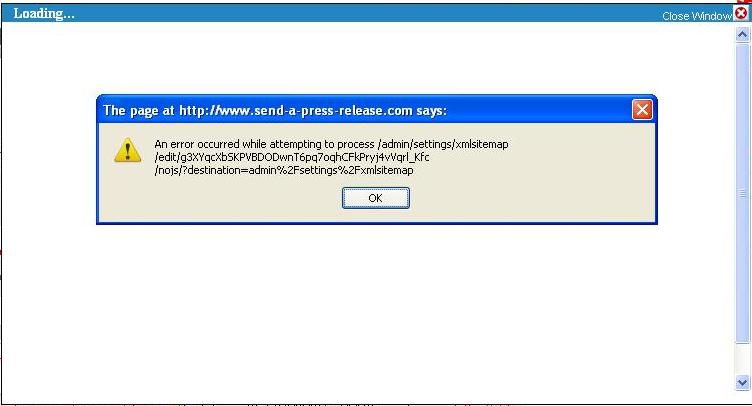
Attached is screenshot which I am getting in the browser. I edited page, product content types and made xmlsitemap included. I can see indexed links in xmlsitemap settings. But when I click the sitemap url, the attached screenshot is coming.Any thoughts?
Thanks
Comment #6
dave reidThis sounds like there is a module that has an empty line before its opening PHP tag, which is causing invalid XML output since XML cannot start with an empty line.
Comment #7
Anonymous (not verified) commentedI agree with Dave and was about to post the exact same message.
Comment #8
kumarangopi commentedEarnie and Dave:
Should I remove the empty line before PHP tags? Can you please confirm me the File in which I have to make the changes?
Thanks
Comment #9
kumarangopi commentedEarnie and Dave:
I have enabled "Developer" mode and here is my output for /sitemap.xml?debug
Current context: Array ( [language] => en )
Sitemap: stdClass Object ( [smid] => g3XYqcXbSKPVBDODwnT6pq7oqhCFkPryj4vVqrl_Kfc [context] => Array ( [language] => en ) [updated] => 1302003230 [links] => 10 [chunks] => 1 [max_filesize] => 1401 [uri] => Array ( [path] => sitemap.xml [options] => Array ( [language] => stdClass Object ( [language] => en [name] => English [native] => English [direction] => 0 [enabled] => 1 [plurals] => 0 [formula] => [domain] => [prefix] => [weight] => 0 [javascript] => ) [absolute] => 1 [base_url] => http://www.send-a-press-release.com ) ) )
Chunk: 1
Cache file location: sites/send-a-press-release.com/files/xmlsitemap/g3XYqcXbSKPVBDODwnT6pq7oqhCFkPryj4vVqrl_Kfc/1.xml
Cache file exists: Yes
****
Anything works?
Comment #10
Anonymous (not verified) commentedYou've installed some other module that has a blank line in one or more of its files prior to the
<?phptag. You will have to look through your active modules and find the culprit. Another method is to start disabling modules to determine which one is adding the blank line. Once you find the module the fix is easy by removing the blank line. You'll want to file an issue with the module about the invalid blank line.Comment #11
kumarangopi commentedEarnie:
The crazy part is that http://www.send-a-press-release.com/sitemap.xml is working well in IE. Content encoding error in Mozilla and blank screen in Chrome.
Will empty space prior to <?php tag will be the reason?
Comment #12
Anonymous (not verified) commentedThe .xsl file has the blank line at the top of the file. See http://www.send-a-press-release.com/sitemap.xsl and view source to see the blank line. Remove the blank line in the sitemap.xsl file.
Comment #13
dave reidThat's also generated by the module, so it would still be a errant Drupal module with a blank line before a PHP tag at fault.
Comment #14
Anonymous (not verified) commentedAppears to be jquery.tablesorter.min.js in the modules/xmlsitemap/xsl directory.
Comment #15
kumarangopi commentedDave:
Sorry I don't understand "errant Drupal module"?
you mean I need to go to each module and check blank line before <?php tag?
Comment #16
dave reid@earnie: JS doesn't affect the PHP output, so that's not the problem. It has to be a PHP file.
@kumarangopi: Basically, yes.
Comment #17
kumarangopi commentedDave:
I am going to submit the sitemap.xml so I will leave this Mozilla content coding issue for a while.
Thanks to both of you