Similar to http://drupal.org/node/516684 I'm looking for some help using hook form altar.
I created my own module, called views_price, using the code in the link that I modified for my own use. I called this: views_price.module
<?php
// $Id: views_price.module,v 1.22 2011/04/02 19:53:27 sun Exp $

/**
* Alter the form to display dropdowns for price range
*/
function mainland_form_alter(&$form, $form_state, $form_id) {
  switch ($form_id) {
    case 'views_exposed_form' :
      $form['submit']['#value'] = t('Search');
      $from_options = array(
        '' => t('Any'),
     '5000' => t('5,000RMB'),
      '10000' => t('10,000 RMB'),
      '15000' => t('15,000 RMB'),
      '20000' => t('20,000 RMB'),
      '30000' => t('30,000 RMB'),
      '40000' => t('40,000 RMB'),
      '50000' => t('50,000 RMB'),
      '100000' => t('100,000 RMB'),
      );
    $to_options = array(
        '' => t('Any'),
     '5000' => t('5,000RMB'),
      '10000' => t('10,000 RMB'),
      '15000' => t('15,000 RMB'),
      '20000' => t('20,000 RMB'),
      '30000' => t('30,000 RMB'),
      '40000' => t('40,000 RMB'),
      '50000' => t('50,000 RMB'),
      '100000' => t('100,000 RMB'),
       '100000' => t('100,000 RMB plus'),
      );
      $field_propprice_value_min = array (
        '#type' => 'select',
        '#multiple' => false,
        '#required' => false,
        '#options' => $from_options,
        '#default_value' => 'Any',
      );
      $field_propprice_value_max = array (
        '#type' => 'select',
        '#multiple' => false,
        '#required' => false,
        '#options' => $to_options,
        '#default_value' => '$1,000,000 plus',
      );
      $form['field_propprice_value']['min'] = $field_propprice_value_min;
      $form['field_propprice_value']['max'] = $field_propprice_value_max;
      $form['field_propprice_value']['min']['#title'] = t('from');
      $form['field_propprice_value']['max']['#title'] = t('to');
      break;
  }

}
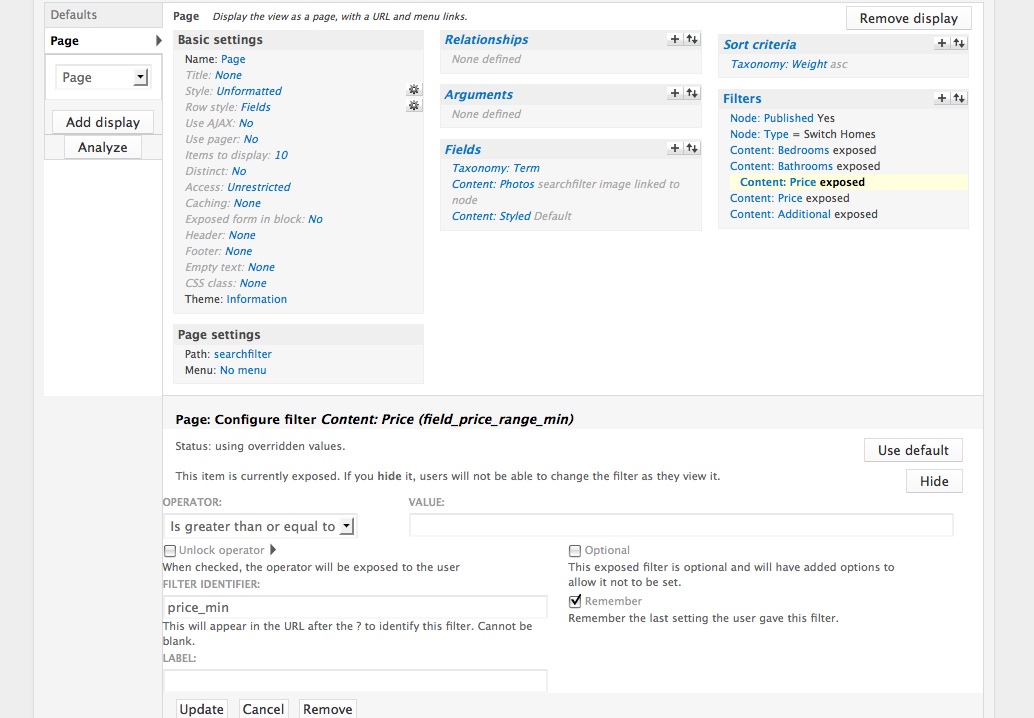
http://terascape.net/images/min.jpg - views settings (max is same, except "less than" & _max
http://terascape.net/images/search.jpg the search box
http://d20010.u35.terascape.net the dev site
Trouble is, it won't show, and I don't see what I'm missing. This is my FIRST attempt at this, so could use a little feedback. And once I get this down, I need to copy all this to a new views_bed.module for number of bedrooms.


Comments
Comment #1
Seneschall commentedhttp://drupal.org/node/1113842 Or is a views THEME a better way to approach this?
Comment #3
msathesh commentedHey skyline5k.. did you make it work? I can make the form with max and min to display (I think you don't need to have the max and min filters in your views filters section). But after I press the search button it's actually posting the values such as this: '/?&min=all&max=all'. Do you know where to post the values actually and get the results?
Comment #4
msathesh commented@skyline5k sorry about my last post. I am facing the same issue. If I expose the price field in filters, the dynamic select elements (min & max) gets vanished for some reason. If I remove the exposed price field in filters I can get the select elements in the form (but it doesn't actually do any filtering work since it's not connected to the view filter itself!). Please do let me know if you solve the issue and I will let you know if I find a solution to the problem. Thanks.
Comment #5
msathesh commented@skyline5k
I have just changed the $form variable from
$form['field_propprice_value']['min']and$form['field_propprice_value']['max']to$form['field_price_range_min']and$form['field_price_range_max']respectively and it worked. Otherwise, everything are same i.e. exposed price field filter withing the views for min and max. Then this code with just a minor change. And it works very well. But how did you handle the max price value in your views for '100,000 RMB plus'?See the following code to see the difference:
Comment #6
Seneschall commentedYou got farther than I did. I'm still not getting any dropdowns at all. What's your view setting for your price field? Also, is your code in a custom module, or did you add that somewhere to the actual views module or a views template?
my price field is set up like this:
http://www.terascape.net/images/propprice.jpg
Comment #7
msathesh commentedYeah I have the code in my custom module only. You could have a look at the screenshots of my setting with max and min fields. And here is my complete code. Hope it helps. Let me know how it goes.
Comment #8
Seneschall commentedStill no dropdown. This site is driving me nuts! Perhaps I'm missing an extra module somewhere.
Comment #9
msathesh commented@skyline5k I don't think you need any extra modules to work. check your 'filter identifier names' within exposed filters matches with the php code in your module. Can you post the latest code with screenshots of your exposed filters?
Comment #10
Seneschall commentedI matched yours the best I could. original field name is still field_propprice
Comment #11
msathesh commentedIn the if statement did you change your page's current display? And change
i.e. 'page_1' in [code]$form_state['view']->current_display == 'page_1'[/code] should be changed to suit your code.
and please change the 'searchfilter' in [code]$form_state['view']->name == 'searchfilter'[/code] to your views' name.
Can you post the page display setting screenshot here?
Comment #12
zdean commentedI tried #5 and everything works fine, except that I get an "An illegal choice has been detected. Please contact the site administrator." error.
Here is the code I used in my module:
Any suggestions on how to overcome the error?
Thanks in advance!!
Comment #13
zdean commentedI think I figured it out. For the options array, I needed to include:
'' => t(''),
So,
should be:
Comment #14
lennyaspen commentedthanks guys this topic really helped me,
@zdean your solution rocked for "An illegal choice has been detected. Please contact the site administrator."
although wouldn`t it be better like this
'' => t('Min Height'), even if it does not contain any value?Comment #15
zdean commentedI think if anything it would have to be
'' => t('Any')Comment #16
lennyaspen commentedyes you are totally right :)
Comment #17
kars-t commentedHi
I am closing this issue to clean up the issue queue. Feel free to reopen the issue if there is new information and the problem still resides. If not please make sure you close your issues that you don't need any more.
Maybe you can get support from the local user group. Please take a look at this list at groups.drupal.org.