

Closed (fixed)
Project:
Views (for Drupal 7)
Version:
7.x-3.0-beta3
Component:
Miscellaneous
Priority:
Normal
Category:
Bug report
Assigned:
Unassigned
Reporter:
Created:
7 Apr 2011 at 06:54 UTC
Updated:
9 Feb 2019 at 12:23 UTC
Jump to comment: Most recent, Most recent file


Comments
Comment #1
dawehnerYou should proboably enable php error display.
Once you have this it's possible to see the actual error you have on your site.
See http://drupal.org/node/571990 about more help how to produce a usable bug report. Thanks!
Comment #2
Ale Deva commentedI don't know if it's the same issue, but I encountered an AJAX problem as well.
I haven't done anything on the website a part from installing and enabling Views module, Ctools module and Advanced Help module. The website is basically still virgin.
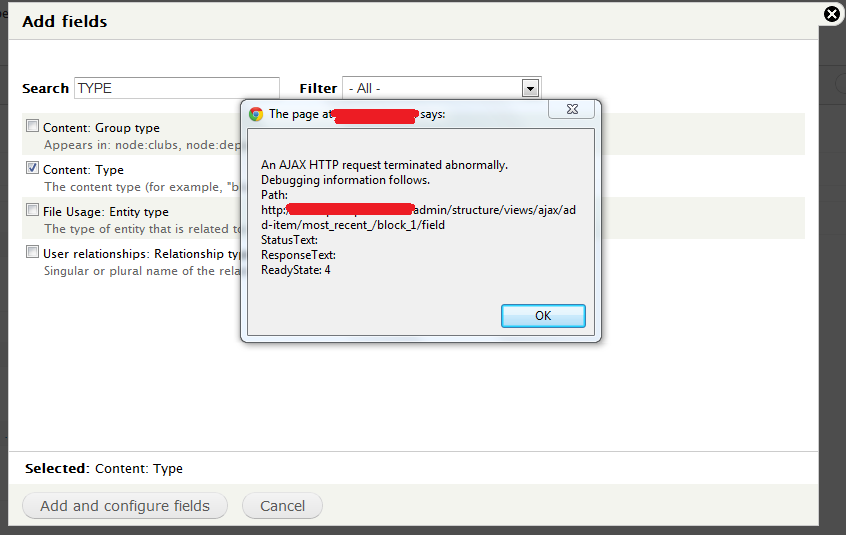
Now if I go into Structure>Views and I click on one of the enable buttons on the right (see attached picture at the end of the post) I get this huge error.
I think it's not even all the text, but with a cmd+a and cmd+c it's the maximum I could obtain.
Anyway even if I get this error pressing the enable button, then the view seems to be enabled.
I'm running Drupal-7.0 on MAMP.
Views module version is 7.x-3.0-beta3.
Ctools module is 7.x-1.0-alpha4.
Advanced help module is 7.x-1.0-beta1.
If you need any specific information let me know.
I don't know if this is the php error you need to see. If not, let me know how can I get it.
Thanks
Ale
Comment #3
Ale Deva commentedI solved the problem re-building everything from scratch.
It might have been a corrupted Drupal installation, who knows.
Comment #4
nikkubhai commentedEven I am not facing this problem anymore.
Comment #5
dawehnerSo let's mark this as fixed unless someone get's the problem again.
Comment #6
Pollydor commentedFYI, I get this error when module Drupal for Firebug is enabled. Disabling it makes editing views work again.
Comment #7
hozt commentedCheck your apache server logs for any errors. I was having a similar problem and it was being caused by apache mod_security.
Comment #8
travisimo commentedSo I just randomly started getting this AJAX error all of a sudden after successfully building and launching a website with 4 functioning views rules. I went back to change the sort order of the blog teaser i made with Views and when i clicked update i get this
"An error occurred at http://www.scarecrowfoundation.org/admin/build/views/ajax/config-item/bl....
Error Description: 0: "
So then i decided to rebuild the rule but now i get errors all the time when i try and do a majority of things. Add-Item as well. Help!!!
Thanks in Advance.
Travis
The website is www.scarecrowfoundation.org.
Comment #9
travisimo commentedI discovered my problem.
Apparently if you have secure pages installed and your admin, user pages activated to be https:// this screws drupal and ajax ALL UP. Temp fix until secure pages fixes this is to simply disable those pages from being secured and make changes as normal.
Comment #11
raulmuroc commentedGetting the same error when trying to import *.xml file obtained by apply BloggerImporter7.x-1.0-alpha2 module on Drupal 7.
Comment #12
dawehnerWhat does a ajax error in views do have to do with the bloggerimporter module? I don't get it.
Comment #13
bojanz commentedAbsolutely nothing.
Comment #14
chigori commentedI am currently receiving this problem when I try to edit views with Chrome. Switched to Firefox and everything is working normal.
Comment #15
RAS commentedThanks chigori. I was having an ajax problem. I was using Chrome and after reading your post, switched to Firefox and everything is working normal for me as well.
Comment #16
closed commentedYea, thank you chigori. Switching from Chrome to Firefox worked for me, even after clearing Chrome's cache. I also do not currently have secure pages installed.
Comment #17
BadboyD commentedI was running in to this issue as well. And I wanted to share that it was the "Ad Blocker" add on for Chrome that was causing error. I paused Ad Blocker and I was able to edit my views again.
Comment #18
GMahe commentedI had the same problem and then I realized the website didn't have a 301 on http://mysite.com to http://WWW.mysite.com which was causing the problem.
You need to use the same url as the one it tells you in the error message.
Comment #19
bearstar commentedDisabling Ad Blocker solved this for me, too. Not sure if it was related to my view being called "Ad Banner"
Comment #20
javiereduardo commentedIn my case it happened when I was on local.
so, in settings.php I uncommented and changed:
$base_url = 'http://mylocaldomain.com';Comment #21
jaesperanza commentedEnded up exporting then re-importing back my View for it to work.
Before that, I have disabled recent modules installed just right before the issue - there was a bunch of them (probably one of those related to user filters, terms, and IP) as the site was on early dev stage. Tried everything else, switching cross browsers, disabling Ad Blocker and similar extensions, base URL, switching themes, jQuery versions, server memory, etc., and none worked. So, it seemed some module conflict. You just have to identify it deductively.