

 The 2026 Drupal Business Survey is open. Your response will help shape the future of the Drupal business ecosystem.
Hi,
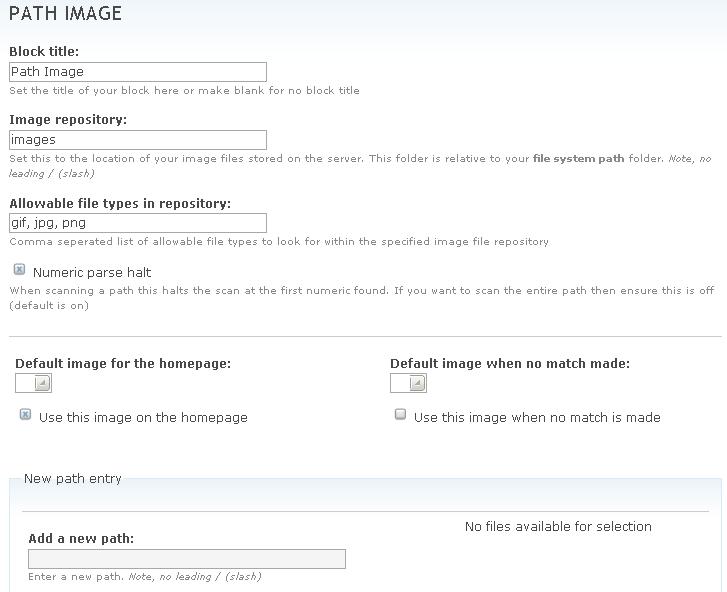
I don't know whether it is just me, however I can't seem to get this module to work. I have followed the instructions provided adn upon configuring the module, no matter what I place in the "image repository" path there will never be any images avalialbe for selection.
I have upgraded from Drupap 4.7 to 5.0 and have the 5.0 version of the module installed. In the "image repository" path I have left it as "images" and have created a new folder under my files path (files/images) then placed several images wthin this directory, however no luck.
Any help or advice would be greatfully recieved!
Shane.
| Comment | File | Size | Author |
|---|---|---|---|
| #6 | path_image.module.doc | 21.59 KB | Kszosze |
| #2 | Path_image2.JPG | 50.01 KB | yeltuor |
| Path_image.JPG | 43.52 KB | yeltuor |


Comments
Comment #1
ajk commentedBizarre! Have the image files you uploaded have "read" permissions by the webserver? Can you cut'n'paste an ftp "ls -l" into a <pre> </pre> block so I can see what they look like on the file system please.
Comment #2
yeltuor commentedHi,
Thanks for the quick responce, i have applied chomd 777 permissions to both the images directory (files/images) and also to my image file (flame.jpg). please see the listing from my ssh session, my userID is "yeltuor"
Also the configuration of my site is in the attached screen shot.
Many Thanks,
Shane.
Comment #3
yeltuor commentedWell.... After some investigation i have found out what the issue was, it appears to be a "bug"... let me explain.
The problem was that my drupal installation wasn;t in the root of my httpdocs, it was actually in a sub-folder called "d"
Therfore my images directory instead of being httpdocs/files/images was actually httpdocs/d/files/images
Within the Path_Image administration it appears to always be looking for the folder httpdocs/files/images NOT httpdocs/d/files/images
Once i created the directory structure at the root of my httpdocs the administration screen was able to allow be to choose a pic as per normal.
However... when the picture came to being disaplyed on the page it was actually looking at the correct location of httpdocs/d/files/images
anyway i hope this makes some sence to you and that it isn't too much of a bug to fix!
Many thanks,
Shane
Comment #4
ajk commentedThe file directory is relative to the standard file_directory_path() setting. So, I would be interested if you could post back the results of this experient.
Create a page or story, set the "input format" to PHP code and enter this:
Then view the page and tell me what it says. Thanks.
Comment #5
yeltuor commentedThis path that is disaplyed is:
files
I hope this helps.
Shane.
Comment #6
Kszosze commentedI have the same problem in the 4.7 version of drupal... after some days investigation that case I founded the error...
In the code of path_image I saw that the way to the 'files' path by "variable_get('file_directory_path', 'files')"
return the full path (c:\.......Drupal\files in my case) when the code only wait relative one... so when it want to build the path to check almost the exist of the image or build the url to put it into de block the result is similar to this "C:\.......\Drupal\files/c:\..........\files/images.....) so it chrash... i make some fast changes becouse i'm a novice in this world of drupal an php so I add my path_image.module to review and correct by you.
I do two changes.. first in line 213-219 and 249 and 289 to create a correct url and
in line 307 - 312 to check if image exist.
I hope this help you.
Comment #7
ajk commentedSorry, that's not a patch. See http://drupal.org/diffandpatch
Comment #8
Kszosze commentedYes, of course, it's not a patch, how I type in my issue, I'm novice here, and I will no upload a fix / patch until some veteran developer has tested and verificated it; I think this is best for all community.
I only type my problem and give my solution... that it couldn't be the best but for me it works.. Fell free to read, understand and download the file I upload and then if you are a veteran developer, and think that my work is good done, make a patch and upload it or tell me "good job guy, it's work, make the patch an upload it"
That's all, thanks
Comment #9
ajk commentedThe problem is as a patch it can be reviewed directly and if good committed. That takes about 10 to 15mins. You method of uploading the whole thing with lots of text is much longer to review. A busy developer doesn't have the time to do that on a issue by issue basis. So the line is drawn, patches ok, entire modules not ok. If every issue were resolved your way I'd have no time to do anything else.
So thanks fo rthe submission, I'm sure it's good, but I don't have the time review. Someone else can and resubmit it as a patch, that's fine. It's just not the way I work I'm afraid.
Comment #10
ajk commentedComment #11
TomArah commentedSimilar problems here under 5.1. Looks like the module is currently hard-wired to being in the root directory.
Comment #12
brewreview.info commentedMore of the same issues here: no matter what combination of paths I try (I have jpgs and pngs scattered throughout my site), path_image doesn't pick up on any of them.....
Since it looks like this module has been put out to pasture maintenance and development-wise, looks like I'll have to try any solution for my site....
//TB
Comment #13
ajk commentedIt's not been put out to pasture. It's just I cannot reproduce the problem. I can't fix what I can't see. Hence why it's (needs more info) as the status.
Comment #14
bradweikel commentedI spent an hour looking into this and, lo and behold, it's been fixed in the head revision for almost a year (#68716 and #68717.
And, for the record, here are some very basic steps to repro with ver 5.x-1.1:
1. install drupal in a subdirectory off of your server root (e.g. www.example.com/subdirectory/)
2. install path_image module
3. Observe that path_image looks for the 'files' directory at 'www.example.com/files' instead of 'www.example.com/subdirectory/files'
Regardless, it's fixed in head. Seems like it's time to release 5.x-1.2...
Comment #15
Anonymous (not verified) commentedAutomatically closed -- issue fixed for two weeks with no activity.