Closed (duplicate)
Project:
Wysiwyg
Version:
7.x-2.0
Component:
Editor - CKEditor
Priority:
Major
Category:
Bug report
Assigned:
Unassigned
Reporter:
Created:
7 Apr 2011 at 16:47 UTC
Updated:
16 May 2011 at 16:46 UTC


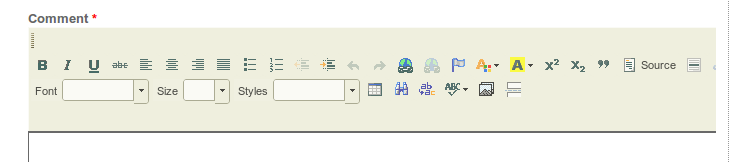
The bug occurs with 3.5.2.xxx and 3.5.3 version of CKeditor. See attached screenshot.
The screenshot refers to the content column of the theme (there is a right column only, no left one). If I remove all the blocks from the right column, the toolbar neatly spans from margin to margin and returns to a new line when the space is over.
| Comment | File | Size | Author |
|---|---|---|---|
| screenshot.png | 8.51 KB | Mac Ryan |

Comments
Comment #1
Sborsody commentedAre you using IE8?
Comment #2
erdembey commentedUpdate your ckeditor and clean your cache ...
I believe that should fix your problem.
Atleast i solve alignment problem in my system with this way.
Comment #3
Mac Ryan commented@Sborsody - Gosh no!!! God saves me from Microsoft (and Apple!).
@Erdembey - Happy that solved your problem, but your belief concerning mine is... wrong. :(
Comment #4
twodI think this happens because all buttons are placed in a single group. Groups are not supposed to be this big and that can cause rendering issues.
See #277954: Allow to sort editor buttons and the sort_buttons feature branch (available in the git repository) for a version of Wysiwyg that lets you put buttons in smaller groups etc. NOTE: there is no upgrade path to that branch yet and probably won't be until soon before that code is ready to be merged into the main branch. Don't use it in production unless you're sure what you're doing.
Or see #829266: Fixing toolbar for the CKeditor / Using the settings hook for workarounds using an implementation of hook_wysiwyg_editor_settings_alter() that you can use with official releases and without modifying Wysiwyg itself.
Comment #5
Sborsody commentedThe reason I asked about IE8 is because placing buttons in a group does nothing in that browser to solve the issue. It turns out that there's some CSS confusion in IE8 (surprise, surprise) and it doesn't obey percent widths in some instances, only pixel widths. CKEditor defaults to 100% width and IE8 seems to render that as 100% of whatever parent div it finds that has a pixel width defined. That will naturally extend beyond any containing div with a percent width. The way we were using it was with Node Form Columns which creates some parent divs with percent widths. I turned Node Form Columns off because it was easier to do than tracking down some IE8-specific CSS issue or trying to guess how many pixels wide the form columns will be. It might be the same issue another person had reported with using CKEditor and Wysisyg 6.x in a fieldset.