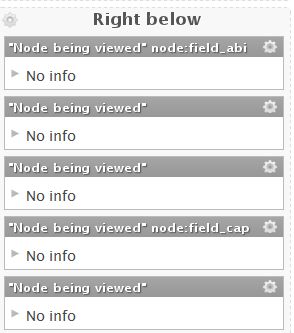
Editing a page variant, in the content section, sometime the field name is not shown and this cause some trouble in projecting the panel. If I have many fields or other piece of content, is difficult to recognize who is who.
The problem happens more often if I choose a two or three column display, that narrow the space for displaying the pane title, and the field name is long.
As you can see from the attached image, is possible to read the name of the fields who's name is shorter then 10 character, like "field_abi" or "field_cap", but not the name of longer fields like "field_ragione_sociale"


Comments
Comment #1
Letharion commentedHello!
Unfortunately, this issue has remained open, without activity, for a very long time. I hope you can understand that between maintaining the module, work, and other obligations, the maintainers are very busy. This leads to not all issues being answered.
In order to figure out which bugs that are still present, I'm going over all low activity bug reports that has not been touched for 6 months, and marking them "Postponed, needs info". In many cases, I expect the bug to have been solved by a newer version of Panels..
If you can still reproduce this issue with the latest dev version of Panels, please just reset it's status to active, and we'll try to work it out. Please remember to post any new information that may be relevant, such as any attempts of your own at debugging.
Regards, Letharion
Comment #2
Letharion commentedA month has passed, and I'm going over the issue queue ones more. Some issues have been closed for other reasons, some re-opened, but this issue has remained silent for the past month.
Because of this, I'm doing a bulk close of a number off issues. I'm sorry that it happened this way, but the issue queue has had to few contributors, and to many questions.
Again, as said in the previous comment, feel free to re-open the issue by setting it to active, if you still need help.
Regards, Letharion.
Comment #3
Andrea C commented@Letharion: Finally I got the time to check. Sorry for the delay.
The problem as described by fedbccer (my previous username) has been fixed.
You can see it in the attached image "Panels-dev-2011.12.07_Layout_2cols_OK.JPG". Now the field "field_ragione_sociale" is displayed with is label "Ragione Sociale" when in the image attached to the previous post was in one of the panes without field name.
Now the field name, if is too long and cannot fit in the pane space, is truncated but at least is possible to read the first letters (like "Indirizzo di" in Panels-dev-2011.12.07_Layout_2cols_OK.JPG.
If you change the layout from two to three columns, with the 1024x768 resolution of my small laptop, all the field lables disappear as you can see in "Panels-dev-2011.12.07_Layout_3cols_No_Field-Lable_displayed.JPG"
This problem can be solved buying a bigger screen or using the zoom feature of the browser (see image "Panels-dev-2011.12.07_Layout_3cols_zoom69_OK.JPG" which is the same as "Panels-dev-2011.12.07_Layout_3cols_No_Field-Lable_displayed.JPG" with browser zoom to 69%)
Comment #4
Letharion commentedComment #5
lsolesen commentedIs this still a problem with the latest version of Panels?
Comment #6
japerryDrupal 7 is no longer supported, closing.