

Closed (fixed)
Project:
Rate
Version:
7.x-1.1-beta1
Component:
Documentation
Priority:
Normal
Category:
Support request
Assigned:
Unassigned
Reporter:
Created:
11 Apr 2011 at 06:36 UTC
Updated:
18 Sep 2025 at 13:32 UTC
Jump to comment: Most recent, Most recent file

Comments
Comment #1
bdtushar commentedI have tried by views, but there is no option, then what to do
Comment #2
jitse commentedTo display the rating of a node, get the node and display the rating.
You could add some code in a custom contentpane for instance and put in the following code assuming you have a nodeid in $nid and the name of your rate widget is node_rating (machinename):
It would be wise to look around in the issuequeue as i believe it is mentioned somewhere around here too.
..the supplied README.txt in the module is a good place to start.
Comment #3
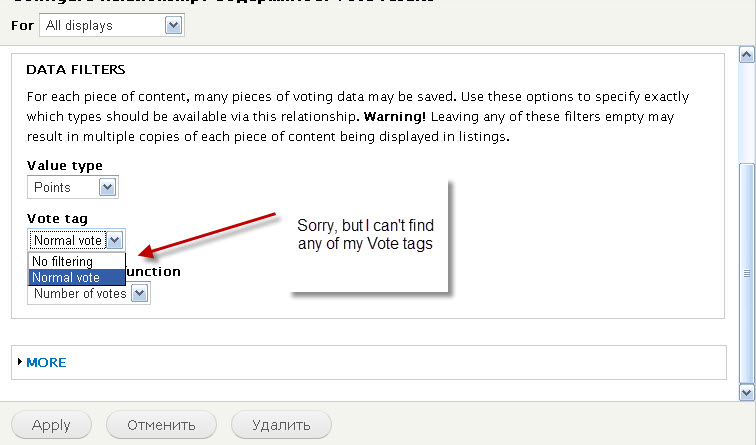
vitkuz commentedIntegration with views does not work well in D7. Widget doesn't show. I think it is because I can't select non of my "Vote tag" when i define relationships. I attached screenshot.
Can you help ?
Comment #4
jienckebd commented#2 didn't work for me with the current version of Rate.
I was able to get the voting results using rate_get_results() in rate.module. Below is an example:
Where the first argument is either 'node' or 'comment', $nid is the node ID, and 1 is the rate widget ID. You can get the rate widget ID by going to admin/structure/rate and looking at the ID in the URL. Look over the function in rate.module for more help.
Comment #5
robertgarrigos commentedIt is in the readme file:
8. Using rate in blocks or panels
--------------------------------------------------------------------------------
You can place the rate widget on a node page in a block or (mini) panel. Add
a custom block with the PHP code input filter or a panel with PHP code and use
the following code:
Replace NAME by the widget's machine readable name. If you already have a loaded
node object, you just need the "print rate_embed" line.
You may also use different build modes:
print rate_embed($node, 'NAME', RATE_FULL);
print rate_embed($node, 'NAME', RATE_COMPACT);
print rate_embed($node, 'NAME', RATE_DISABLED);
print rate_embed($node, 'NAME', RATE_CLOSED);
Comment #7
ivnish