

Active
Project:
Image Browser
Version:
6.x-2.x-dev
Component:
Documentation
Priority:
Normal
Category:
Feature request
Assigned:
Unassigned
Reporter:
Created:
12 Apr 2011 at 06:06 UTC
Updated:
16 Jul 2011 at 04:42 UTC
Jump to comment: Most recent file


Comments
Comment #1
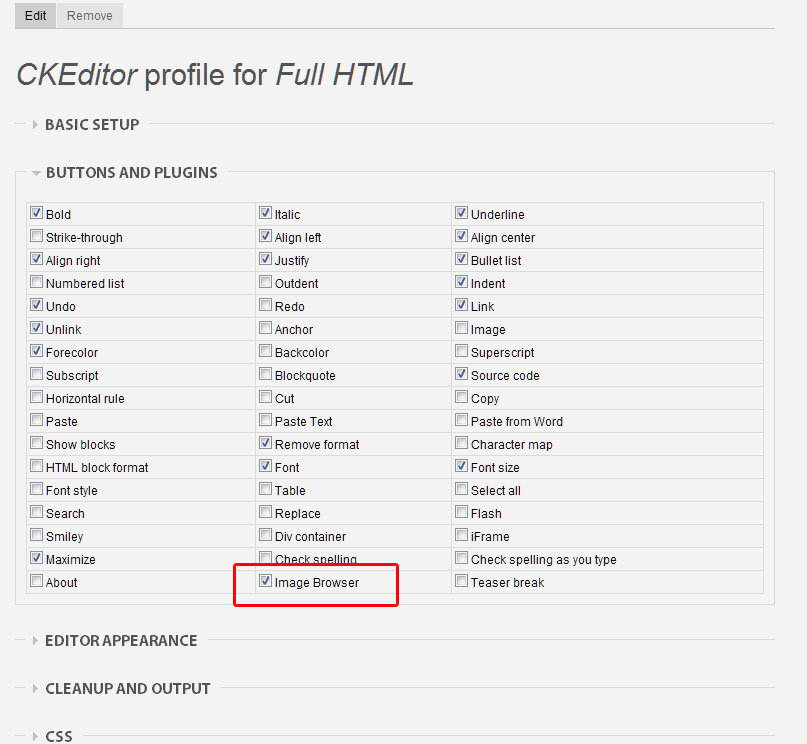
mattcasey commentedAlso, if you want to use CKEditor, don't use the CKEditor module. I was only able to get 2.x-dev working by using WYSIWYG module + CKEditor library, and remember to enable the Image Browser icon from your WYSIWYG profile.
I spent a lot of time googling and searching here before pulling all the pieces together because the README.txt says you *need* the CKeditor or FCKeditor modules.
Comment #2
justageek commentedI have installed Wysiwyg, CkEditor and the dev version of image browser, I do not see a button option at all in my wysiwyg profiles to "turn on" image browser.
Comment #3
mattcasey commentedHere's a screenshot. Make sure you're using IB 2.x and you have the separate "Image Browser Plugin - WYSIWYG API" module enabled too.
Comment #4
justageek commentedThe UI is completely hosed on my site, it doesn't look like the project page, all black and gray, but it looks like there is CSS missing. I'm using 6.2.x dev. When I try to insert, it loads a frame inside the frame of the popup window, and the insert does not work. Does the dev version work?
Comment #5
mattcasey commentedI am using an administration theme but the UI is loading my site's regular theme, so I had to add some adjustments to get the "Upload image" text to show up in the button.
Also, I realized it loads all images in your sites/default/files/images folder. I fixed this by editing the filepath used in imagebrowser_upload_submit() to a custom folder. You also need to customize the filters in the view which loads the images to only show that directory.