

 The 2026 Drupal Business Survey is open. Your response will help shape the future of the Drupal business ecosystem.
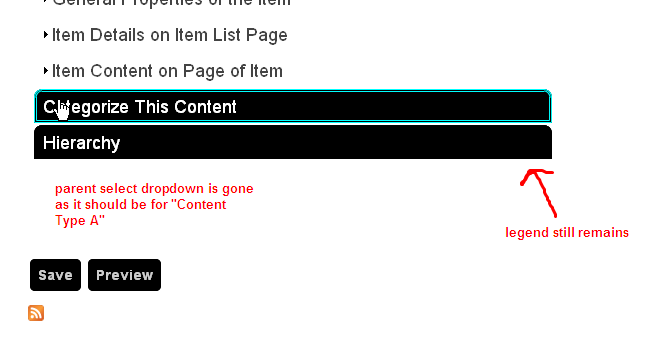
I have a particular content type that can not be a child itself but can have children of a different content type. The Hierarchy fieldset is still showing on the Parent content type edit form but it should be removed because the "parent" field is not there (which is good) and no other field is there. As such this is confusing the users.
There is a similar tix but seems that is more permission based:
http://drupal.org/node/629046
Thanks!
| Comment | File | Size | Author |
|---|---|---|---|
| #24 | patch_commit_8d81b4980fc1.patch | 1.92 KB | jbylsma |
| #22 | patch_commit_5dc10edba693.patch | 1.27 KB | markhalliwell |
| #6 | nh_1125298.patch | 529 bytes | markhalliwell |
| #4 | example.png | 13.26 KB | djween |

Comments
Comment #1
markhalliwellI am a little confused myself. You're saying that:
Page can have children of Story and Book, but not another Page? #629046: Fieldset not disappearing from edit form was my original ticket for determining access in general which is, yes, based on permissions.
If you allow children of a content type, shouldn't you be able to select a parent? I'm honestly just not sure what you're talking about, could you explain in a little better detail. Screenshots would be helpful too.
Comment #2
markhalliwellComment #3
djween commentedSorry for the confusion.
I have
--Content Type A (allowed child node types: Content Type B)
--Content Type B (also has allowed child node types: Content Type B)
In Content Type A edit pages, I however still see the hierarchy fieldset legend.
However, as per above config, Content Type A should not have a select field for parent node on its node edit pages. It actually doesn't contain the dropdown, but its form legend still remains.
Thanks
Comment #4
djween commentedplease find img attached
Comment #5
djween commentedComment #6
markhalliwellHere's a quick patch to determine if what's being called by the form. It will cause a drupal error message of the array to appear when you edit a node. Please paste the output here.
Comment #7
markhalliwellComment #8
djween commentedarray (
'nodehierarchy_old_menu_links' =>
array (
'#type' => 'value',
'#value' => NULL,
),
'nodehierarchy_menu_links' =>
array (
'#tree' => true,
0 =>
array (
'#type' => 'fieldset',
'#title' => 'Parent',
'#tree' => true,
'#prefix' => '
',
'#suffix' => '
',
'pnid' =>
array (
'#type' => 'value',
'#value' => 0,
),
'menu_name' =>
array (
'#type' => 'value',
'#value' => 'secondary-links',
),
'mlid' =>
array (
'#type' => 'value',
'#value' => '3719',
),
'plid' =>
array (
'#type' => 'value',
'#value' => '0',
),
'link_path' =>
array (
'#type' => 'value',
'#value' => 'node/86',
),
'router_path' =>
array (
'#type' => 'value',
'#value' => 'node/%',
),
'link_title' =>
array (
'#type' => 'value',
'#value' => 'parent',
),
'options' =>
array (
'#type' => 'value',
'#value' =>
array (
),
),
'module' =>
array (
'#type' => 'value',
'#value' => 'nodehierarchy',
),
'hidden' =>
array (
'#type' => 'value',
'#value' => '1',
),
'external' =>
array (
'#type' => 'value',
'#value' => '0',
),
'has_children' =>
array (
'#type' => 'value',
'#value' => '0',
),
'expanded' =>
array (
'#type' => 'value',
'#value' => '0',
),
'weight' =>
array (
'#type' => 'value',
'#value' => '0',
),
'depth' =>
array (
'#type' => 'value',
'#value' => '1',
),
'customized' =>
array (
'#type' => 'value',
'#value' => '0',
),
'p1' =>
array (
'#type' => 'value',
'#value' => '3719',
),
'p2' =>
array (
'#type' => 'value',
'#value' => '0',
),
'p3' =>
array (
'#type' => 'value',
'#value' => '0',
),
'p4' =>
array (
'#type' => 'value',
'#value' => '0',
),
'p5' =>
array (
'#type' => 'value',
'#value' => '0',
),
'p6' =>
array (
'#type' => 'value',
'#value' => '0',
),
'p7' =>
array (
'#type' => 'value',
'#value' => '0',
),
'p8' =>
array (
'#type' => 'value',
'#value' => '0',
),
'p9' =>
array (
'#type' => 'value',
'#value' => '0',
),
'updated' =>
array (
'#type' => 'value',
'#value' => '0',
),
'enabled' =>
array (
'#type' => 'value',
'#value' => false,
),
'nid' =>
array (
'#type' => 'value',
'#value' => '86',
),
),
),
'nh_children_view' =>
array (
'#type' => 'value',
'#title' => 'Embed Children View',
'#multiple' => false,
'#options' =>
array (
0 => '-- NONE --',
'nodehierarchy_children_teasers:default' => 'nodehierarchy_children_teasers: Defaults',
'nodehierarchy_children_list:default' => 'nodehierarchy_children_list: Defaults',
),
'#required' => false,
'#default_value' => NULL,
'#description' => 'Embed a view containing this node\'s children into the node\'s page view',
),
)
Comment #9
markhalliwellJust a quick glance at the pic you uploaded, the fieldset says "Hierarchy", not "Node Hierarchy"... why is this? Might be the key to this.
Comment #10
djween commentedI changed the display value because my users have no clue what a NODE is.
I hope that is not an/the issue
:/
Comment #11
djween commentedI changed it back to the orig and the issue persists.
FYI...I had only changed this line and nothing else:
'#title' => t('Hierarchy'),
from this block of code...
if ($hierarchy_form) {
$weight = function_exists('content_extra_field_weight') ? content_extra_field_weight($type, 'nodehierarchy') : 10;
$form['nodehierarchy'] = array_merge(
array(
'#type' => 'fieldset',
'#title' => t('Hierarchy'),
'#collapsible' => TRUE,
'#collapsed' => empty($form_state['nodehierarchy_expanded']) ? TRUE : FALSE,
'#weight' => $weight,
'#access' => $access,
),
$hierarchy_form);
Comment #12
markhalliwellAh ok.. well forking a module/theme/core is NEVER good. It makes updating/upgrading complicated and time consuming. Instead I strongly recommend reading: #1097138: Restrict fieldset options based on node type.
I'm still not sure why the fieldset is still showing up, perhaps you can restrict it in your theme. Theme hooks are ran after core and modules. This gives us the ability of overriding anything a module would output. Granted this is simply a temporarily fix until this can figured out. More than likely it will be fixed in 3.x as it's a huge rewrite in any case.
Using similar code from the issue above in your case:
Comment #13
markhalliwellMeh, should leave it in 2.x as that's where the bug lies, for now. If a fix is created in 3.x we'll port.
Comment #14
djween commentedI actually tried to hide it via my CSS so that I wouldn't have to fork the module which I really don't want to do except for some reason the divs surrounding it have no NH specific ids or classes that I can use to set display: none.
Sorry for my ignorance but in which file would I insert the code you have provided above?
Thanks again for your help on this.
Comment #15
markhalliwellNo problem :) This is how we all learn! The above code should be placed in your theme's
template.phpfile. You also need to replaceYOURTHEMENAMEof both functions to match the shortname of the theme you're using. I also modified the code to include the title change of the fieldset if it does show up.Comment #16
djween commentedsays that function is already called:
I am using my own version of Zen theme and I do not know much programming but I do see that it is already called here...
/**
* Implementation of HOOK_theme().
*/
function gb_theme_theme(&$existing, $type, $theme, $path) {
$hooks = zen_theme($existing, $type, $theme, $path);
// Add your theme hooks like this:
/*
$hooks['hook_name_here'] = array( // Details go here );
*/
// @TODO: Needs detailed comments. Patches welcome!
return $hooks;
}
Comment #17
markhalliwellComment #18
djween commentedhmm, I updated, cleared cached and it didn't remove anything. It just moved my Submit and Preview buttons to the top of the form on the page :\
Comment #19
markhalliwellDid you change the
$excluded_typesto match your site's shortnamed content types? And did it at least change the fieldset title?Comment #20
djween commentedYep, I set it to the machine name and the update of the legend didn't work either.
Comment #21
markhalliwellOk fixed the temporary fix lol Forgot to return the rendered form. I have updated the code above (#12 & #17) to reflect the changes. Also weighted the form items so it appears correctly.
Comment #22
markhalliwellHere's a patch that should fix the problem.
Comment #23
markhalliwellCommitted to 2.x-dev.
Comment #24
jbylsma commentedI did a little tweaking and dancing in order to get "customized menu settings" to show up for users. There's some manually set lines for detecting if anything is in "menu"settings" form stuff (which is what "customized menu settings" uses) but anything else that should be a child of the NH fieldset should get detected and shown.
Comment #25
markhalliwellWorks even better! Thanks! Normally would run this through another review but jbylsma and I hashed this out via instant messenger.
Committed to 2.x-dev.