

Closed (fixed)
Project:
FAQ_Ask
Version:
6.x-2.x-dev
Component:
User interface
Priority:
Normal
Category:
Bug report
Assigned:
Reporter:
Created:
14 Apr 2011 at 21:42 UTC
Updated:
22 Mar 2012 at 21:30 UTC
Jump to comment: Most recent file


Comments
Comment #1
stenjo commentedOn your admin/settings/faq/ask page is the "Only expert can categorize" checkbox checked?
If so, uncheck and try again.
Comment #2
stenjo commentedFound the answer you are looking for.
This is actually by design ;-)
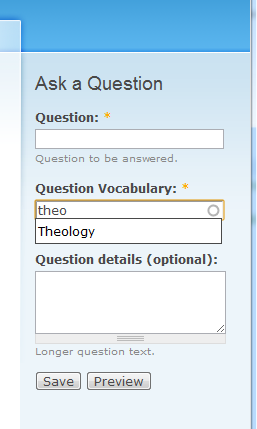
If the vocabulary you are using is not tag-enabled (http://drupal.org/files/vocab_tag_enabled.png) on admin/content/taxonomy/edit/vocabulary/x (where x is the vocabulary you are using), the categories selector will not display in block-view. This is to save space.
I was on the verge of making a change on that one, but on second thought I'm not sure that is a good idea.
What do you think?
See attached image illustration of the Ask a Question block.
Comment #3
nancydruI don't recall making that decision, but perhaps FAQ does that. If I did that on purpose, it should be documented.
Comment #4
stenjo commentedOh, no Nancy, this is not from FAQ or you. This is my fault entirely. I honestly only designed it for Taxonomy where the Tags where enabled only.
You are also right this should be documented.
Where would be best to do such a thing?
Comment #5
nancydruI would say the handbook page, but it is probably very out of date. Perhaps a small note in the form, or at least on an admin page?
Comment #6
stenjo commentedAfter a closer investigation I realise this is a bug. The correct behaviour for the block form is to display all taxonomy options while the asker is allowed to select tags or categories.
Working on an update that should fix this now.
Comment #7
nimek commentedsubscribing. It is a bug. When the fix will be ready?
Comment #8
stenjo commentedA commit is made to the 6.x-2.x-dev branch of this module where the limitation of only tag vocabularies is removed in block question form. Please try out the dev version and come back to me if this works for you.
Comment #9
stenjo commentedComment #10
stenjo commented