

 The 2026 Drupal Business Survey is open. Your response will help shape the future of the Drupal business ecosystem.
I have the site set to a static 960px wide.
I created a block with a banner image 960px x 200px.
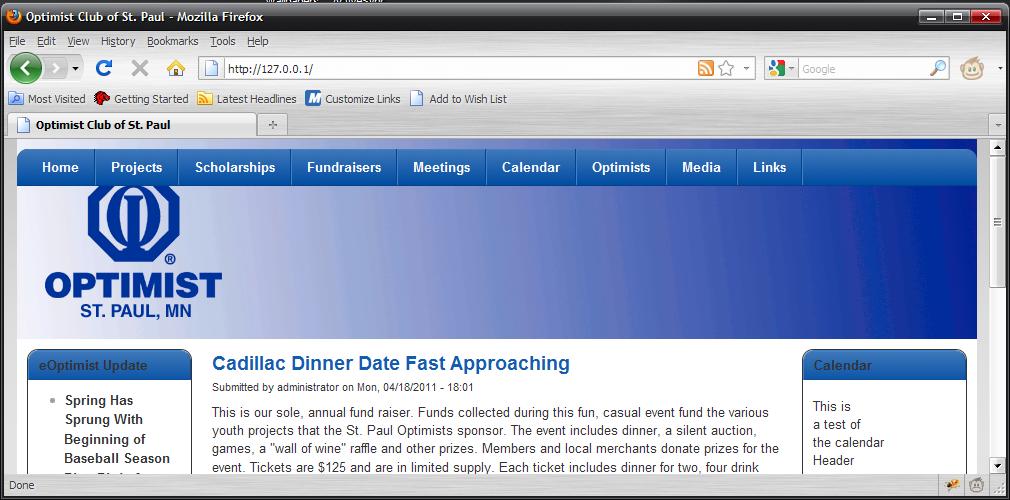
The block is shifted to the right right by about 10px, and consequently the image is being cut off on the far-right by 10px as well. I'd like the image to match the width of the menu/site (960px).
I inspected the CSS and HTML with Firefly, but can't seem to figure out exactly where that 10px padding is coming from.
See attachments to see what I'm experiencing.e know if you have any questions, or ideas on how I can fix this.
Thanks much!
| Comment | File | Size | Author |
|---|---|---|---|
| #7 | Unbenannt.PNG | 29.6 KB | klaasklever |
| #4 | Menu_Float_at_top.JPG | 87.82 KB | gnicho |
| #3 | Banner_not_Showing.JPG | 83.71 KB | gnicho |
| BlockInHeader_10pxRt_Firefly.jpg | 126.04 KB | gnicho | |
| BlockInHeader_10pxRt_NormalView.jpg | 111.43 KB | gnicho |




Comments
Comment #1
ajross commentedThere are padding and margins associated with blocks that we might need to remove to fix your issue. However, it might just be easier to put the image in as a background image using CSS. If you look in local-sample.css, I included the code that could be used to add an image as a full width header background. Can you try that instead?
Comment #2
gnicho commentedajross:
Thanks for the idea... Dont' ask me why I hadn't done that sooner - I actually was going to dig into the local-sample.css tonight.... I don't have a problem trying that at all... (Heck I'm a hellcat demon - I'll jump off any programming cliff! (very little risk of hurting oneself.))
I'm ok with trying the background idea... Might provide for some other interesting layout ideas.
I had one other question, but I'll put it in it's own thread... it's going to relate to the local.css file as well.
Thanks!
./g
Comment #3
gnicho commentedAdded the image to the #header-group in the local.css using the following:
background-image:url("../images/logobanner.gif");
Now all that appears is is the last few rows of pixels of the banner and that's it! (see the attached image). I tried using the background-position property, but that's not fixing it (i didn't think it would).
What am I missing?
Thanks for your guidance.
./g
Comment #4
gnicho commentedUPDATE: After a couple missteps and trying things, I happened upon the semi-solution. Of course it's not without it's faults. It turns out that I wasn't looking at the bottom rows of pixels, but the top!
I added the "height:" property before the background-image property to the #header-group section in the local.css using the following:
Now what appears is the "test" banner in it's full size (yay!), except the menu is floating a few pixels from the top, not at the bottom of the banner (see the attached image). I tried using the background-position property, but that certainly didn't fix it (I didn't think it would).
What am I missing? Any ideas?
Thanks much for your guidance.
Comment #5
ajross commentedI think this is a sort of unusual situation as there is usually something above the navbar (logo, site name, search box, etc.) which causes it to be positioned lower. Before I start trying to come up with a fix, are you planning on putting any blocks in the header region? Or enabling the search box, etc? These will also affect the positioning, so if you are planning on that, it would be good to make sure everything is already in place before we start tweaking the positioning. If not, I'll assume the header is nothing but a 200px background image and the navbar at the bottom. Correct?
Comment #6
gnicho commentedWith regard to the banner/header, let me play with this a little.
I'm under the assumption that if I add a block above the menu, the menu will drop back down.
Ultimately I think the fix is going to come from a combination of solutions.
It will be nice when the "pixel shift" issue gets resolved, but I'm willing to work within the existing confines of the theme.
We're still a month or two before this site will be expected to be live, and for now we're just using a placeholder banner. The design for that hasn't been finalized.
I'll keep this thread updated with any progress or discoveries on this issue.
Thanks much for your help on this.
./g
Comment #7
klaasklever commentedsame here! - probably.
after fooling around with some not working template-hacks (http://drupal.org/node/1149182 - closed it by myself, i'm not very experienced in css) - i took the css-placing in the local.css, but have the same problems like gnicho.
i expected the banner to be placed directly between top and navbar, but now it has a gap at the bottom and is "cut off" at the top see the attached screenshot.
i added the following in the local css:
[code]
/* HELPER CODE FOR SETTING BACKGROUND IMAGES */
/* Add a custom header background (above navbar) here */
#header-group {
background-image: url("../images/header-image.png"); background-repeat: no-repeat;
}
[/code]
adding or changing a height parameter (the image is 960x90) doesn't change anything. i flushed the cache and cleared the cache of firefox and opera.
the other parameters for the header/top-region should be back at normal, i cleared them out of the local.css.
additionally, the image is designed for placing it 4 pixels behind the navbar (margin -4px...) for better fitting. i don't know, if this could be handled right.
thanks for any help,
greets, karsten
Comment #8
klaasklever commentedhere is my workaround for the gap, tested in opera 11 and ff4 so far:
in local.css:
#header-group {
background-image: url("../images/header-image.png"); background-repeat: no-repeat;
background-position: 0px 24px;
this seems to close the gap and is giving me the needed 4 pixel overlap.
but i still don't know, if this is clean editing and if this could make problemes in future.
thx, greets, karsten
Comment #9
ajross commented