Closed (works as designed)
Project:
Video
Version:
6.x-4.2-beta3
Component:
Video Core
Priority:
Normal
Category:
Support request
Assigned:
Unassigned
Reporter:
Created:
22 Apr 2011 at 16:33 UTC
Updated:
24 Nov 2011 at 19:41 UTC


dear maintainers,
thanks a lot for this module
i can't figure out how to make it work properly (beta3).
here is what i would like to do:
- allow users to upload videos (mp4)
- render these videos through HTML5 if the browser is capable + fallback on flash if not (apparently this feature is now added to the beta3 version of the module).
here are the configurations i use:
Video settings
- General: Automatically start video buffering is checked, rest is not
- players: HTML5 Player is selected for mp4, and flowplayer for FLV and F4V
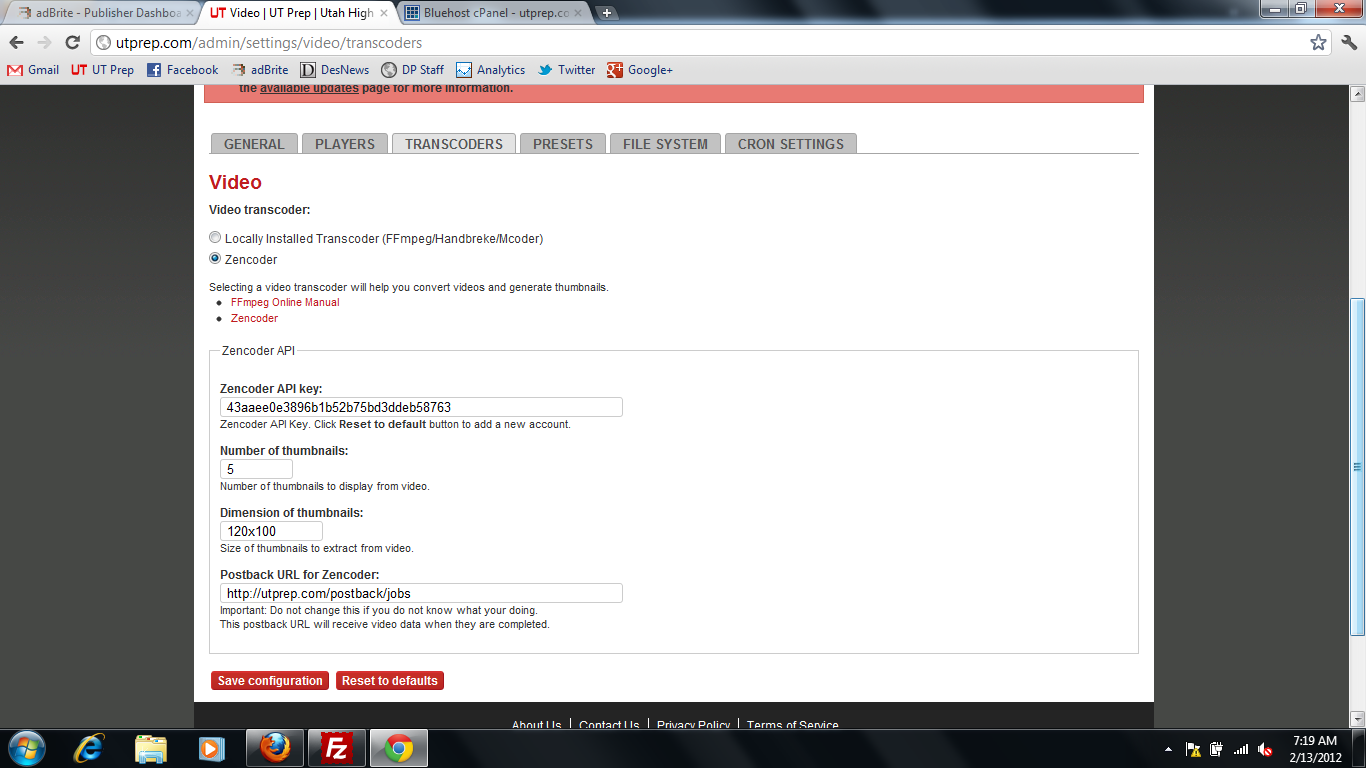
- transcoders: see attached transcoders.png
- presets: 2 cases
1. if i check only HTML5 MP4 the videos are rendered in Chrome but not FF (normal since it is MP4 but no fallback happens)
2. if i check HTML5 MP4 and FLV, videos are always rendered through flowplayer with FLV file, whatever the browser
- metadata is enabled
- filesystem is drupal filesystem
- cron converts 5 videos per process but i convert videos on nodesave for testing purposes
cck settings
cck output is set to video
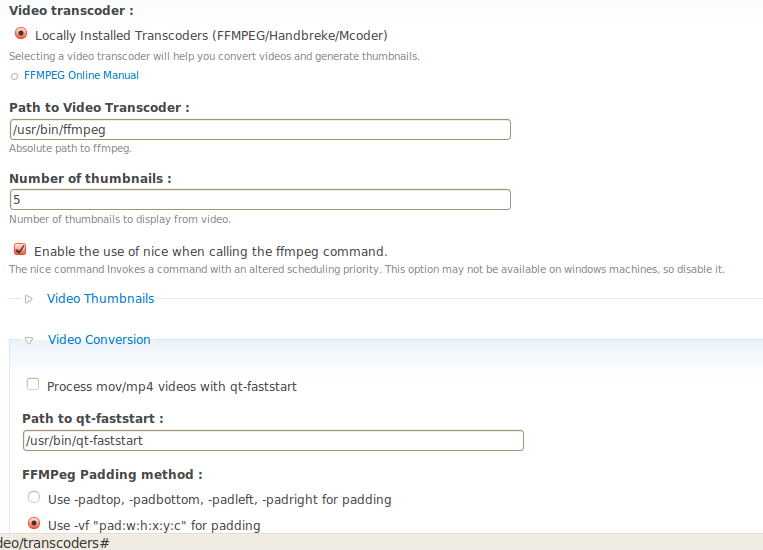
cck field is configured to convert videos (see cckvideo.png
can someone please help me configuring this module to work properly?
i'm scanning the whole web and spend hours reading around with no success and now i'm lost
thanks in advance
| Comment | File | Size | Author |
|---|---|---|---|
| cckvideo.png | 55.67 KB | miaoulafrite | |
| transcoders.png | 48.96 KB | miaoulafrite |



Comments
Comment #1
hypertext200Please read this : http://video.heidisoft.com/blog/how-many-formats-do-i-need-html5-video
Comment #2
lismail commentedHi,
This is a great module! Thanks.
I am not sure if I understand the term "flash fallback" and how does it work when we implement HTML5 video. Refer to #1, if we transcoded MP4 and either WebM or Ogg which are supported natively by majority browsers, why do we need flash fallback anyway?
Sorry for my ignorance, but the idea is new to me. Thank you in advance.
Lismail
Comment #3
hypertext200Flash fallback is for older browsers like IE8
Comment #4
miaoulafrite commentedthanks a lot heshan.lk your post is very interesting, but can you please explain how i should configure the video module to make it work?
the goal is to display a video whatever the device and browser you're using (including smartphone devices). thanks for your recommendations.
note: i read: http://video.heidisoft.com/blog/how-encode-video-mobile-use-0 which is very interesting as well but still i don't know how to translate all this information into settings for video module
Comment #5
hypertext200@miaoulafrite, You have to use Zencoder account for those in D6 and in D7 version you can just do it with what ever currently u have.
Comment #6
miaoulafrite commented@heshan.lk, thanks for your answer, so far only ffmpeg is installed on the site (D6, we use 6.x-4.2-beta3 version of the module), what would zencoder bring in addition?
can you please give more details on the module configuration? which settings shall i set to make it work? even with Zencoder if it is the only way to achieve it.
and please explain why 2. if i check HTML5 MP4 and FLV, videos are always rendered through flowplayer with FLV file, whatever the browser or if HTML5 MP4 and HTML5 WebM are checked in presets, why only MP4 file shows up.
thanks in advance.
Comment #7
lismail commentedZencoder is video encoder SaaS with many advantages over local ffmpeg. Don't forget, you will also need an Amazon S3 account with one bucket spared for Zencoder to send back your encoded video.
Comment #8
miaoulafrite commentedthanks lismail. as far as i have seen zencoder is not free where ffmpeg is
but however, in the issue i describe, there is apparently no encoding issue it is a matter of rendering the appropriate video file depending on the browser
Comment #9
hypertext200@miaoulafrite, I know in D6 version its bit tricky to use conversions with FFMPEG while D7 support it very well. Flashfallback is already in the code. You do not need to worry about it if you properly convert videos.
Comment #10
miaoulafrite commentedthanks heshan, so please tell me what is wrong with my presets.
videos are converted, but whatever the amount of conversions, only one file is presented to user, not depending on the browser.
as i described in #6 for example, why don't i get the webm file on FF and the mp4 on Chrome?
in need more explanations, i read all the documentations but still cannot set up the module properly
Comment #11
miaoulafrite commented@heshan.lk please support
if others succeeded in configuring it their comments / support is also welcome of course!
thanks for your time
Comment #12
lismail commented@heshan.lk
(1) Can we leverage flash fallback feature to serve mobile users (i.e. iPhone, iPad or Blackberry) with OGG or MP4, while serving FLV for desktop / notebook browsers (assuming users have installed flash)?
(2) Currently I am testing Video module under D6 with FFMPEG along with SWF Tools + SWF Object 2 and JW5 combination. If I replace FFMPEG with Zendcoder + S3 combination, can I get the flash fallback with SWF Tools + SWF Object 2 and JW5 as player, or shall I replace this combination with Flowplayer selected directly from Video module? I am not sure about this, because both Flowplayer and JW support HTML5. In short, can I use SWF Tools + SWF Object 2 and JW5 combination as HTML5 player?
Thank you in advance.
@miaoulafrite
Not sure about this, but you have 640x350 size on preset, that is not available at http://video.heidisoft.com/blog/how-encode-video-mobile-use-0. Looks like the size does not comply with any smartphone profile in that blog.
Comment #13
miaoulafrite commented@lismail
thanks for your feedback
it seems that we try to achieve the same goals (your issue #1)
isuue #2: why do you use so many modules? what are the benefits of SWFTools, SWF Object2 and JW5 compared to flowplayer?
do you also mean that if you do not encode your videos with FFMpeg but with Zencoder you get the fallback? why is that so?.
what do you mean when you say "flowplayer supports HTML5"? when you select it as a player, if the browser is able to read the video via the tag it does and if not it falls back to the player?
Comment #14
hypertext200@miaoulafrite , sorry for taking long time.
The flash fallback is inbuit. So what you have to do is just convert files to mp4, ogg then it will play all browsers with fallback. I've see some guys are trying to convert to FLV but its useless as we have h246 mp4 which can be play in Flowplayer.
In player settings set html5 player for mp4, ogg, ogv, wemb formats.
Comment #15
lismail commentedFlash fallback seems to be working with me now, but don't ask why. Probably the encoding preset?
@miaoulafrite
SWFTools is needed as bridge to JW5, as the customer has had a custom JW plugin by other developer. However, I had to create custom module to inject the required flashvars (*sigh*).
Comment #16
kenwen commentedHi all,
I'm trying to set this up with the config described above, html5 and mp4 as standard with flash as fallback but it doesn't appear to work?
tested the following node on Chrome, Safari (where it works), Firefox and IE7 (where it doesn't)
http://www.klfit.co.uk/kettlebell-exercises/snatch
Settings all as described. However, I'm not sure I set up the flowplayer API properly? All I did was activate the module. Haven't added code snippets to template?
Is this necessary? I thought the API / video module integration would take care of it
Thx,
Ken
Comment #17
Jorrit commentedPlease retest with video 6.x-4.3-rc1. If it doesn't work, please reply with the browser version and a URL where I can see the problem ór the generated HTML snippet with the player code.
Comment #18
Jorrit commentedClosed because of lack of response.