When I am trying to change the style of anything to custom by clicking on a gear, nothing happens when I am logged in under any user other than the main site admin. I have tried changing the permission on things and nothing seems to make a difference. I can change the style to rounded corners or the other choices except for the custom style. Do you have any idea what I might try to get this to work?
Thanks

CommentFileSizeAuthor
#3 styles_missing.jpg28.38 KBjuanjo_vlc

Comments

Letharion’s picture

Status: Active » Postponed (maintainer needs more info)

Hello!

Unfortunately, this issue has remained open, without activity, for a very long time. I hope you can understand that between maintaining the module, work, and other obligations, the maintainers are very busy. This leads to not all issues being answered.

In order to figure out which bugs that are still present, I'm going over all low activity bug reports that has not been touched for 6 months, and marking them "Postponed, needs info". In many cases, I expect the bug to have been solved by a newer version of Panels..

If you can still reproduce this issue with the latest dev version of Panels, please just reset it's status to active, and we'll try to work it out. Please remember to post any new information that may be relevant, such as any attempts of your own at debugging.

Regards, Letharion

Letharion’s picture

Status: Postponed (maintainer needs more info) » Closed (cannot reproduce)

A month has passed, and I'm going over the issue queue ones more. Some issues have been closed for other reasons, some re-opened, but this issue has remained silent for the past month.
Because of this, I'm doing a bulk close of a number off issues. I'm sorry that it happened this way, but the issue queue has had to few contributors, and to many questions.

Again, as said in the previous comment, feel free to re-open the issue by setting it to active, if you still need help.

Regards, Letharion.

juanjo_vlc’s picture

Version: 6.x-3.9 » 6.x-3.x-dev
Status: Closed (cannot reproduce) » Active
StatusFileSize
new28.38 KB

Hi, sorry about reopen it, but this bug remains and I need it to work.

I've tested it with:
ctools 6.x-1.8
panels 6.x-3.10

And after that I test it with
ctools 6.x-1.x-dev
panels 6.x-3.x-dev

And the problem persists.

To reproduce it:
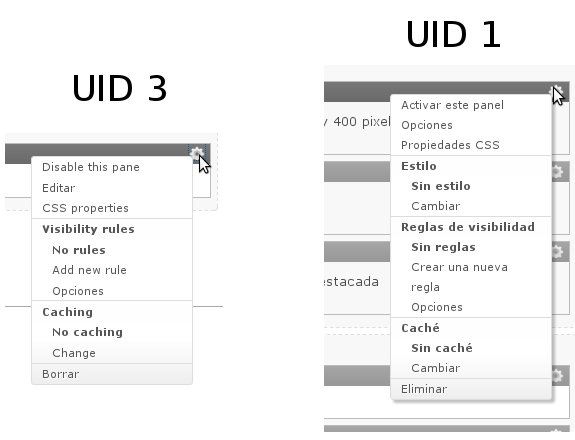
Try to edit a pane with an user different from user 1 and the "style" section of pane options menu doesn't show. If you give me a clue of how is this menu generated, I can try to fix it.
This images come from two different sites, but the behaviour is the same.
styles are missing

merlinofchaos’s picture

Status: Active » Fixed

Did you give your non uid 1 user role the "administer panel styles" permission? Since you did not mention this, I am guessing you did not. (This only exists in the -dev, I think).

juanjo_vlc’s picture

Hi merlinofchaos
which module provided such permission? I don't have it.

On site with ctools 6.x-1.8 and panels 6.x-3.10 I've run this on devel/php

$res = module_invoke_all('perm');
sort($res);
print_r($res);

And the output is:

Array
(
    [0] => Use PHP input for field settings (dangerous - grant with care)
    [1] => acceso al panel de control
    [2] => access administration pages
    [3] => access all views
    [4] => access content
    [5] => access devel information
    [6] => access facebookshare
    [7] => access site map
    [8] => access site reports
    [9] => access site-wide contact form
    [10] => access skinr
    [11] => access skinr classes
    [12] => access user profiles
    [13] => add twitter accounts
    [14] => administer actions
    [15] => administer advanced pane settings
    [16] => administer all languages
    [17] => administer blocks
    [18] => administer content types
    [19] => administer custom css and js
    [20] => administer date tools
    [21] => administer demo settings
    [22] => administer facebookshare
    [23] => administer features
    [24] => administer files
    [25] => administer filters
    [26] => administer gweather
    [27] => administer imageapi
    [28] => administer imagecache
    [29] => administer imce(execute PHP)
    [30] => administer languages
    [31] => administer menu
    [32] => administer menu attributes
    [33] => administer nodes
    [34] => administer page manager
    [35] => administer pane access
    [36] => administer pane visibility
    [37] => administer panels layouts
    [38] => administer pathauto
    [39] => administer permissions
    [40] => administer portales municipales
    [41] => administer scheduler
    [42] => administer search
    [43] => administer site configuration
    [44] => administer site-wide contact form
    [45] => administer skinr
    [46] => administer stylizer
    [47] => administer taxonomy
    [48] => administer translations
    [49] => administer url aliases
    [50] => administer users
    [51] => administer views
    [52] => change own username
    [53] => configure modules
    [54] => configure permissions
    [55] => configure themes
    [56] => create page content
    [57] => create url aliases
    [58] => delete any page content
    [59] => delete own page content
    [60] => delete revisions
    [61] => display source code
    [62] => download all audio files
    [63] => download own audio files
    [64] => edit any page content
    [65] => edit own page content
    [66] => execute php code
    [67] => flush imagecache
    [68] => import own tweets
    [69] => import to imagefield
    [70] => make twitter accounts global
    [71] => manage ca translation overview priorities
    [72] => manage es translation overview priorities
    [73] => manage features
    [74] => notify of path changes
    [75] => revert revisions
    [76] => schedule (un)publishing of nodes
    [77] => search content
    [78] => select different theme
    [79] => statistics admin
    [80] => switch users
    [81] => translate content
    [82] => translate interface
    [83] => use PHP for block visibility
    [84] => use advanced search
    [85] => use global twitter account
    [86] => use page manager
    [87] => use panels caching features
    [88] => use panels dashboard
    [89] => use panels in place editing
    [90] => use views exporter
    [91] => view advanced help index
    [92] => view advanced help popup
    [93] => view advanced help topic
    [94] => view all panes
    [95] => view date repeats
    [96] => view imagecache actualidad-municipal-imagen
    [97] => view imagecache actualidad-municipal-nivo-slider
    [98] => view imagecache agenda-imagen
    [99] => view imagecache banner-carrusel
    [100] => view imagecache banner-formato-a
    [101] => view imagecache banner-formato-b
    [102] => view imagecache banner-formato-c
    [103] => view imagecache banner-formato-d
    [104] => view imagecache banner-formato-e
    [105] => view imagecache bim-image
    [106] => view imagecache calendar_day
    [107] => view imagecache calendar_page
    [108] => view imagecache carrusel-350
    [109] => view imagecache carrusel-480
    [110] => view imagecache carrusel-700
    [111] => view imagecache carrusel-960
    [112] => view imagecache carrusel-noticia
    [113] => view imagecache galeria
    [114] => view imagecache image-carrusel
    [115] => view imagecache image-galery
    [116] => view imagecache listado-imagen-archivo
    [117] => view imagecache listado-imagenes
    [118] => view imagecache listado_por_tipo
    [119] => view imagecache lsmenu-imagen
    [120] => view imagecache nivo-slider-image
    [121] => view imagecache noticia-destacada-imagen
    [122] => view imagecache original
    [123] => view imagecache teaser-image
    [124] => view imagecache thumbnail
    [125] => view imagecache ultimas_noticias
    [126] => view pane admin links
    [127] => view revisions
    [128] => view site statistics
    [129] => view translation overview assigments
)

If I run the same code on site running panels-6.x-3.x-dev the permission is avaliable, and works as expected. So, may I update from a stable release to a dev version?

merlinofchaos’s picture

(This only exists in the -dev, I think).

^^ you just confirmed what I said in #4

Status: Fixed » Closed (fixed)

Automatically closed -- issue fixed for 2 weeks with no activity.