Closed (won't fix)
Project:
Drupal core
Version:
6.19
Component:
cache system
Priority:
Normal
Category:
Support request
Assigned:
Unassigned
Issue tags:
Reporter:
Created:
2 May 2011 at 17:30 UTC
Updated:
6 May 2011 at 18:30 UTC


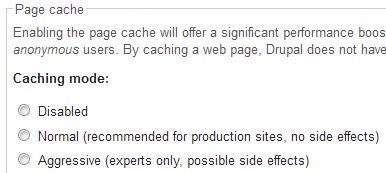
I have Drupal 6.20 installed and checked the checksums on all files. For some reason, I can't turn on the page cache under admin/settings/performance. The radio buttons revert to no box checked as in the attached image.
I have other working Drupal sites on the same server that allow page cacheing, so I don't know why this form won't accept normal cacheing. All of the other enable/disable options on the page work as normal.

Comments
Comment #1
izus commentedmay be it's hardcoded in the settings.php
Do you have this line in your settings file ? you just should remove the value to 1 instead of 0.
$conf['cache'] = 0;Do your Drupal installation behaves like this even if you disabled all your costum modules ?
Comment #2
dhigby commentedI checked the settings file and there is no setting override, as you suggested, izus. Good idea, though.
I have a number of modules installed, I will have to experiment with disabling them and then report back.
Comment #3
damien tournoud commentedThanks for your report, but this is not a support area. Please see http://drupal.org/support for your support options, your question should probably better be asked in the forums.
Comment #4
cjohn112 commentedsubscribing