

Active
Project:
Ubercart 2 VAT support
Version:
6.x-1.x-dev
Component:
User interface
Priority:
Normal
Category:
Support request
Assigned:
Unassigned
Reporter:
Created:
10 May 2011 at 14:21 UTC
Updated:
22 Oct 2011 at 19:15 UTC
Jump to comment: Most recent file



Comments
Comment #1
tuwebo commentedHave you checked out permissions? (admin/user/permissions)
There is one called "show prices excluding VAT", you need to grant this one to the users if you want them to see product prices without VAT.
Comment #2
yannickoo"Show prices excluding VAT to the superuser." YEAH! :D
But after clearing the cache, I'm don't see the "excluding VAT" label :s I don't want to add the label manually.
Comment #3
tuwebo commentedTry to make this clear...
This is what I think:
1 - If you check "Show prices excluding VAT to the superuser." The super user will see the product prices without VAT and without any other text. Just the product price.
2 - If you grant to "show prices excluding VAT" to anonymous users, these ones could see the text you are asking for... Just try it!. For this, you need to go to the admin/user/permissions in your web site and grant it!
Let me know!
Comment #4
yannickooYeah that isn't a problem. This thing is working. But I don't see the label. If the price including the taxes I see "incl. VAT" but if the price excluding the taxes I want to see "excl. VAT".
Clear?
Comment #5
tuwebo commentedOk,
Log out as administrator and try to see the label with anonymous users. Superuser will not see it.
If anonymous have the right permissions and there is no problem with the theming (maybe the label is hiding somewhere), I don´t know what could it be.
I´ve attached an image with both VAT included and excluded (it is just in my local computer so there is no theming applied) for anonymous users... and it is working.
In Spain VAT = I.V.A
Comment #6
yannickooHm okay :/ Thanks for the image.
Yannick
Comment #7
yannickooOkay, but anyhow the "excl. VAT" is missing on the node.
Comment #8
tuwebo commentedHave you tried with anonymous user?
If you did so, it must be something with the configuration... I don´t have any more clues!
Comment #9
jeroen commentedauguskii, I really wonder how you were able to display both the price with and without taxes. I'm looking to enable this functionality as well but I don't see how to enable it.
Comment #10
tuwebo commentedHi jeroen,
I was able to show that prices with the Ubercart 6.x-2.2 version, and VAT module prior to the 6.x-1.1
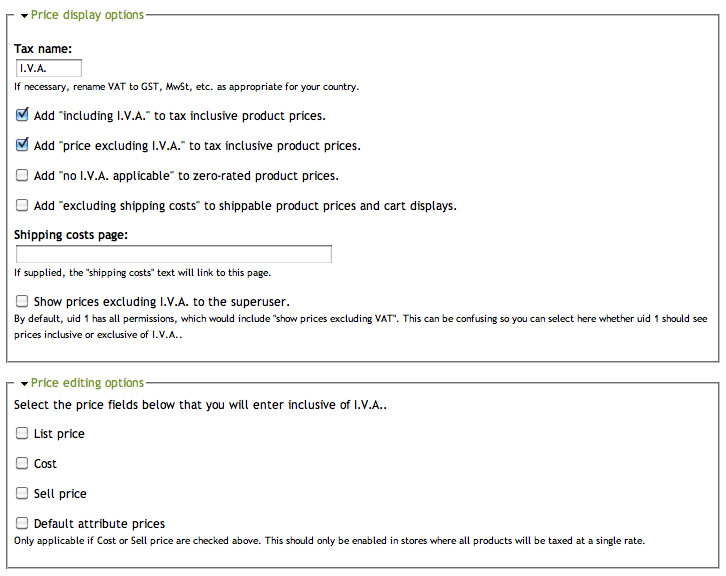
Working with those versions there were an option in "admin/store/settings/taxes/vat" where you could check both
Add "including I.V.A." to tax inclusive product prices
Add "price excluding I.V.A." to tax inclusive product price
(notice that I have changed the tax name from VAT to I.V.A, which is the name that we use in Spain).
Right now, I can't see that option with the Ubercart 6.x-2.4 and VAT 6.x-1.1, but I am not really sure if it is a configuration thing or version thing (long time since I configured the store)
I´ve attached two pictures showing the changes.
Maybe some else could provide more accurate information about this question.
Sorry about that!