

Closed (fixed)
Project:
FCKeditor - WYSIWYG HTML editor
Version:
5.x-1.x-dev
Component:
Code
Priority:
Normal
Category:
Bug report
Assigned:
Reporter:
Created:
2 Feb 2007 at 09:14 UTC
Updated:
27 Aug 2007 at 17:52 UTC
Jump to comment: Most recent file

Comments
Comment #1
ontwerpwerk commentedComment #2
jonathanchris commentedHere's my setup:
Apache version :Apache/2.0.59 (Win32)
PHP version :5.2.0
Loaded extensions :
bcmath, calendar, com_dotnet, ctype, session, filter, ftp, hash, iconv, json, odbc, pcre, Reflection, date, libxml, standard, tokenizer, zlib, SimpleXML, dom, SPL, wddx, xml, xmlreader, xmlwriter, apache2handler, mbstring, mime_magic, mysql, mysqli, PDO, pdo_sqlite, SQLite
MySQL version :5.0.27-community-nt
Drupal 5.1,
FCKeditor module 5.X-1.1
FCKeditor 2.3.2
IE 6.0
Other drupal modules enabled/installed:
comment, Help, Menu, Path, Search, Upload, and FCKeditor
As I said previous, for me I don't have the problem with FF under this setup condition.
I have a few custom node modules, but the problem occurs for all regular node types and settings too.
Hope this helps, good luck!
Comment #3
geograt commentedThis is my status:
Status report:
Drupal 5.1
Configuration file Protected
Cron maintenance tasks Last run 44 min 44 sec ago
You can run cron manually.
Database schema Up to date
File system Writable (private download method)
MySQL database 4.1.21
PHP 4.4.3
Unicode library PHP Mbstring Extension
Web server Apache/1.3.37 (Unix) mod_auth_passthrough/1.8 mod_log_bytes/1.2 mod_bwlimited/1.4 FrontPage/5.0.2.2635.SR1.2 mod_ssl/2.8.28 OpenSSL/0.9.7a PHP-CGI/0.1b
Contributed modules instaled:
Image, Image Attach, Image Galley, Google Sitemap, Text Image, captcha, FCKeditor: 5.x-1.x-dev (with 2.3.2)
Theme: Fancy 5.x
IE: 6.0 and 7
Comment #4
ontwerpwerk commentedDo the pages keep loading? and if you hit the stop button - do the fieldsets work?
Comment #5
jonathanchris commentedIn IE the page stops loading. And when I hit the stop button nothing happens (because, well, it's already stopped).
It's as if after the js for the fckeditor loads it completely ignores the other js on the page.
Comment #6
ontwerpwerk commentedjonathanchris:
What theme are you using?
And are you sure all the files for FCKeditor and drupal are correctly uploaded (I had problems with uploading through filezilla some times on certain servers where some files were truncated in transmission)
geograt:
does it work in another theme like bluemarine or garland?
---
There is a newer version of the FCKeditor module at the moment (5.x-1.x-dev published Feb 8) which will behave better in drupal 5.1 and needs testing by the way.
Comment #7
geograt commentedCleaning the browser cache, enabling FCKeditor (5.x-1.x-dev 2007-Feb-08) in textarea with bluemarine or garland crash some times the IE 7. But when enabling the FCKeditor to open in pop pup window it work fine. Thank ontwerpwer for this improvment.
Comment #8
jonathanchris commentedI'm using my own theme, but I've tested it with garland and bluemarine and still get the same problems. And I'm sure I have all the files in all the right places, I have a test site locally so all my files are downloaded.
And again this is ONLY happening in IE 6, it works ok in FF and I haven't tested it in IE 7 yet.
It's not that big of a deal now that the popup feature is working again.
Comment #9
Ashraf Amayreh commentedI'm facing this problem as well. It only occurs with FCKEditor 2.3.2/3 viewed on IE7. I'm using a custom theme, not a core or contributed one.
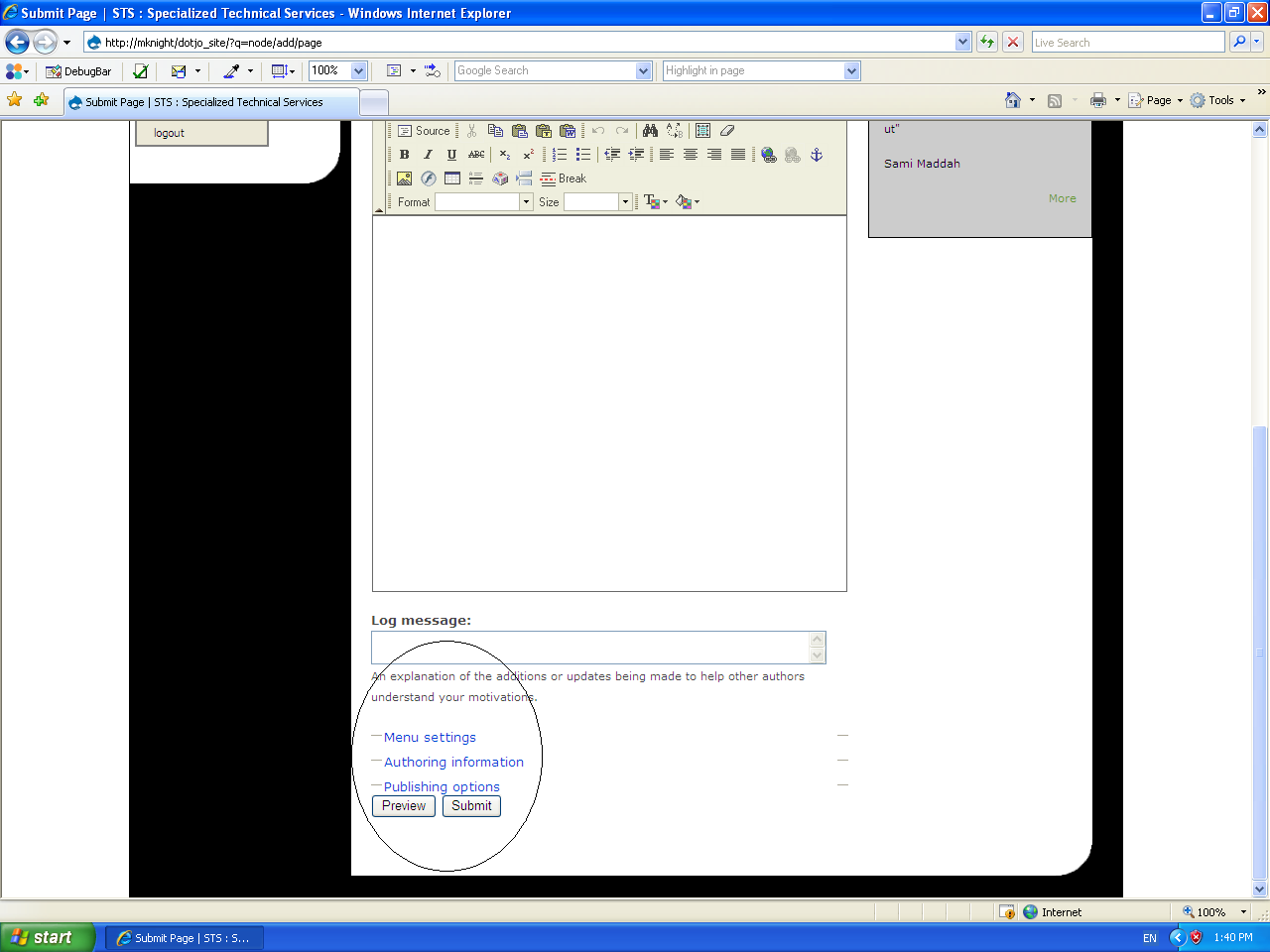
When FCKEditor is set to start in a popup window, the problem disappears. So I guess it's safe to deduce that it has something to do with the onload event? Or maybe a body onmouseover event? I can't say for certain. The browser loads nicely and stops with the fieldset links colored "blue" instead of "green" and non-clickable. Also, the fieldset arrow image doesn't show up. The page finishes loading, it doesn't just hang while loading.
I've attached a snapshot image of the problem. Really hope this gets fixed soon :-(
Comment #10
acsubscribing
Comment #11
terrybritton commentedI don't know if this helps troubleshoot the problem any, but clearing the browser cache seems to affect the problem. If I clear my browsers cache and then reload the create content page I'm working on the expanding fieldsets below the editor work. If I then reload the page or exit and try to create another page, the expanding fieldsets quit working. Clear the cache, reload and they work again.
Comment #12
ontwerpwerk commentedthe latest development version uses a different way to initialize the FCKeditor... please confirm if the problem still occurs in your configuration.
Comment #13
acThe new way to initialise seems to have solved all the IE related issues for me.
Cheers
Comment #14
ontwerpwerk commented