

Closed (duplicate)
Project:
Terms of Use
Version:
7.x-1.1
Component:
Code
Priority:
Major
Category:
Bug report
Assigned:
Unassigned
Reporter:
Created:
10 May 2011 at 21:01 UTC
Updated:
8 Jul 2012 at 06:26 UTC
Jump to comment: Most recent file


Comments
Comment #1
andrenoronha commentedSame here!
Comment #2
Sborsody commentedsubscribe
Comment #3
Sborsody commentedThere's an error showing up in the logs: "No node is set to use as terms of use in the currecnt language [en]."
It would seem that there's something not working right with setting up the node in the configuration section. I put in a node id, but the variable terms_of_use_node_id does not get set. Devel moduel variable editor is showing blank for that variable.
Comment #4
Sborsody commentedHere's the issue: things get messed up with the configuration form if one leaves the "Title of the post where your Terms of Use are published" field blank and clicks on "I prefer to specify the node id" button then tries to save the form with the node id. I noticed that the "Label for the checkbox " field change I had made wasn't sticking either when trying to specify the node id.
After clearing cache and doing something else for awhile, I revisted the configuration page and typed in the title of the node rather than clicking on the button to specify the node id. Now things seem to be working and the terms_of_use_node_id variable is no longer blank.
Comment #5
andrenoronha commentedThank you Sborsody!
Comment #6
choy commentednot a very logical configuration - however in my case
doesn't work like that, neither with name, neither with id - the node continue unviewable at the registration page -
Log message is: The body field of the terms of use node was empty. Please check the the nodes content.
Comment #7
Sborsody commentedHrm... Sounds like it knew of the right node but could not read it. If I had to guess, I'd say check permissions/promoted to front page status/published status. If I recall correctly, you need to ensure the node is not promoted to the front page.
Comment #8
choy commentedThe log reports: The body field of the terms of use node was empty. Please check the the nodes content.
I tried both solution - per title in my case "Terms of use" and per node number "123"
Nothing works - flush caches doesn't help - The terms of use node is set to published, nothing else
So why terms of use doesn't recognize ... ?
Comment #9
Arnion commentedhttp://drupal.org/node/1172866#comment-4709846
Comment #10
choy commentedAll propsals indicated here above don't work on my installation Neither the node title neither the node id is recognized on the regstration site - just the agreement box is to see - but no terms of use node is recognized (as report as well the log again) - If there is no way to repair this bug, I fear the stays unusable for me :-(
Comment #11
Sborsody commentedChoY,
It would be helpful if you provided more detail about your installation. For example, are you using any sort of node or field access kind of module that restricts permissions? You posted earlier that the log message was "The body field of the terms of use node was empty" so it sounds like the problem is related to Terms of Use being unable to read the body field of that node for some reason.
Comment #12
choy commentedAs told above I tried every kind of variation to install terms of use - including on a clean drupal7 with nothing else than drupal core - always with the same result: "The body field of the terms of use node was empty" -
On my live version I use as extra fields for registration fields generated by module "name" and "profile2" - the node itselfs make use of the module content_access. Additionally he is translatable and translated with the module i18n. - All anonym and users have right to see the content.
However on my test-site all this modules are not avtivated and and I get the same non-results by terms of use
Comment #13
nicolasdiogo commentedsame problem here
i tried entering the number or the page title
flushed all cache
tried again but nothing seems to work.
any suggestions? or is there an alternative module?
thanks,
Comment #14
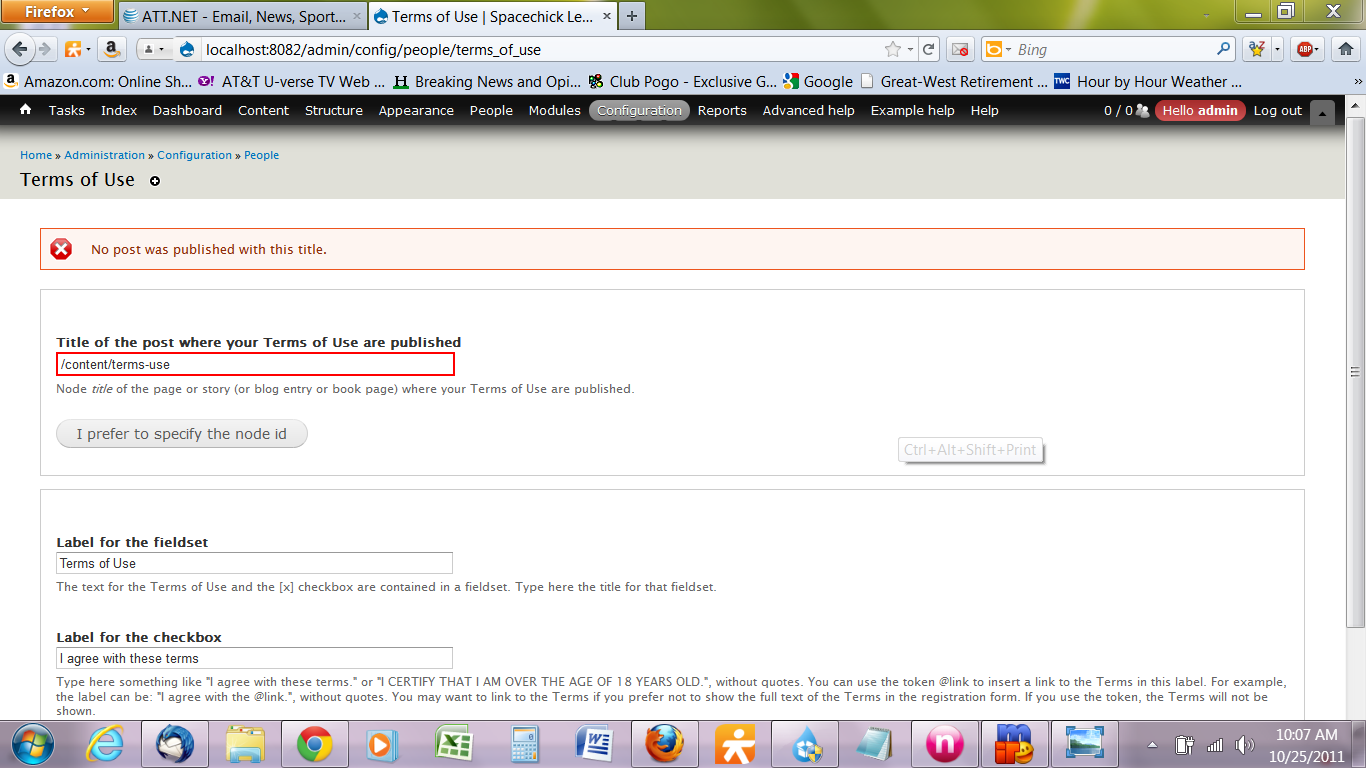
spacechick commentedPretty much the same thing, but here's my error code:
Comment #15
spacechick commentedThe title will save if I use the node ID, but the page's "Terms of Use" body text still doesn't show up when creating a new account.
More info: Running Acquia Dev Desktop distribution, 7.4.4 core, with a WAMP stack...
And, in case you're wondering, I did flush cache and the other things suggested above...
Comment #16
Sborsody commented@spacechick
It looks like you specified the path of the node, not the title. Specifying by node id never worked for me.
Comment #17
spacechick commentedThanks, @Sborsody, that's exactly what I did. Specifying the title rather than the path took care of it.
Comment #18
kenorb commentedthe same problem
Comment #19
Québec commentededit:
Hi, it finally worked (new install) on a new install with the «translate» patch. Could it be a problem with Profile2 module? I have not installed it yet this time. But the first time, when Terms_of_Use did not work, I had Profile2 installed with fields to fill on registration.
Hi,
I have experienced the same problem. I did the change to line 26 in terms_of_use.admin.inc.
The default language is French.
What is the solution? Thank you for your time.
Comment #20
kars-t commentedComment #21
kars-t commentedDuplicate of #1153256: no node body visible on create account
Comment #22
Sborsody commentedIssue can't be a duplicate of itself.
Comment #23
kars-t commentedHi
uups yes the issue was #1378600: Undefined language in user_registration_form_alter
Please test the latest dev and if the body still doesn't show up please check the logs again if there are any errors. And make sure there really is a node in the desired language. Maybe field translation could be a problem here.