When node content which contains HTML character entities is displayed in a tooltip, the HTML character entities are not rendered as symbols, but rather are displayed as the underlying code. So, for example, a copyright symbol in a teaser would display as © rather than as ©. I have only encountered this problem in a block, so I don't know if this problem is limited to blocks or if it occurs for all display types.
Title and teaser are the only two fields in this view display. The teaser field checkbox for "Field can contain HTML" is not checked, but I have tried checking it and there was no visible result. The teaser field checkbox for "Strip HTML tags" is checked, but I have tried unchecking it, and once again there was no visible result. I have tried the possible combinations of these two checkboxes.




Comments
Comment #1
dawehnerHow do you display the content as a tooltip?
Can you give some more informations about this?
Comment #2
esmerel commentedComment #3
rowbotony commentedHello, I have also encountered this issue with the latest 7.x3-dev version, here is a more thorough explanation from what I've experienced. The original report indicates problems with HTML characters within tooltips, but those tooltips are derived from the "
title=""" attribute.Examples:
<a href="some-link.html" title="Click this awesome link!">Click here</a><img src="cute-kittens.jpg" title="How cute are these kitties!">Example #1 will show as a tooltip; "Click this awesome link!"
Example #2 will show as a tooltip; "How cute are these kitties!"
Now, as this relates to Views "Rewrite Results", when HTML characters are within the
title=""attribute they will display as the literal characters that were input rather than the single HTML & character we were intending to display.Examples:
<a href="some-link.html" title="Newsletter Volume:12 Issue:4 - My ORG © 2011">Click here</a><img src="cute-kittens.jpg" title="These kitties < puppies >!">We want these to show:
Example 3)
"Newsletter Volume:12 Issue:4 - My ORG © 2011"Example 4)
"These kitties > puppies <!"so when these HTML characters are within the
title=""of a Views Rewrite Result, the result will be displayed exactly as typed with the©and all.Here's a real world example on one of my sites. When I want to customize a view field I have been adding the fields to the view text input window, hiding them via the "[] Exclude from display" checkbox, then I use the last field to rewrite the results with token replacements. Perhaps I am not going about this in the right way, if there is a better/cleaner way to achieve this result I would welcome it. So for example I have the following fields added in my view:
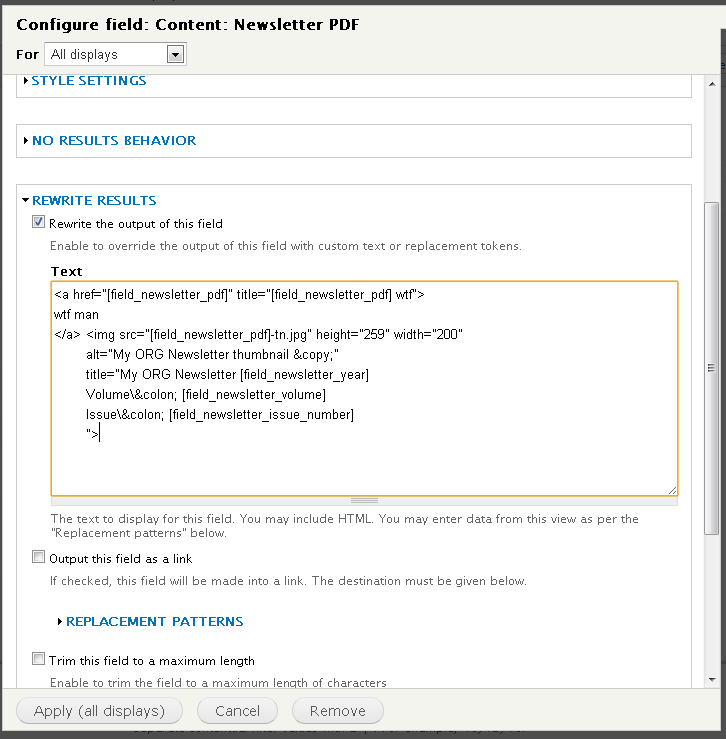
I will "Exclude from display" the Year, Volume, and Issue Number. Then in the Newsletter PDF field I will use the following code to "Rewrite Results":
As Examples 3 and 4 are written here - the results are being shown with the exact input I typed - ":" rather than ":".
This seems to be getting into a gray area concerning security and SQL injections, so I'm not sure if this is a bug, or by design, or if there is some sort of way to escape these characters to they are properly represented. I have tried quoting the characters with ' ' and preceding them with a backslash, but that doesn't fix the display issue. HOWEVER - when HTML characters are used outside of attributes and outside of HTML tags - all is well and they are properly represented. I hope that helps and will be interested in other's input on this issue.
Thank you,
--Tony
Comment #4
rowbotony commentedChanged the name of issue to be more properly descriptive.
I have also found a W3C reference supporting/recommending that the HTML character entities should indeed be used within attributes (I wasn't sure about that usage until now even though I've been doing it for years :).
http://www.w3.org/TR/html4/charset.html#h-5.3.2
Comment #5
dawehnerThanks for your detailed reports, they are indeed really helpful to understand what's going on.
In the last time there was an issue regarding a similar issue, so maybe the current 7.x-3.x-dev fixes the issue for you already. It would be cool if you could make a backup and try it out.
Comment #6
esmerel commented