

 Come together with the global Drupal community in Rotterdam, 28 Sept – 1 Oct 2026. Sessions, contribution, connection, and Early Bird savings until 8 June.
Compass module works amazingly in linux. Thanks guys.
But, when it comes to Windows, its getting impossible to work!
I installed compass using gem. Assigned the path "C:\Ruby192\bin\compass" to the executable path! And it just does not work.
I tried compass.bat instead of compass also. Does not work. It says its not executable.
compass works from commandline, which means PATH is set.
Please help solve this issue.
| Comment | File | Size | Author |
|---|---|---|---|
| #1 | compass_windows_patch.diff | 2.71 KB | 5t4rdu5t |
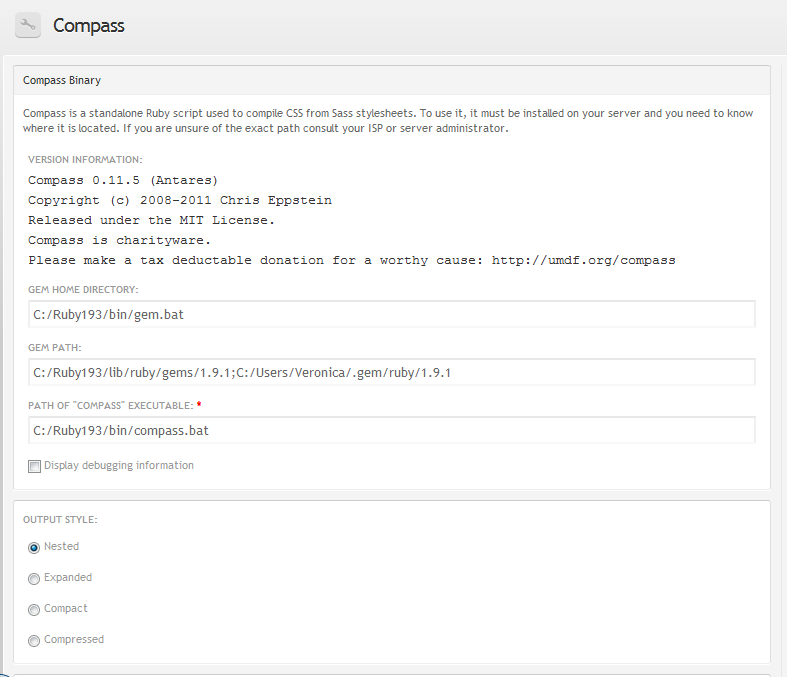
| #1 | compass_settings.png | 29.63 KB | 5t4rdu5t |

Comments
Comment #1
5t4rdu5t commentedAfter long hours of debugging, trial and error, I've made this work on Windows 7!
Here's a patch for HEAD revision of the module, and a screenshot of the settings page I'm using.
To install Compass I've followed the simple instructions shown on http://www.ladysign-apps.com/blog/code/css/installing-sass-compass-for-o.... Only thing is in windows you don't use "sudo" for commands. :)
I needed to restart my computer after installing ruby/gems/compass to get the ruby bin dir included into %PATH%.
Apart from the compass module modifications, everything else worked pretty much out of the box.
Comment #2
5t4rdu5t commentedForgot to mention the module's version I'm using is 6.x-1.0-beta3.
Comment #3
eigentor commentedI tried to get this to work (Drupal 7 version of the module) on Windows as well. The patch from 5t4rdu5t should work for D7 with a minor reroll. As far as I can see, the compass.inc has hardly changed in the Drupal 7 version at all. So I applied the patch manually.
Still I did not get it to work, as I have the even worse situation that I installed Ruby inside Cygwin, and cygwin inside the "Program Files" directory (silly me). So I even got spaces in the patch to compass.bat, I found no way of passing the spaces to the module, no "Program Files" or 'Program Files' did the trick.
Comment #4
eric.chenchao commentedTry to use double quotes to quote the whole path in windows.
For example: "C\Program Files\path to your folder"
Comment #5
oliver huynh commentedThe patch runs well. Thanks!