

Closed (fixed)
Project:
Wysiwyg
Version:
7.x-2.0
Component:
Editor - CKEditor
Priority:
Normal
Category:
Support request
Assigned:
Unassigned
Reporter:
Created:
12 May 2011 at 23:36 UTC
Updated:
21 Mar 2012 at 05:11 UTC
Jump to comment: Most recent file


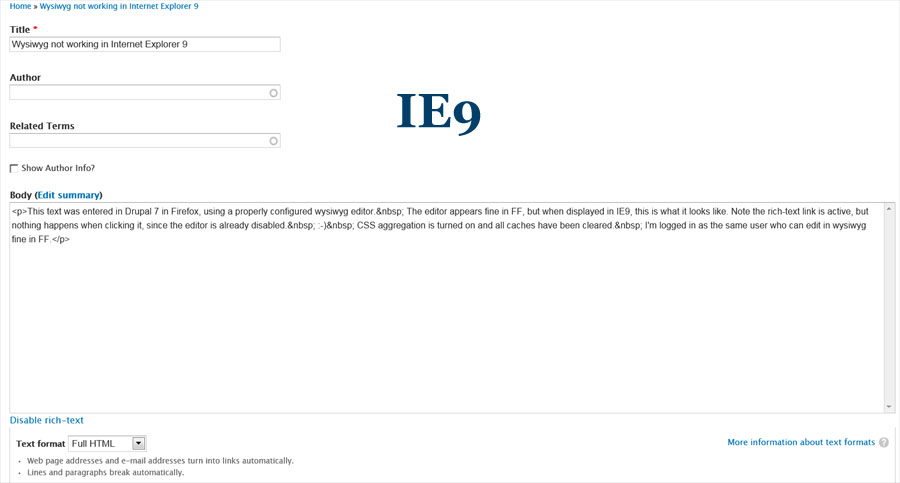
Comments
Comment #1
twodAre there any JavaScript errors in IE? F12 should bring up the development tools.
Comment #2
zoon_unit commentedI got the following from the script console:
Comment #3
twodStrange, it looks like ckeditor.js was never included.
If you disable JavaScript optimization/aggregation, flush caches (site and browser), open the IE dev tools (F12) and check the network related info while refreshing the page you should see if the browser is unable to fetch some files.
Anything that doesn't turn up with HTTP status "200 OK" should be investigated.
Do you have any non-standard JavaSript aggregation/minification on as well?
We got some errors when the main CKEditor script file was being aggregated with other files so we've set an exclusion flag on it, but perhaps some module (or perhaps the mod_pagespeed server extension) is overriding that?
Comment #4
zoon_unit commentedWith javascript compression turned off, this is the error I get on the script panel:
On the network panel, I get a few 200 codes and a bunch of 304 codes. I've attached an xls with the results.
Comment #5
droplet commentedtry to upgrade your ckeditor
Comment #6
twod304 means the server is telling the browser the contents of a file has not been modified since it was last requested so that is fine (unless a corrupt version of the file has been cached by the browser).
Like droplet said, try to upgrade to the latest version of CKEditor, maybe they found a [browser] bug that has been recently corrected. Note that you will also have to switch to Wysiwyg 7.x-2.x-dev in order to use the latest CKEditor version since 7.x-2.0 isn't able to find the version string in the editor's source.
Comment #7
zoon_unit commentedSUCCESS!!
Thanks guys. The combination of ckeditor 3.6 and wysiwyg 7.x-2.x-dev did the trick.
Comment #8
twodOk, good. Looks like this was probably a conflict between CKEditor itself and IE9 which got fixed in the latest release(s).
The next official Wysiwyg releases will already have support for CKEditor 3.6 so we should not have to do anything extra here.
Comment #10
carlhinton commentedSolution that worked for me:
Comment #11
twodAs a quick reminder; This is not the ckeditor.module issue queue. Ckeditor.module does not go well with wysiwyg.module, use either one together with the CKEditor library, but not both.