Closed (fixed)
Project:
MAYO
Version:
7.x-1.2
Component:
Code
Priority:
Minor
Category:
Bug report
Assigned:
Unassigned
Reporter:
Created:
21 May 2011 at 08:24 UTC
Updated:
18 Feb 2012 at 15:35 UTC
Jump to comment: Most recent file


Please have a look at attached screenshot
Perhaps a css problem ?
I changed nothing
| Comment | File | Size | Author |
|---|---|---|---|
| mayo7_inline_labels.JPG | 22.43 KB | Micha1111 |


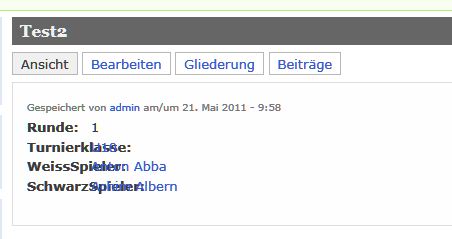
Comments
Comment #1
drkrusher commentedHi,
I fixed this by editing the css/style.css file under the mayo theme directory. At approximately line 635 in this file, you'll see:
You can change the inline header width by changing the width value or just comment it out as follows:
Comment #2
add1sun commentedGrr, I'm trying to upload a patch but there is a problem with D.o that won't allow me to upload it (I have a webmasters issue for that). I'm pasting the text for the patch in here because it is so small. I don't see any reason to set the label width and it looks horrible out of the box with Fields. I'm writing the next edition of Using Drupal and trying to use this theme for a chapter and it is not usable unless the label width is removed. This patch just removes it altogether.
Comment #3
mermentau commented@add1sun, It looks good to me, but I would like to see the bug in action. Could you give me the steps so I could recreate the problem. I can't seem to duplicate it on my own.
Comment #4
tanitani commented@drkrusher, @add1sun:
Thank you, this was one of the issues I was dealing with. It did solve the run in problem as it is illustrated by the attached image in the issue summary, although I just put the segment in a comment block.
I wish I could tabulate the values to appear along the same line but, alas, I do not know how to do that.
@bumpaw:
For steps:
As it belongs to the style.css I mention another problem here, please let me know if I should open a new issue:
If some of the fields are taxonomy reference fields (with node reference module) they appear smaller because of the following block:
which I had to change to:
As you can see the label "Dimension" has the problem of run-in text and the label "Publish Date" wraps; the taxonomy terms and their labels are small:

I still have to figure out how the lines can be the same height, but above issues are solved:

Thanks,
Gábor
Comment #5
mermentau commentedCommitted patch by add1sun that fixed the field label issue.
@tanitani, I just took the font-size: 0.8em; out and it seems to work for your problem. Thanks for your detailed help. I'll mark it closed but feel free to open another issue if you think we need it.
Comment #6
uufsm commentedThe field-width is at line 661 in version 7.x-1.2
Comment #7
veskimees commentedJust comment: I had the same problem with inline field labels. Thanks for help (in my case I changed width to 128; example: http://d7test.veskimees.eu/node/85 [in future it will be http://www.veskimees.eu/node/85, now its D6 site].
Mayo is a great theme (thanks, bumpaw), maybe it's good idea to put that 'inline field width' somewhere in settings (omit/fixed?) ?
Comment #8
mermentau commentedThis is a bug report and it's probably not the best way for a feature request. Changing back to bug report and closed.