Hi,
I am seeing this issue while uploading images.
warning: mkdir() [function.mkdir]: Permission denied in /~/public_html/sites/all/modules/imagecache/imagecache.module on line 601.
Please let me know if there is a fix for this. I tried to change the permissions on
drwxrwxrwx 25 sitead sitead 4096 Oct 20 2010 imagecache
and also changing the 601 line to allow 0777 but there is no change.
// Build the destination folder tree if it doesn't already exists.
Line 601 -> if (!file_check_directory($dir, FILE_CREATE_DIRECTORY) && !mkdir($dir, 0775, TRUE)) {
# if (!file_check_directory($dir, FILE_CREATE_DIRECTORY) && !mkdir($dir, 0777, TRUE)) {
watchdog('imagecache', 'Failed to create imagecache directory: %dir', array('%dir' => $dir), WATCHDOG_ERROR);
return FALSE;
}
Durpal version: 6.20
Regards,
Paradesi




Comments
Comment #1
zirafi commentedCould someone help me to resolve this long pending issue?
Comment #2
zirafi commentedComment #3
sandrewj commentedCould you tell what the log lists as the imagecache error, or does one not show up?
Or, check your imagecache directory permissions in, by default,
/sites/default/files/imagecache
you don't need permissions on
/sites/all/modules/imagecache
Comment #4
zirafi commentedHi,
Thank you for the response. I don't see "imagecache" directory under
/~/www/sites/default/files/
I see it under this location. Does it look right to you?
$ pwd
/~/www/
$ ls -la
total 292
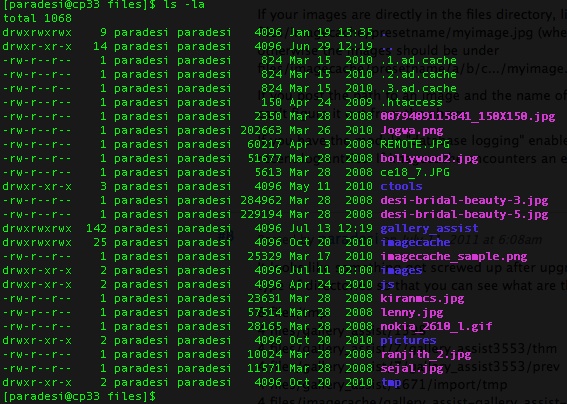
drwxrwxrwx 9 paradesi paradesi 4096 Jan 19 15:35 files
$cd /~/www/files/
$ ls -la
drwxrwxrwx 140 paradesi paradesi 4096 Jul 6 01:23 gallery_assist
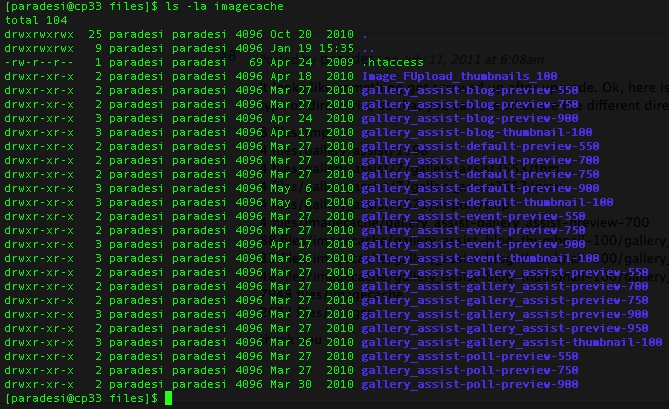
drwxrwxrwx 25 paradesi paradesi 4096 Oct 20 2010 imagecache
thanks again
Comment #5
sandrewj commentedCould you give me a couple of pieces of information:
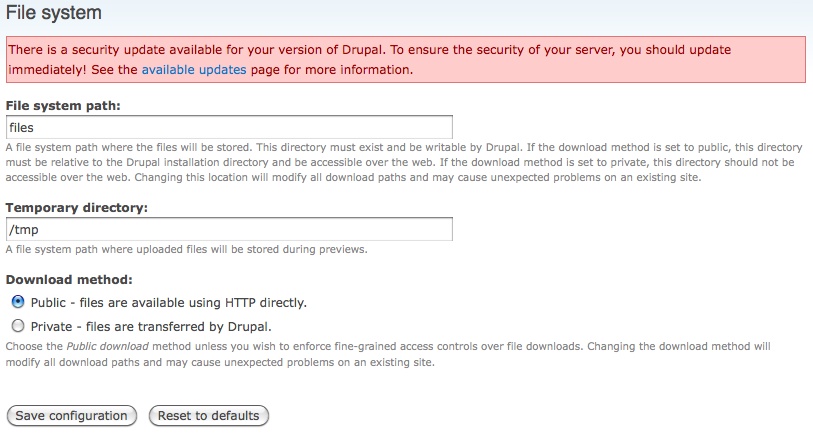
1. under admin/settings/file-system, what is the file system path and is it public or private?
2. on the status report does it correctly list the file system as writeable?
3. When you receive the error what is the log entry in admin/reports/dblog?
Thanks!
Comment #6
zirafi commentedHi,
Thank you for your reply. Please find here attached the snaps that will give more details on your questions. And I am not seeing "dblog" in UI. Is it there on the server?
thanks again
Comment #7
sandrewj commentedIf your file system path is "files":
images should be originally sent to some directory under files. uploading myimage.jpg should put it under either
files/myimage.jpg
files/a/b/c/.../myimage.jpg (some number of subdirectories under "files")
If your images are directly in the files directory, like the first option, the imagecache images would be under
files/imagecache/presetname/myimage.jpg (where presetname is the name of a imagecache preset)
otherwise the images should be under
files/imagecache/presetname/a/b/c.../myimage.jpg (the same directory as the base image.
If you post the path to an image and the name of the preset you are trying to use, I could tell you the folders that would need to exist if you can't figure it out from the above.
If you have the module "database logging" enabled under the category "Core - optional" there will be an option under admin -> reports -> recent log entries. If imagecache encounters an error, I believe it will show a log entry for it.
Comment #8
zirafi commentedIt looks like something got screwed up after upgrade. Ok, here is the "files" directory structure. I'm attaching files and directories under /~/www/files. What I noticed is that all the files and gallery assist image directories were created fine before upgrade. But now they are being created with "nobody" ownership and that could be one of the reason why the images are appeared while loading as well as after uploading. Please see the attached files for complete details of this message.
thank you
Comment #9
sandrewj commentedIt looks like imagecache has successfully made some of the folders.
Any chance you know the folder where the original is being stored when it gives you the error?
If you have access to the error log that drupal is able to keep, it may store the imagecache errors for you.
Just to make sure, are you using clean urls?
Are you using GD or ImageMagick for your toolkit?
Comment #10
zirafi commentedSorry I might have mislead you by pasting all those directories without much details. Now I attached directories and files directory structure. Please note the the directories or files that are being created by either gallery assist or imagecache after upgrade in 2011. And the ownership was created as "nobody". I don't know whether this could be one of the reason.
thanks,
~Ram
Comment #11
fizk commentedPlease reopen if this is still an issue with 2.0-rc1.
Comment #12
mnkysrbtr commentedI spent 3 hours trying to figure this out, decided to move on to getting the clean urls working and found the solution. Make sure you have the .htaccess file uploaded. This cured all of the issues I was having with my installation.