Active
Project:
Zenophile
Version:
7.x-1.0
Component:
Code
Priority:
Major
Category:
Bug report
Assigned:
Unassigned
Reporter:
Created:
22 May 2011 at 06:53 UTC
Updated:
2 Jun 2011 at 03:05 UTC
Jump to comment: Most recent file


Given that I can Not change this text;
and historically I always want to in retrospect;
see the first comment below-- which I can edit.




Comments
Comment #1
christopher james francis rodgers commentedIgnore "Fresh.css" above.
Comment #2
christopher james francis rodgers commentedIgnore "fresh_css-2011.05.21.info".
Comment #3
christopher james francis rodgers commentedIgnore "fresh_css-2011.05.22.info"
Comment #4
christopher james francis rodgers commented*
Comment #5
christopher james francis rodgers commentedEven if zen_midnight is Not used for the administrative theme,
the "Comments preview" CSS below is critically needed.
The "Forms input field-boxes." CSS is the change I most desired
to have so that adding content can be done in black field boxes
even if Zen_midnight is not the administrative theme;
and when zen_midnight is not the admin theme
black input boxes require removing the default check in the check-box
"Use the administration theme when editing or creating content"
at the bottom of the "Appearance page".
The additional CSS addresses all of the illegible text on Drupal 7
administration pages with the "Standard" installation Core modules enabled
(except the "Overlay" module is Not enabled and remains a problem).
I intend to enable all of the core modules next, and continue the hunt;
and any additional issues I find will be addressed
in additional comments on this page.
No contributed modules are yet enabled
and because contrib modules at times define item colors
in their own CSS that renders text illegible,
using zen_midnight as an administrative theme
might not even be feasible. However, I hold out hope
that we will find a global solution for that.
===
Note aside: Memory error with all Core modules enabled.
At my shared-webhost D7 installation,
the anticipated memory error similar to
"Fatal error: Allowed memory... 67MB exhausted..."
requires the addition of a simple text file named
"php.ini" (without the double-quotes in its name)
in the D7 root folder.
===
The following CSS code is intended for "zen_midnight.css".
All text "color"s for items below without my having specified their
rule declarations are
via [zeno-subtheme]/css/zen_midnight.css
body { color: white; }
Tools used: FireFox 4 and FireBug 1.7.1.
========================================
Comment preview: Critical for site visitors.
See thee attached file
comment_preview-1-illegible.jpg
BG via [zeno-subtheme]/css/comments.css
.comment-preview {
background-color: #FFFFEA;
}
The node preview colors are defined in
zen_midnight in the section
"Unpublished and preview stuff" with...
.preview .node {
background-color: #222201; /* #ffffea */
}
... and so the following code matches the comment preview
background to the node preview color.
Critical Addition.
See this change in
comment_preview-2-corrected.jpg
===
Form input field-boxes.
Adding or editing content and comments "Body" field-box;
and other input form input text areas.
textarea_form-input_form-1-white_bg.jpg
Note: If zen_midnight is Not being used as the administrative theme
this requires you to remove the default check
in the check-box at the bottom of the "Appearance" page
"Use the administration theme when editing or creating content".
I wanted these field-boxes changed to black BG with
white text more than any other single item in addition
to the page itself because of their blindingly large
page areas.
I feel it is important that the these text boxes be
as high-contrast as possible using fff and 000 to allow me
to more easily differentiate, for example,
a colon from a semi-colon; or a period from a comma.
Using FireBug I can Not seem to determine where these field-box
BGs or text colors are defined, but the following code
works beautifully to change the BG and text colors
exactly as I had wanted.
Highly Recommended Addition.
textarea_form-input_form-2-black_bg.jpg
=======================================
The following is for zen_midnight use as the "Administration theme"
with the all of the default Core modules enabled except "Overlay".
===
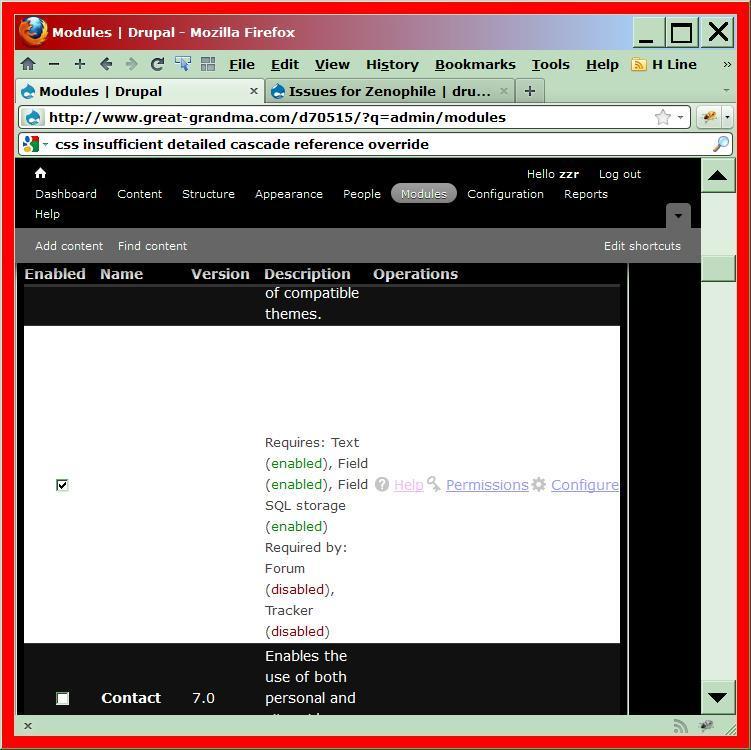
Modules page: "tr.even", "tr.odd".
modules_page-1-illegible.jpg
The tr.even background color is white
via [zeno-subtheme]/css/forms.css...
form tr.even {
background-color: #fff;
}
The zen_midnight.css file attempts to address this
in the "Tables" section via...
tr.even, tr.odd {
background-color: #111;
}
...but that is overridden by the more specific
"form tr.even" of [zeno-subtheme]/css/forms.css.
It is important to specify the tr.even in this case
with "form tr.even".
Additionally, I always liked tr items
to alternate colors, so...
Important Correction within Suggested Replacement
modules_page-2-intermediate.jpg
===
Modules page: "Requires:" and "Required by:".
See the image just above.
The "Requires:" and "Required by:" text is #444
and is intended for white BG. It is too dark
at only 25% illumination up from black;
where-as #bbb is 75%.
Text via: [root]/modules/system/system.admin.css
div.admin-requirements,
div.admin-required {
color: #444;
}
Important Addition.
modules_page-3-intermediate2.jpg
===
Modules page: "(enabled)", "(disabled)".
See last image above.
The green "(enabled)" and the red "(disabled)"
colors are too dark; at only 16% up from black.
Text via [root]/modules/system/system.admin.css
span.admin-disabled { color: #800; }
... and ...
span.admin-enabled { color: #080; }
Important Addition.
modules_page-4-corrected.jpg
===
Status report page: "tr.ok".
status_reports-1-illegible.jpg
Button "Reports" > first link: "Status report".
The BG of tr.ok is near-white with text near-white.
BG via /modules/system/system.messages.css
div.status, table tr.ok {
background-color: #F8FFF0;
}
Text via zen_midnight.css "Messages and such" section.
div.ok, tr.ok, .update tr.ok {
color: #dfd;
}
Important Addition.
status_reports-2-intermediate.jpg
===
Status report page: "tr.info".
See last image above.
The "Upload progress" heading and the description below it
are each <tr class"info"> with no defined BG.
The following sets tr.info to a slightly
lighter black than tr.ok so that it stands out
from both the tr.ok and the page's black BG.
Suggested Addition.
status_reports-3-corrected.jpg
===
Status report page: "tr.warning".
See the image attached to comment #2 below
status_reports-4-warning-illegible.jpg
BG via /modules/system/system.messages.css
div.warning, table tr.warning {
background-color: #FFFCE5;
Important Addition.
See the image attached to comment #2 below
status_reports-5-warning-corrected.jpg
===
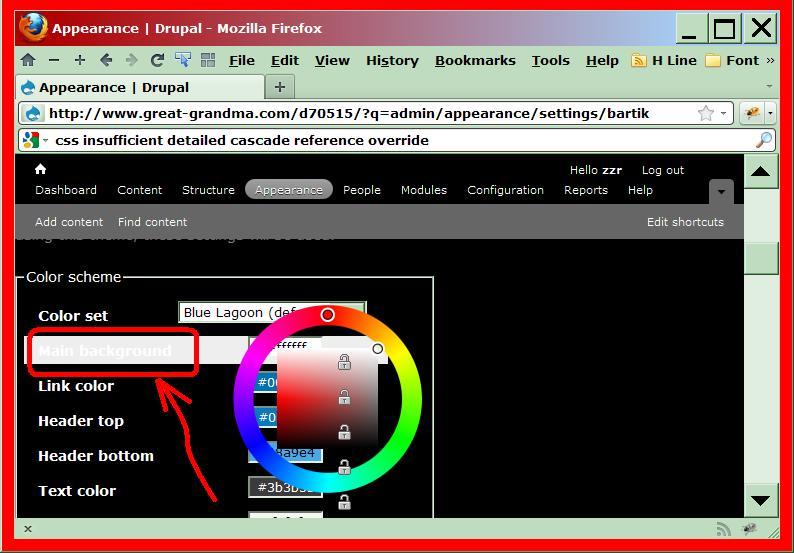
Bartik theme Settings >
"Color scheme": your selected item.
bartik_theme-1-illegible.jpg
Button "Appearance" (Bartik theme "Enabled") >
Bartik: link "Settings" > Heading: Color scheme:
your selected tab.
See the heading "Color scheme" and
your selected item.
BG via /modules/color/color.css
#palette .item-selected {
background: none repeat scroll 0 0 #EEEEEE;
}
Text via zen_midnight
body { color: white; }
Important Addition.
bartik_theme-2-corrected.jpg
===
Red asterisk "*" after table row table-drag.
asterisk-before_and_after.jpg
Structure > Blocks >
Click "Hide row weights", if necessary,
to allow the dragging of items to reorder them.
Text via
[root]/modules/system/system.messages.css
div.warning, .warning { color: #884400; }
Suggested Addition.
========================================================
The update.php page uses theme "Seven".
Zen sub-theme CSS is not referenced. I do not have a solution for this.
Note: In an attempt to force D7 to use zen_midnight
I renamed the /themes/seven folder to"seven-x"
but D7 simply referenced theme "seven-x" instead;
and my removing the "seven" folder brought a host of errors.
Comment #6
christopher james francis rodgers commentedHi Garrett: How are you?
Comment #7
Garrett Albright commentedChris, do you think you could submit your fixes as patches instead of several walls of text? No offense, but it would be a lot easier for me to understand and implement!
Comment #8
christopher james francis rodgers commentedGarrett:
I will be happy to do anything you suggest.
Would you be so kind as to tell me where
to start to learn how to do that,
and it will be my pleasure to learn that process for you.
I look forward to your response and thank you in advance.
(Yeah I could stumble around in d.o with no guidance,
but just give me one pointer
and I will be on my way.. on my own)
I will take it from there; whatever I can do to make it easiest
for you is what I seek.
-c
Comment #9
christopher james francis rodgers commentedGarrett: lisarex in irc #drupal-docs showed me the way to
http://drupal.org/patch
so next weekend I will submit updated Zen Midnight CSS as patch
as zen_midnight.css file replacement;
and I will fore-go spending time on screen capture images, etc.
Please understand that I am aware of the hierarchical nature of CSS
and changes I submit will be as global as possible.
Thanks again for Zenophile. I do love it.
-c
Comment #10
christopher james francis rodgers commentedSorry Garrett:
I posted on the wrong issue page.
... but since I'm here, and if you like dry humor...
http://drupal.org/node/1173626
Drupal 7 Module CSS "Rule Declarations" Must Specify "background-color" And "color" Instead of Only One or the Other.
-Chris
PS: Thee attached file does not belong here either.
Comment #11
christopher james francis rodgers commentedGarrett:
I am now convinced that there is no way to use Zenophile Midnight
(formerly referred to by me as Zen Midnight)
as an administrative theme; nor any other dark background theme
since Core and Contrib module CSS designers regularly assume
a light background theme when they specify only one or the other
of "background-color" or "color"; which then renders text illegible or invisible
with dark BG themes.
### Example of Contrib module CSS that renders text invisible...
CSS#module-filter-squeeze {
background-color: #FFFFFF;
}
###
Therefore, my next submission to you here will be simply to address zeno_midnight.css
additions or replacements that are necessary to render text visible/ or more legibly
when zeno_midnight.css is a site's main theme; and Zeno Midnight is used for
for editing/ adding content via the check-mark being removed from
"Use the administration theme when editing or creating content"-- only
given that a light background theme is necessary for the "Administration theme".
Additionally, I have scanned every d.o handbook page starting with
http://drupal.org/patch and although I would like to submit to you my suggested changes
in the standard patch form "diff --git (...etc.)", that learning curve is Not one I am likely
to embark upon anytime soon enough to allow me to submit my suggested changes to you
in a timely fashion.
By the way, I moved my "Issue" to its own page from where I formerly had it.
re: "Notify the queen and king" ;o) http://drupal.org/node/1173774
I know I am wasting my time with that issue in D7;
and so I got to get into the D8 que immediately.
- Zeno: The Prince of Darkness...
By-the-way: You could do nothing that would make me happier than
to have the Midnight option create instead a file named "zeno_midnight.css".
That would be the greatest.
All the best.
Comment #12
christopher james francis rodgers commentedSee you next weekend... the stock market calls...