

Closed (fixed)
Project:
GMap Module
Version:
7.x-1.x-dev
Component:
Documentation
Priority:
Major
Category:
Support request
Assigned:
Unassigned
Issue tags:
Reporter:
Created:
2 Jun 2011 at 04:21 UTC
Updated:
8 Dec 2014 at 19:12 UTC
Jump to comment: Most recent, Most recent file



Comments
Comment #1
jerryplin commentedI had this issue earlier today, and as far as I can tell, it seems like the map wasn't showing up because the location wasn't being geocoded. And the location wasn't being geocoded because the geocoding option was not set. After I set it for US (a tab in the Location configuration), it seems to work.
Hope that helps.
Comment #2
samhassell commentedI'm in the same boat as tgroff.. everything looks fine, including geocoding settings but i can only get the link to display.
Comment #3
dobrzyns commentedI'm running into this issue as well. Only link displays correctly. When follow link, Google Map is correct.
Comment #4
ChrizUK commentedI'm having the same problems in D7 I think I must be going wrong somewhere. I have posted a discussion here: http://groups.drupal.org/node/168124
Chris
Comment #5
hutch commentedUsing Location and Location CCK v. 7.x-3.x-dev, Gmap and Gmap Location v. 7.x-1.x-dev
After a recent upgrade of Location module to latest dev I still saw no map, went in and reset the field display format to "Address with map" and hit Save and the map appeared. The See map: Google Maps link is also there and correct.
The map on the edit page also works correctly and geocoding works too.
This discussion really belongs on the Location Issue queue IMO.
Comment #6
LTech commentedHi, I'm not sure if I should open a new issue for this. But I'm having the opposite problem. I ONLY want to display the see map LINK, not the map itself. I've set the manage display to 'address with map' and this shows the map and no link. Does anyone know how I would only show a link, no map? I'm using the Gmap and Location modules.
Thanks
Comment #7
arnemaine commentedI'm having the same problem of the map not showing. Using current Drupal 7 versions of GMap, GMap Location and Location. I even tried Location CCK to add a field that I could manage the display on re comment #5.
I've tried switching over to the Bartik theme to make sure it wasn't my theme causing the problem. I watched the video tutorial on the GMap site for Drupal 6, which made it look so easy.
Anyone know of any updates to a solution?
Comment #8
Anonymous (not verified) commentedme too
Comment #9
BenjaminRH commentedsubscribing
Comment #10
vishalkhialani commentedcount me in too
Comment #11
vishalkhialani commentedI am updating this to critical as the demand for this is high and user experience suffers.
I will see if I can solve this and update this thread. Hope anyone else can do this too
Comment #12
vishalkhialani commentedSo I managed to get it to work.
The module works as its suppose to. The problem is we need to go to blocks and place a block called "location map" into the content area or wht ever area you want it in.
Everything well work accordingly then.
reference:
http://drupal.org/node/1017588
Comment #13
bmblack commentedComment #14
bmblack commentedI cannot get this to work. I selected "Address with map" and all I get is the address with a link to google maps. I added that block to my page and the map still does not display.
Comment #15
bmblack commentedUpon further investigation, I believe the problem is that the address isn't being geocoded. I've triple-checked and all of my geocoding settings are correct (I copied them directly from one of my d6 sites that works correctly). Anybody have any ideas on this?
Comment #16
acarpio commentedI'm having same issue and would like to provide some more information:
- Map was (and still is) displaying in localhost, using location CCK and display as "Address with Map". Last versions of modul and core.
- After uploading the site to webhost, content already created in localhost is still displaying map in node, but new content is not displaying it anymore, just "See Map"
- Of course, I updated google api key in webhost and google maps is displaying maps in views, but location cck is not displaying them anymore for new content.
- I did not change any configuration in webhost (just the google api key). I have double checked Location configuration but can't not figure out what the problem is.
- New content created in localhost work as expected.
Comment #17
khumbu commentedsame issue here....trying to solve it....it's kinda critical for our project...
Comment #18
khumbu commentedMy teammate found a solution for the problem, so here we go:
In the theme we added:
$gstreet = $content['body']['#object']->field_adres['und']['0']['street'];
$gcity = print $content['body']['#object']->field_adres['und']['0']['postal_code'] . " " . $content['body']['#object']->field_adres['und']['0']['city'];
$lokation = gmap_geocode($gstreet . " " . $gcity);
print gmap_simple_map($lokation[latitude], $lokation[longitude]);
In the code of the gmap module we changed following line from
1147 $data = drupal_http_request('http://maps.google.' . $tld . '/maps/geo?q=' . drupal_urlencode($address) . '&output=csv&key=' . $key);
to
1147 $data = drupal_http_request('http://maps.google.' . $tld . '/maps/geo?q=' . drupal_encode_path($address) . '&output=csv&key=' . $key);
still needs some finetunning but we hope it helps, if somebody finds a better and cleaner solotion...thx...:)
greets,
Miguel
Comment #19
kenyan commentedI'd been running around with this issue for a while too with no map showing after trying out all the suggestions around the site for Drupal 7x.
I managed to solve my issue by going to: admin/config/content/formats
and for Full HTML and Filtered text formats enabling the "GMap Macro expander" Filter. My gmap now shows in the nodes.
Hope that helps
Comment #20
rowbotony commentedI tried all but #18, and still none of these solutions work for me. I made sure my API key is correct, tried adding a location map block to the content area, and added Gmap Macro Expander in my text formats - still broken as I first reported in June - I see only the link, then inline map is not displayed..... bummer :(
Comment #21
bmblack commentedI needed the map to display on a project I'm currently working on, so I threw something together using views. This is not a fix for the gmap module, but it got me out of a jam and works well, so I figured I'd post it on here in case somebody else could be helped by it.
This is not going to provide you an inline map that you can drag around and zoom in and out. This is going to provide you a static image of the location as well as a link to a google maps page for your location.
Using views, I took the location information provided by the location module and constructed an img tag that pulls a static google map image. I also constructed a link, so if you click on the image it opens a new window and brings you to google maps.
Here's an example of the link and image I constructed:
<a href="http://maps.google.com/maps?q=[street],[city],[province],[postal_code]" target="blank"><img src="http://maps.googleapis.com/maps/api/staticmap?center=[street],[city],[province],[postal_code]&zoom=14&size=305x150&maptype=roadmap&markers=red|[street],[city],[province],[postal_code]&sensor=false"/></a>In my view, I added the following fields:
Location: City
Location: Postal Code
Location: Province
Location: Street
Global: Custom text (in this field, I simply added the code block above)
No filters necessary. In the advanced area, I added the contextual filter Content: Nid. When the filter value is NOT available, provide default value: Content ID from URL
That's it. I added the view to a "Node template" panels page. For the context, I chose Content ID. I'm sure you could probably create a block out of this view and put it on a page also.
You could do this using CCK fields instead of the Location module, but my fingers are crossed that the gmap module will eventually work for D7 and when it does, it will be very easy to simply delete this view and revert back to using gmap.
In case anybody is interested in seeing exactly how I created my view, I attached an export of it.
Comment #22
sammyframson commentedSame issue here... Subscribing
Comment #23
sammyframson commentedI tried all with no success either and then I stumbled onto a post here: http://drupal.org/node/249025 which indicates that there is something wrong with the geocoding... When I manually added in Longitude and Latitude with the block enabled, etc, I was finally able to get a map to show up on the node.
This is a huge pain because it is not easy for me to find the Lat / Long for each node I was working with but I was able to go into the Location configuration (admin/config/content/location) and check "Use a Google Map to set latitude and longitude" where I could then drag and drop. Once I did this, I was finally able to set the Lat and Long on the map and get a map to show correctly with the node.
Hope that helps some...
Comment #24
BenjaminRH commentedThis is still an issue that needs to be fixed, but I've figured out a workaround; this worked perfectly on two different sites that were having this problem:
And if you're trying to associate a location with a node, don't do it through the Your Content Type > Edit > Locative information -- set the maximum and minimum number of locations there to 0, and instead make your own Location field in the Your Content Type > Manage Fields.
Hope this helps.
Comment #25
bmblack commentedI tried #24 and can confirm it works. Thanks!
Comment #26
javier1968 commented#12 works but the block is very limited so most of what Gmap has to offer get's lost. I have tried #24 but it does not work for me.
Cheers
Comment #27
trillex commentedThis is still relevant in the latest dev version and none of the workarounds in this issue thread have worked for me.I'm using the Location field and have made sure that everything is up to snuff, as described in this thread. I cannot get the Gmap to show, no matter what display settings I have set the field for - but the "See map" works just fine. I have made sure that Node Locations is disabled and checked to see if the actual coordination chooser works (it does).
It seems that it isn't properly geocoding, but works just fine if using the Location based maps.. I also cannot get it to display with the block.
I have also noticed that the display mode for the field doesn't change, no matter what I do. Could this be a issue with Location CCK rather than Gmap?
EDIT: I sorted out the issue, it seemed that the location is very nitpicky for my country (Denmark)
Comment #28
pauln600 commentedThe fun continues on this one - In D7, I did as #24 suggests (added a location field), but when you edit a record, fill out the location information and submit, it isn't saved.
Paul
Comment #29
zarkozunic commentedI had same problem, only map link. But somehoew i managed to get map in place (see picture), but kill me if i can remember how i did it. I was doing something in Configuration -> content authoring ->Location. Now I disableing enableing to see what did the work.
(GMap: 7.x-1.x-dev)(Location: 7.x-3.x-dev)
In Location field displaysettings was set map an link
Comment #30
zarkozunic commentedI enabled some cdountries here, Administration > Configuration > Content Authoring > Location > Geocoding Options. and than it worked , but later i disabled it and it still worked.
Display location was enablled
Comment #31
spesso commentedIn my case it worked only after following this:
http://drupal.org/node/527796
Having enabled countries before as #24 .
If your issue is only link without map, it is geocoding that is working and geocode will not work on the address if you have custom latitude and longitude fields enabled.
No need for Location Block... map just apperad under CCK location field address and link display.
Comment #32
amschroeder commentedI had the same problem many others here experienced... if I entered the latitude and longitude, the locations would show up on the map just fine. If I entered the address, geocoding would not work (it was enabled for the United States). The only thing that got it working for me was to disable the 'Additional' field in the content type I was using.
Structure > [Your Content Type] > Edit > Locative Information > Set 'Additional' to 'Do not collect'.
Upon doing that, all of my locations were rendered perfectly (locations entered via address and locations entered via coordinates).
Not sure if there is somewhere in the code that skips the geocoding if any of the fields are empty...
Comment #33
Anonymous (not verified) commentedFINALLY!! The empty field was what fixed gmap for me. I turned off "Additional" in my field setting (under manage fields), used "Address and map" in display. I also had postal code turned on, but had not filled it in on all my nodes. Once that was entered the map appeared. I should mention that after I did this ALL my maps came on...the Location Block, my view's Block and some other one I obviously had tried along the way. Now to sort that mess out... :)
Thanks to all who are so diligently contributing what they have tried. It helps!
EDIT: FYI after I set "Additional" field to not collect I had to go back into each existing node of that content type and edit any one of the other fields (literally I hit space bar and delete), even if all the fields were filled already, and re-saved. So you might want to try that if it's still not working for you. Not sure what a quick fix would be for an existing site that has a huge list of nodes. I can't remember if I tried clearing the cache or not. I usually do. Good luck!
Comment #34
podaroklooks like documentation issue
Comment #35
rowbotony commentedThank you @amschroeder, nearly 2 years later and this finally works on my website, thanks!
Also, 7.x-1.x isn't even available for download anymore, cleaning up the issue queue - closing this request.
Comment #36
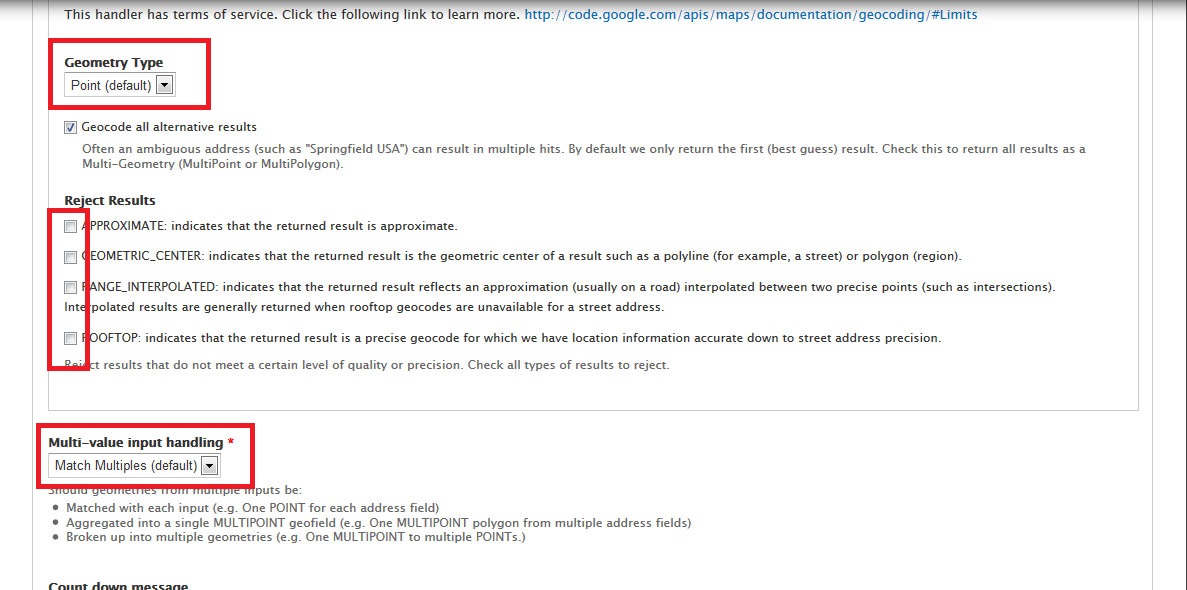
GaneshKumar commentedWhile adding the Map field, Do the following:
1. Set "Point (default)" in Geometry Type.
2. Under Reject Results Uncheck APPEOXIMATE:indicates that the returned result is approximate option and other option too.
3. In Multi-value input handling - select Match Multiples (default)
Comment #37
stevensunsunsun commented#32 + #33
Thank you :) Turned off Additional field, re-saved and all working!
Comment #38
neorush commentedIn case someone else runs across this, setting the height to a percentage seems to break the map.
Under /admin/config/services/gmap
"Default height:
The default height of a Google map, as a CSS length or percentage. Examples: 50px, 5em, 2.5in, 95%"
This is in Gmap 7.x-2.8 and the latest Drupal 7.26
Setting it to an em or px value makes it reappear.
NOTE: I may have CSS breaking the map, I'll try and post back later if I have time to debug
Comment #39
FranCarstens commentedCan confirm #38. Setting to em or px height works. Setting to % causes the map to disappear.
Comment #40
hutch commentedIf the container the map is in is given a "real" height, in px or em then the percentage will work, 100% of nothing is nothing and the default height of a div is nothing.
Comment #41
FranCarstens commentedMakes sense.
Comment #42
royerd commentedIt seems this issue was never resolved. I've tried the fixes that worked for others, but still no luck. I'm installing the Dev version now to see if that helps.
Comment #43
Malek75 commentedThere is a workaround by specifying the Latitude and Longitude of the location.
Comment #44
barry6575 commented#24 worked!
Comment #45
anacat commented@amschroeder #32
huge thanks ! It worked just fine!
Comment #46
jQN commentedIn case anyone is still having problems displaying the map, the fix for me was to remove percentages from the width and height settings.
yourawesomesite/admin/config/services/gmap