Project Infomation
This module is a collection of helper modules extending Workflow’s access capabilities and granularity.
It currently includes 3 extension modules:
- Workflow user reference access
- Workflow role reference access
- Workflow transitions access
Project link: http://drupal.org/sandbox/alfababy/1172924
These modules are particularly useful when working on advanced workflows, roles and rights/permissions structures for projects such as collaborative platforms or intranets. Concretely speaking, for those having worked with Open Atrium and workflow, this module was successfully tested and brings a useful addition to fulfill advanced requirements.
The Workflow user reference access and Workflow role reference access modules work in a very similar way, to provide dynamic resolution of node access rights/permissions for a particular state in a defined workflow. By changing values of user or role reference fields in a given node, different users or roles can be granted/revoked access to this node, according to a specific workflow.
Workflow user reference access
This module extends Workflow by allowing CCK user reference fields to grant referenced users specific permissions/rights on the node, according to Workflow’s defined logic.
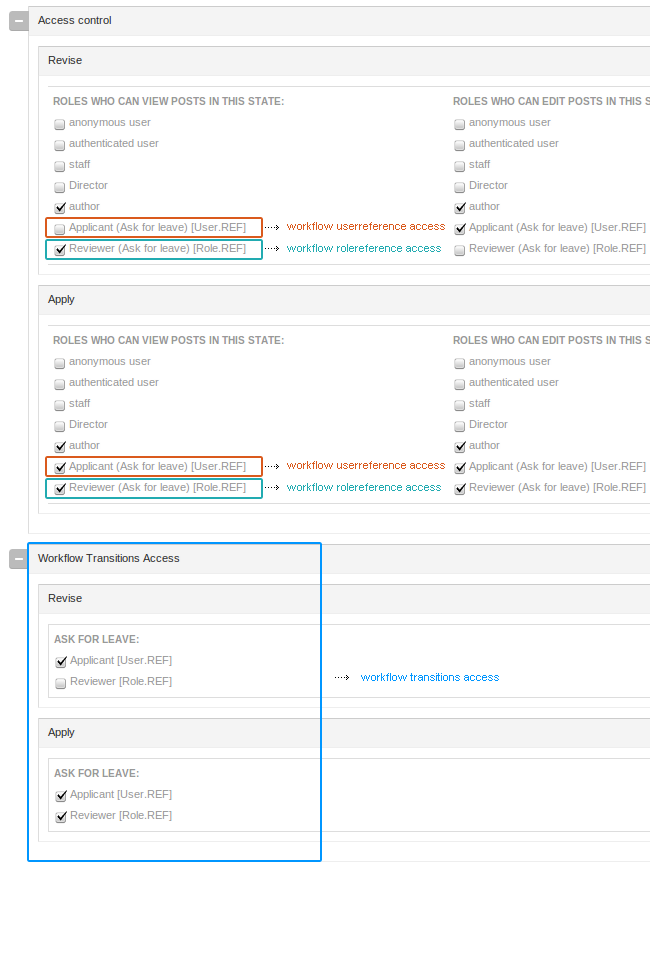
The workflow state form is extended to show all user reference fields with appropriate controls to grant or revoke specific access rights on the node for that particular state, to the referenced user(s) (value of the field).
Workflow user reference access comes as an addition to the Workflow Fields module and actually adds another level of granularity for referenced users to not only have access to fields, but also node level, including view, edit, delete permissions on nodes.
USAGE
When the module is enabled, the "Edit workflow state" page is augmented with a list of user reference fields that correspond to the content types using the workflow. You can specify whether each user reference field should enable or not a specific permission for referenced user value(s), when the node's workflow is in that particular state.
Use case example:
Author uid1 has the right to change in the node nid1 the value of the user reference field to uid2.
User uid2 is granted the rights/permissions on the node defined in the workflow admin page in a particular state.
Workflow role reference access
This module extends Workflow by allowing the CCK Role Reference field module to grant referenced roles specific permissions/rights on the node, according to workflow’s defined logic.
The workflow state form is extended to show all role reference fields with appropriate controls to grant or revoke specific access rights on the node for that particular state, to the user(s) within the referenced role(s) (value of the field).
Workflow role reference access comes as an addition to the workflow fields module and actually adds another level of granularity for users within referenced roles to not only have access to fields, but also node level, including view, edit, delete permissions on nodes.
USAGE
When the module is enabled, the "Edit workflow state" page is augmented with a list of role reference fields that correspond to the content types using the workflow. You can specify whether each role reference field should enable or not a specific permission for referenced role value(s), when the node's workflow is in that particular state.
Use case example:
Author uid1 has the right to change in the node nid1 the value of the role reference field to role1.
User uid2 belonging to role1 is granted the rights/permissions on the node defined in the workflow admin page in a particular state.
Concretely speaking, this module allows opening a node in a specific role when the node's workflow is in a particular state.
Workflow transitions access
This module extends Workflow and transitions, in particular, by adding another layer of validation for a user to be able to change a node’s status, to initiate a transition.
It requires at least the Workflow user reference access module, but also integrates well with Workflow role reference access.
The Workflow module allows definition of which roles can perform which transitions (From status A to status B).
With this extension, users have to validate another condition, based on user reference (user is being referenced) or role reference (user’s role is being referenced) in order to gain access to the original workflow transition rights.
USAGE
When the module is enabled, the "Edit workflow state" page is augmented with a list of transitions that correspond to the defined workflow. For each transition, a list of user and role reference fields are displayed with appropriate controls to grant or revoke specific access rights on the node for that particular transition.
Use case example:
This module is used to prevent certain users within a particular role from being able to get the permissions granted by the workflow module as defined on the transitions configuration pages.
Drupal Integration:
These modules are fully integrated with other contributed modules and Drupal’s API through implementation of modules’ specific hooks: Workflow, CCK, Node access system, mostly.
They were successfully tested with Views and perfectly integrate with it.
Integration with features for a full consistent export of workflow with all related modules and objects is planned to be added. Currently under work and should part of next version releases.
CREDITS AND SPONSORSHIP
Thank you for your support, testing and requests.


Comments
Comment #1
Encarte commentedThis seems like a major improvement to workflow module.
I would be careful with one thing: the workflow edit form can get quit long and if you have more then 10 roles and 10 states it can became impossible to edit (lots of php memory and even browser problems). Even today it would be important to separate worflow transition permissions and workflow access permission to different pages or to make a filtering system (like this one: http://drupal.org/project/filter_perms ). If you're going to add even more things to the same page...
Finally, workflow module, although with lots of users, is in effect almost abandoned by its maintainers. All feature requests are being ignored, port to Drupal 7 didn't even started, the last significant improvement was the porting to Drupal 6 and even ready patches are hardly being committed. I think Davyin Internet Solutions contribution will be very, very welcomed.
Comment #2
miloyz commentedThanks for your comment. We will try to optimize it. I beleive workflow will not die.
Comment #3
fixer22 commentedHello,
I'm having problems with module: Workflow_features_extention (missing)
Comment #4
R.J. Steinert commentedBravo! A wonderful addition conceptually though I haven't had a chance to test it. Looking at workflow_userreference_access.module, line 169, I see you don't have priority set high. My experience from using the workflow_access module in the context of Open Atrium (which for this subject, the OG Spaces module is really what we're dealing with), I had to set the priority above that of OG otherwise as long as a user had membership to a group they were granted view privilege and edit privilege if the node type was set to "Wiki group post". It seems workflow_access module and this group of modules could benefit by having a "Set grant priority" setting similar to what the Nodeaccess module has (just a checkbox for granting priority for Nodeaccess grants).
For now, I wouldn't worry about additional settings or admin form modifications as Encarte suggests. Making sure it works "as is" should be priority.
Comment #5
alfababy commentedThank you for your finding the bug. I have already removed the dependency for "Workflow_features_extention", it is useless.
Comment #6
erok415 commentedIs it safe to assume that this is a beta of the Workflow module?
Thanks,
Comment #7
miloyz commentedFYI.
We have already used it in production site. :)
Comment #8
gregglesHi Alfababy - sorry it's taking so long for your review. I think the area of knowledge needed to review this is pretty specific making it harder for people to review it.
It seems like you've got a few issues in the queue - http://drupal.org/project/issues/1172924?categories=All - it would be great for you to respond to those and help close them. In particular #1267490: Transition from / to seems like an important one to address.
Suggestions
Your .info files have windows new lines and should be switched to unix line endings.
Please remove the $Id$ from all files - this is no longer useful now that drupal.org is on git.
workflow_rolereference_access_schema looks like it uses tabs instead of 2 spaces sometimes and doesn't follow standard array indentation. The same problem is in a few places of workflow_transitions_access and workflow_userreference_access.install and all the module files.
Other than that the code looks relatively good.
Comment #9
gregglesWhoops, forgot to mark needs work. I'd love to get one more set of eyes on this and fixing the tabs/formatting issue should be easy and should make it easier to review.
Comment #10
Encarte commentedIs #8 solved? I'm thinking about testing the module but would rather do it with #8 issues already solved.
Comment #11
alfababy commentedChanged project name.
Comment #12
miloyz commentedyes, all issues have been fix. Please go ahead. We are currently porting it to D7 version.
Comment #13
Bastlynn commentedWorkflow for D7 was just releases, there are a number of changes in available functions that you'll want to keep an eye out for. Let me know how this goes, I'd love to be able to point people to this where they need more complex user permissions.
Comment #14
Bastlynn commentedAs a side note - would it be helpful to have any hooks in place in workflow_access to make this easier on your end? If so - let me know.
Comment #15
klausiIt appears you are working in the "master" branch in git. You should really be working in a version specific branch. The most direct documentation on this is Moving from a master branch to a version branch. For additional resources please see the documentation about release naming conventions and creating a branch in git.
Review of the master branch:
This automated report was generated with PAReview.sh, your friendly project application review script. You can also use the online version to check your project. Get a review bonus and we will come back to your application sooner.
Comment #16
timwoodalfababy,
Just curious to know when you might have time to apply the reviewers recommendations, finalize and promote this module here on D.O.
Thanks!
Comment #17
klausiClosing due to lack of activity. Feel free to reopen if you are still working on this application.
Comment #18
alfababy commentedHi klausi,
Thank you for your help. I have already fixed the coding format. Following the coding standards. Please review it again. Thank you.
Comment #19
stborchertThere are still several issues reported by PAReview:
Additionally its very hard to read through your code. Please have a look at the Drupal Coding Standards and re-format your code. While applying the coding standards consider commenting your code (see Doxygen and comment formatting conventions. There are large code blocks without any comments so its very hard to understand whats going on there and why the code is just like it is.
Comment #20
alfababy commentedstBorchert,
Thanks for your review. I will re-format coding again. Let it follow the drupal coding standard.
Comment #21
alfababy commentedI will back soon on this project.
Comment #22
klausiduplicate of #1927636: Grid Field Formatter.
Comment #23
timwoodklausi,
I don't understand how this is a duplicate of the Grid Field Formatter project. Workflow Access Extension is completely different. Maybe I don't understand how the status field is used in the Project application queue?
alfababy,
I also don't get why you marked this as "closed (won't fix)" but made a statement indicating you would be back working on the project soon. Can you clarify whether you will be pursuing the Workflow Access Extension project application?
Thanks!
Comment #24
klausi@timwood: one applicant should only have one project application active, all others of the same applicant are duplicates.
Comment #25
timwoodThanks for clarifying.
Comment #26
alfababy commentedHi klausi and timwood,
Thanks very much for your very kind message.
Indeed, this is not a Duplicate and I initially closed this as (won't fix).
You are right, after second thought, I don't think I will keep working on this project application anymore.
I think I will simply keep maintaining the code in sandbox and see if later on anybody expresses a great interest in the module, I could still publish it as a full module and potentially find other co-maintainers.
Main reason being that I've mostly moved to D7 and this could be achieved in other ways, that wouldn't necessarily require this module anymore.
I allowed myself to change the status again to won't fix and hope this wouldn't be a problem/confusing this time.
Thanks again so much for all your help, reviews, feedback and comments, it is certainly highly appreciated.
Cheers!
Comment #27
johnvMoving this project application to the Workflow issue queue. Although it is not active anymore, people may find it more easily, and take the ideas.
Comment #28
WorldFallz commentedI've been researching this for a while now (allowing a user specified in an entityreference field on a node to make only certain state changes), and have been unsuccessful thus far. Might I ask to which other ways were you referring?
Or am I looking at a custom hook_workflow_permitted_state_transitions_alter implementation based on a user entityreference field?
Comment #29
johnv@wordlfallzz, commenting on closed issue normally falls below the radar :-(
This thread is about a D6 sandbox project. If you want this in the D7 Workflow module, please open a new issue with reference to this one. D7 has a massive rewrite. And yes, the hook_workflow_permitted_state_transitions_alter gives you much context to decide upon the available states for a given user.