

Closed (fixed)
Project:
Hostmaster (Aegir)
Version:
6.x-1.3
Component:
Code
Priority:
Normal
Category:
Support request
Assigned:
Unassigned
Reporter:
Created:
3 Jun 2011 at 05:39 UTC
Updated:
21 Jun 2012 at 17:09 UTC
Jump to comment: Most recent file

Comments
Comment #1
acMore info:
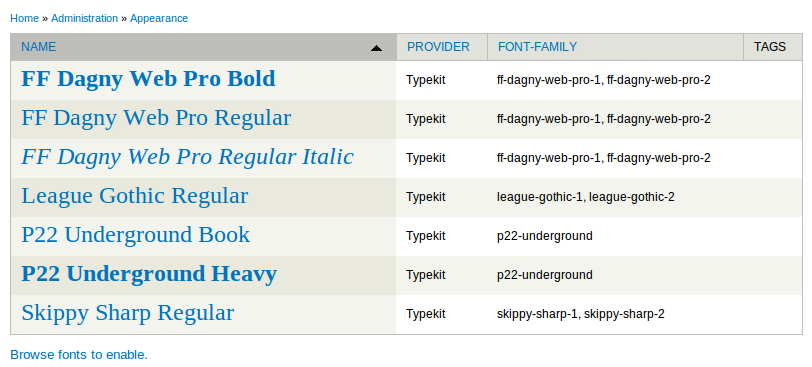
Using the typekit API only. When I import fonts from typekit after adding the API key it imports 5 extra fonts that aren't in my kit. These fonts are automatically enabled and start to overide the real fonts I want to use.. very strange.
Comment #2
sreynen commentedFor the permissions error, you need to change the permissions on your sites/default/files directory. The exact permissions depend on your particular setup. See:
http://drupal.org/node/244924
To look at why Typekit is importing extra fonts, I'd need to look at your Typekit project. Please send me your kit ID via the contact form. (You shouldn't post it here, as those keys are supposed to be private.) In general, @font-yourface gets all its import information from Typekit, so I can't imagine how that would happen unless there's an issue on Typekit's side.
These both sound like configuration issues, so I'm changing this to a support request.
Comment #3
g76 commentedsame issue, running on Aegir, shouldn't be a server-config issue. I am only using google fonts, not typekit at all. using latest dev version.
Comment #4
sreynen commentedLooking at the code, I don't see how it could possibly not be a server config issue.
The error comes from drupal_chmod, called by file_unmanaged_copy(), file_unmanaged_move(), file_unmanaged_save_data(), fontyourface_preprocess_page(). The error happens when chmod() fails, and chmod() fails when the server user doesn't have permissions to change permissions on the file.
What are the permissions on that file, who is the owner, and what user is your server running as?
Comment #5
acAlso using Aegir.. here are the permissions (www-data is apache user obviously)
Comment #6
acChanging status
Comment #7
g76 commentedI am really sorry, it seems I probably jumped the gun with my statement. I also should have posted more info and hope that you will accept my apologies. I really love your module and sincerely appreciate all your hard work and that you open that up to the community and do not take that for granted. As I have taken a closer look(which I should have initially), despite the error it is writing to the font.css file just fine.
thank you again, and again please accept my apologies.
Jen
Comment #8
acAny thoughts sreynen? The webserver group has permissions to modify that file and that file is getting modified. It is just being logged as an error to watchdog.
Comment #9
acAlso, the typekit bug has gone away without any changes at this end so I suspect you were right in suggesting that was a Typekit API error.
Comment #10
sreynen commentedMy guess is this is an Aegir-specific issue. I don't have an Aegir install handy to test this on, but there are a few notes in PHP's chmod() documentation that sound like they might be relevant. Specifically, "When safe mode is enabled, PHP checks whether the files or directories you are about to operate on have the same UID (owner) as the script that is being executed" seems a likely cause. If you install Devel, you can confirm if you're running in safe_mode at /devel/phpinfo. You can also confirm which user your server is running as by executing this at /devel/php:
return exec('whoami');Please post that information here and set this back to "active."
Comment #11
acThe server runs as www-data which is the group of the files which also has rwx. The server does not run in safe mode.
Comment #12
sreynen commentedI'm kind of stumped. I guess I'd probably try changing the permissions to 777 briefly just to see if the error still shows up. That will at least confirm whether or not it's a permissions error.
Comment #13
acI set fontyourface directory and font.css to 777 and the error is still being logged.
Comment #14
acMore information on initial error:
1) enabled fontyourface 7.x.1-3 and typekit API
2) add typekit api key
3) import fonts (total ends up as 7, should be 2)
4) Browse to fontyourface section in appearance (see screenshot - the only fonts meant to be there are the P22 ones)
5) The extra 5 fonts are enabled.
I can replicated this every time by uninstalling the module and re enabling it.
Comment #15
sreynen commentedac, I'm a little confused. At which of those 5 steps do you see the error? Or is this a separate problem?
Comment #16
acThe error in watchdog happens on every page load. This issue was the one I mentioned at the start of this issue that you thought might be a campaign monitor issue.
Comment #17
cpelham commentedI am also getting this error though fontyourface folder and font.css permissions are set to 777. I am using Ubuntu Lucid on a Rackspace cloud server.
Comment #18
sreynen commentedI'm currently out of guesses as to what's going on with this issue. If anyone is willing to give me direct access to a server where this is happening, I'd be happy to see if I can figure anything out. You can use my private contact form to send info.
Comment #19
flosuter commentedI had the same issue after migrating a site with aegir.
I just deleted the files/fontyourface/ folder and now everything works again as expected.
Comment #20
acI can confirm that removing the directory solves the issue. The directory was owned by the aegir user and in the apache group. When it is recreated after being removed it is owned by apache and in the apache group. It seems group write permission aren't enough. Don't know if there is much this module can do about this so you can probably close this.
Comment #21
sreynen commentedI'm moving this to the Hostmaster queue. This seems to be the part of Aegir that does the actual moving, which should be where the directory owner is being set to aegir. I'm just guessing on the version number.
Comment #22
rowbotony commentedConfirm with post #19 and #20 - I imported a site in to an Aegir platform then fontyourface started complaining in watchdog about not being able to set file permissions - I deleted the
files/fontyourface/folder, it was then automatically recreated and all is fixed now.UPDATE..... not so much. The web server will recreate the directory with the owner/group as www-data:www-data, but shouldn't it be aegir:www-data? All of the rest of my files are owned by aegir:www-data. So when I chown back to aegir:www-data I get the permission error again :(
Comment #23
sreynen commentedwww-data is Drupal (more specifically, whatever server is running Drupal). aegir is, well, Aegir. So your files are owned by Aegir when Aegir created them, and by Drupal when Drupal created them. It sounds like Drupal can't edit files that Aegir created, which is a problem with how user groups are set up on your server, not something we can fix in the module. I'm marking this as "fixed," as I don't see anything else we can do on this. If anyone else sees an opportunity to resolve this in the module code, please re-open.
Comment #24
rowbotony commentedThanks sreynen, this was indeed a group permissions problem, nothing to do with the Hostmaster module itself.
Update for future reference - everything is functioning properly for me now that I added the "www-data" user to the aegir group. I thought I had done that previously when I installed Aegir, but apparently I didn't have the setup right in the first place. So the command
# usermod -a -G aegir www-dataworked for me to add www-data (apache server) to the aegir group so they can work with each others files.Comment #26
hyperglide commentedHello,
I have re-opened this issue as I am experiencing the same problem.
Per #24 I have verified that "www-data" is i the "aegir" group.
We are using AEgir from the BOA project.
Thank you,
Hg
Comment #27
sreynen commentedHyperGlide, what are the permissions set on the directory/file throwing permissions errors?
Comment #28
hyperglide commented@sreynen - thanks for the reply.
drwxrwsr-x 2 www-data 4096 May 9 11:56 fontyourfaceComment #29
joestewart commentedHyperGlide - aegir should be a member of the www-data group.
You don't want www-data being able to write to all files owned by aegir. But do want files/directories in the www-data group to be able to written by aegir user.
Comment #30
joestewart commentedHyperGlide,
The Barracuda script adds to aegir to the www-data group:
http://drupalcode.org/project/barracuda.git/blob/refs/heads/master:/BARR...
And the manual installation says the same:
http://community.aegirproject.org/installing/manual#Create_the_Aegir_user
Comment #31
hyperglide commented@ joestewart
Thank you for the reply -- I had thought that BOA would fix this issue automatically with it's permission checks.
I have not made any changes to the groups or permissions.
Fix:
1 - Add "aegir" to the "www-data" group.
2- Remove "www-data" from the "aegir" group
Will adjust per the documents and confirm solution.
Thank you,
Hg
Comment #32
sreynen commentedSounds like this is fixed again.
Comment #33
hyperglide commentedRegrets for a previous error.
Checking the groups again, making use of the (2) commands:
shows:
"www-data" does not appear to be in the "aegir" group.
"dev" is our boa satellite user for the site having the file warning.
Thank you again for the help.
Comment #34
rowbotony commentedFrom Aegir Troubleshooting:
http://community.aegirproject.org/aegir-handbook/getting-help/troublesho...
This will also show aegir groups:
Comment #35
hyperglide commented@drupleg - Thanks!
Comment #36
hyperglide commentedany ideas on the cause?
Comment #37
gandhiano commentedI was having the same problem, with the aegir setup mentioned here. The problem seems to have been solved by removing the 0 bytes font.css:
It recreates with www-data ownership:
I'm not sure what could be the cause, because aegir is in the www-data group, but the errors stopped.
Note: my platform is in a remote server. I guess these working permissions would be broken during the standard verify process of aegir. I am using a patch from #1561102: Allow spokes to change their themes and modules , which disables syncing the files/ to the remote host
Comment #38
hyperglide commented@gandhiano thanks.
Not sure is our issue looking at font.css we have:
-rw-rw-r-- 1 dev www-data 74 Jun 22 01:04 font.cssTried it anyways and initial results is positive. WIll keep an eye on the log.
Thanks again.
Comment #39
hyperglide commentedMarking closed :-)