Closed (fixed)
Project:
Quickstart: Prebuilt Drupal Development Environment
Component:
Packaging
Priority:
Normal
Category:
Bug report
Assigned:
Unassigned
Reporter:
Created:
8 Jun 2011 at 17:48 UTC
Updated:
2 Jun 2012 at 15:11 UTC


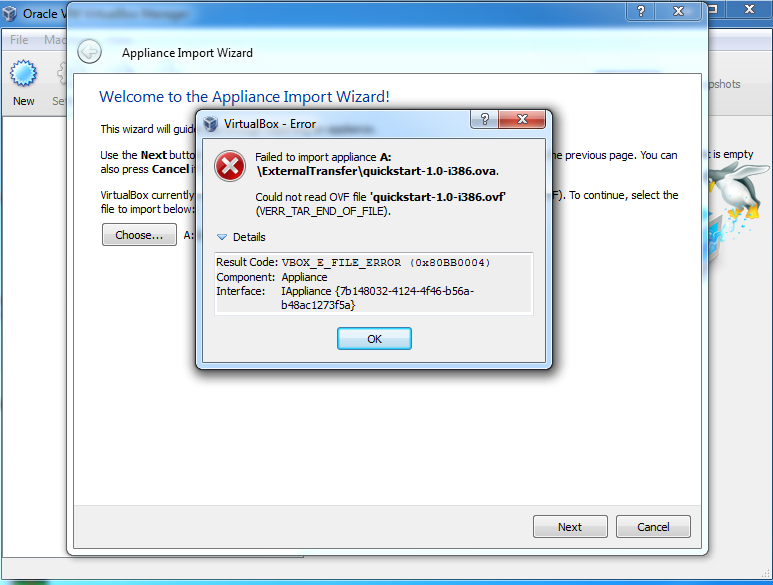
I am having problem with i386 version on my 32 bit laptop. Here is a screenshot of what error I am getting. Is it just me or is it because of virtualbox version 4.0.8? Anyone else getting same error?
Thanks in advance!
| Comment | File | Size | Author |
|---|---|---|---|
| quickstart_error.png | 108.4 KB | denny84 |

Comments
Comment #1
MichaelCole commentedHi Denny, I Googled around on VERR_TAR_END_OF_FILE and you may find this information useful.
Your file appears to be broken. Make sure you haven't changed the file name and it's the right size - about 1.1 or 1.2 gigs. You might try re-downloading the file to be sure.
Mike
Comment #2
denny84 commentedHi Michael,
Thanks for the help. I downloaded the file from the amazon as it is and not changed anything. Not even the filename. The filename was "quickstart-1.0-i386.ova" when I downloaded.
May be the file itself got corrupted while uploading to amazon. I will download the file again and check back here if the problem still persists.
Thanks
Comment #3
silkogelman commentedrenaming the filename to Quickstart 1.0 i386.ova should fix this problem.
I changed the filename to lowercase and I cut out the spaces before uploading to Amazon.
I can rename the Amazon files, but that would break the links on the project page AND it may result in people to have to rename the filename anyway because the space will probably be replaced by %20 when saving to their computer.
Mike, for the next Quickstart version, can you create the ova file in lowercase and without spaces?
This way we won't have to worry about url's with spaces e.d.
the correct name for the amd64 version is Quickstart 1.0 amd64.ova
Comment #4
michelleI got the same error and confirmed that changing the file name fixes it. Thanks!
Michelle
Comment #5
denny84 commented@s1 Thanks a million..............
Comment #6
MichaelCole commentedHi, sorry for this, I checked the md5sums on the files, but didn't test the actual import. Mea culpa.
I'm uploading new files now that will fix this so that others don't run into this problem in the future.
Thanks for the patience with the process. This has been a rocky release, but I've definitely learned some things and build a process for the future.
Cheers,
Mike
Comment #7
MichaelCole commentedThe links are now fixed on the home page. The files are the same, so no need to re-install if you got it to work.
Cheers,
Mike
Comment #9
brett1 commentedThanx, renaming the file worked for me too :>
Comment #10
deastlack commentedI'm running VBox 4.1.4 and still getting this problem.
Please state clearly what the file name should be and don't use periods in a file name in the future. Yes I know its supposed to be supported but it can cause problems and it is always better to avoid a problem than to fix one.
Comment #11
mike stewart commentedSorry the filename was a problem. In the next version (we're working on now) we'll fix. But it sounds renaming the file with spaces instead of dashes works.
FWIW, I did not encounter this problem when I recently installed the 64-bit version on Win7 using Vbox 4.1.10. Dos seem specific to the 32bit version ... and likely OS specific.
Comment #12
mike stewart commentedI missed #7 that fixed the links on the quickstart project homepage ... the fix should ensure this isn't a problem. Which suggests your file got corrupted. Either way, we'll be sure not to name with spaces or periods in the next release.
I suggest using a file download manager to be certain your files didn't get truncated during download.
Comment #13
mike stewart commented