

Closed (fixed)
Project:
Commerce Product Bundle
Version:
7.x-1.x-dev
Component:
Code
Priority:
Normal
Category:
Support request
Assigned:
Reporter:
Created:
16 Jun 2011 at 10:56 UTC
Updated:
16 Mar 2012 at 10:33 UTC
Jump to comment: Most recent file



Comments
Comment #1
jaxon77 commentedI can't find anything related to the module once enabled. Where do I create a product bundle?
Comment #2
JGO commentedyeah it sucks, waiting for support ... :(
Comment #3
hunziker commentedI will check this in next days. I have currently never tested multiple references per product.
The bundles can be created under Store > Products > Product Bundles (tab).
Comment #4
JGO commentedHi hunziker, I'm very happy you replied ;)
The problem is dat I cannot create bundles, the option is simply missing. Could you tell me which code that creates the required stuff for this so I can perhaps manually run it ? No idea why it's not there, maybe because of an uninstall/reinstall of the module. Also see attached screenshot, I'm pretty sure it's there normally, but missing in my case :(
The line type itself is created it seems though.
Comment #5
JGO commentedAny news ? Is there anyone who successfully implemented this module with the current drupal commerce alpha 4 ??
This is getting quite urgent for me now :(
Comment #6
hunziker commentedHave you tried to install the module in a complete fresh installation? Perhaps there is a clash with another module.
Comment #7
JGO commentedYes, this is what I did today because I was completely desperate. Maybe I'm missing a step. Don't know.
I just installed drupal, with all required modules for commerce including commerce alpha4 itself. But I didn't notice a difference. I guess if you would follow the same steps you would come to the same conclusion with current modules, unless I'm really missing something.
In the code I couldn't find anything that would create the "add bundle product" functionality under store > products > product types.
Do I need to add anything as a line item or so ? I would expect that I could just create a bundle product.
Comment #8
vthirteen commentedsame here, cannot find no bundle product type option/tab anywhere.
(in an almost clean installation using commerce_kickstarter installation profile)
Comment #9
noemi commentedI created a new product type with a product reference field.
I think that's all.
But I have an issue after step 6. If I select "Add to cart form" as display setting for the field, I get an error. I can select only "Product bundle: add to cart form" but in the product display I can't see the products list.
Am I doing anything wrong?
Comment #10
spuky commentedAny one got this working with commerce RC1 or later... ??? any hints on how to set this up...
Thanks Thomas
Comment #11
jared12 commented3) Setup a bundle product type with product reference fields. Each reference represents a products in the bundle. You could setup multiple product per reference, then the customer can select between these products.
I interpret this step to mean that a "bundle product type" is not automatically created by the module, but must be created manually.
So I did that. I created a "Bundle Product" and added four separate "product reference" fields to it. And then clicked over to the "Manage display" tab and set each one to "Bundle Product: add to cart form," as I believe step four says to do.
I added several regular products and then created one of my "Bundle Products" and referenced the regular products. Then I created a product display and referenced the bundle. It doesn't seem to do anything at all. It displays the price I put in for the bundle, but it doesn't list any products on the node or when added the shopping cart.
Am I missing something? Did I follow the directions correctly? Thanks!
Comment #12
kbeck303 commentedI am having the same exact problem as #11 - the "add a product bundle" is not an option for me under store > products > product types.
Comment #13
uprojects commentedSame problème !!! my brain is in fire ! the formater bundle add to cart does not work, and it display no errors anymore
Comment #14
ewyglend commentedSame problem as #11, followed instructions yet my bundle product does not display options or anything of the sort. Looks like a normal product.
Comment #15
derekw commentedAfter enabling the module in Modules, Save Configuration (modules) gives me a blank screen. I think something is not getting installed properly.
Comment #16
kolier commentedsubscribe.
Comment #17
kbeck303 commentedI'm changing this to critical because this module is not working. The install instructions do not work.
Comment #18
marknorris commentedReply to issue #15
I had the same issue and it was being caused by the Commerce Product Attributes module I was using.
I was also getting a blank screen when trying to view my products.
I followed the White Screen Of Death instructions: http://drupal.org/node/158043
This lead me to the issue: http://drupal.org/node/1209430
I then used the Dev release of Commerce Product Attributes instead of Alpha1 and now it appears to work.
I am still suffering from the lack of product bundles tab though :-(
Comment #19
olafkarsten commentedOkay, this is a project in explicit alpha stage. Expect some difficulties. And as I know, the maintainer is very busy, but expect some progress in the next weeks.
I think we have a some misleading naming, as 'BUNDLES' is used in Drupal7 too. Maybe that is somewhat confusing. As soon as the module is working like expected, I will help in updating the HowTo. For the moment, be patient - please.
Comment #20
Babalu commentedWhen i want to 6) Link the product bundle to a product display and save it, it does not take any effect without errors
i think i do all right to setup a bundled product
Comment #21
Babalu commentedwith add to cart but without product bundle: add to cart form field display i get this a little bit working
Comment #22
olafkarsten commentedThe Readme is updated in the current dev release. With all the other fixes in the last days, the dev version should basically work. Thought there are issues with the ajax update of the price in the display node and the commerce_product_attribute integration.
Comment #24
kitikonti commentedi have tried to setup like in the readme.txt from the dev version but there are a thew things not really clear.
i have created a product type für the bundle and also three product reference fields for this product type.
but which settings are too choose at the field settings for the product reference field? or are the default ok?
and whats the right way to create new bundles? i create a new product with the product bundle product type.
there i have again a price field, but i thought the price should be callculatet from the products i choose in the
product reference fields? and should i then create a product for every product combination or for example for
one product and the products to combine with:
Product example:
sku: the bundle dont have a own sku, only the singe products in the bundle so i dont know what to enter here
title: any title
price: the price should be callculatet expect from the products i choose, so i also dont know what to enter here
product reference 1: door 1
product reference 2: frame 1, frame 2
product reference 3: door lock 1, door lock 5
is this the right way or should i create a bundle for every possible combination like:
Product example (combi 1):
sku: the bundle dont have a own sku, only the singe products in the bundle so i dont know what to enter here
title: any title
price: the price should be callculatet expect from the products i choose, so i also dont know what to enter here
product reference 1: door 1
product reference 2: frame 1
product reference 3: door lock 1
Product example (combi 2):
sku: the bundle dont have a own sku, only the singe products in the bundle so i dont know what to enter here
title: any title
price: the price should be callculatet expect from the products i choose, so i also dont know what to enter here
product reference 1: door 1
product reference 2: frame 1
product reference 3: door lock 5
Product example (combi 3):
sku: the bundle dont have a own sku, only the singe products in the bundle so i dont know what to enter here
title: any title
price: the price should be callculatet expect from the products i choose, so i also dont know what to enter here
product reference 1: door 1
product reference 2: frame 2
product reference 3: door lock 1
Product example (combi 3):
sku: the bundle dont have a own sku, only the singe products in the bundle so i dont know what to enter here
title: any title
price: the price should be callculatet expect from the products i choose, so i also dont know what to enter here
product reference 1: door 1
product reference 2: frame 2
product reference 3: door lock 5
actually i dont really know how to use the module, or if it is possible to do what i need
Comment #25
olafkarsten commentedokay, the combi 1 looks like the right one.
Set the display settings for your three reference fields, like the README.txt describes.
All other setting on the three product reference fields are up to you. This is plain commerce - nothing special to this module. I didn't see something wrong in the first steps you have done. You only have to complete the procedure. Create an appropriate display node and you should see how it works.
We will not change the logic behind commerce - so of course the bundle product (as it is a product) has its own sku, even if you don't need it. Same with price, you have to enter a price for the bundle product. If you don't change the product bundle price calculation rule, than the price will calculated at the product display (bundle product) per rules magic ;) - at least it should.
Hope that helps. Keep trying and posting, if you have problems.
Comment #26
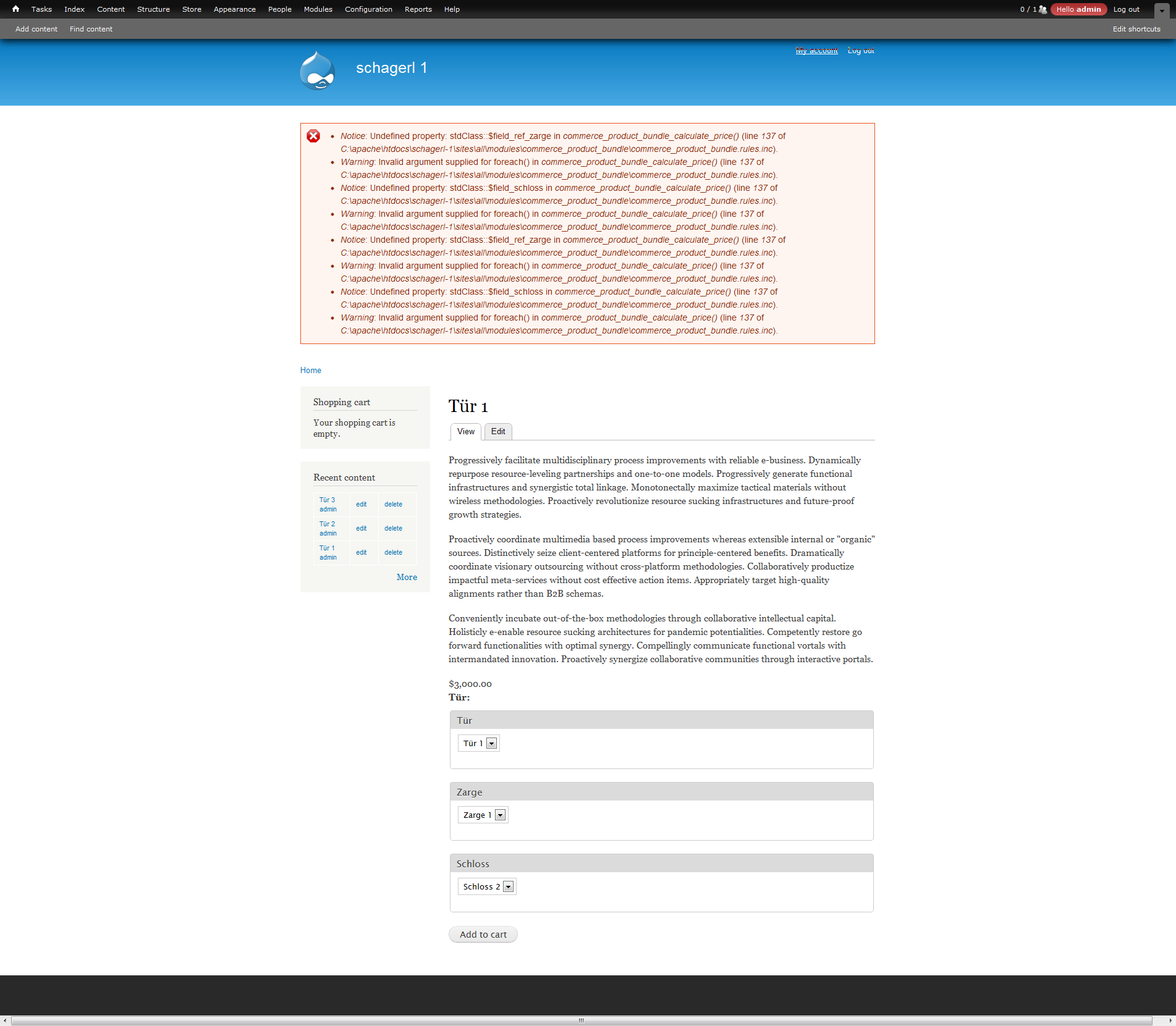
kitikonti commentedso now i have tried it again, but after creating a product display for a bundle i get errors. i also get the error on every page where the product display is used (teaser or full node).
and the caluculatet price is false, and dont change if i change the kombinatied products.
in the chart the price will be OK
Comment #27
olafkarsten commentedLooks like the setup is okay. I can't reproduce this error. I would be a great help, if you can send me the database. Looks like it is a testinstall. You can use dropbox or wetransfer or something to send the file. Then I will look, if I can find something. ( Set the admin login data to admin / admin). post.olaf + gmail dot com
Comment #28
kitikonti commentedyes is a testinstall,
https://www.dropbox.com/s/la28kltrt93pj23#view:list
i have uploaded a backup_migrate dump und a screenshot of my modules list
Comment #29
olafkarsten commentedokay, now I can reproduce it. I will have a look.
Comment #30
olafkarsten commentedThe new dev version should fix the error messages and should showing the correct initial price amount for the bundle. But as for now, the ajax update in this case doesn't work. But that has nothing to do with this issue. Follow up #1314028: Ajax update of the price in product displays didn't work in some cases
But your setup can one easily do with plain commerce. Nothing special as I can see. Create one product type "Tür" or "Türkombination" and add 3 fields for you options - style(tür), zarge, schloss. Create a product for each possible combination. Then create a product display and reference all you're products you just created. Thats all what you need to get all the commerce magic. The product display will only show the possible product combinations.
Comment #31
kitikonti commentedthx for your fast support.
i dont really know if i really think exactly the same like you discribe to set up my site. is the actuall setup false? because in the bundle products i created, i selected one "tür", multible "zargen" and multible "schlösser".
if i would have to create a own bundle for each possible combination, this will be very complex. then have to create for a combination of one "tür", two "zargen" and two "schlösser" four product bundles.
i have tried this allready but the first time i dont really got what i want.
if you need, i have a test installation where the ajax price update work, but this installation has other errors.
it would be nice if you would be in #drupal.de (i saw you there) so we could work a little bit faster on the problems.
Comment #32
olafkarsten commentedYes, I want that install, where the ajax works. Did you manage it and wrote the code, or is it just happen?
Ping me in IRC.
Comment #33
olafkarsten commented@kitikonti - and now, your setup is okay. But I think you don't need to fiddle around with commerce bundle as commerce should handle your use case out of the box.