

 The 2026 Drupal Business Survey is open. Your response will help shape the future of the Drupal business ecosystem.
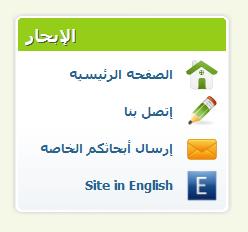
I love the way blocks appear with rounded corners and green background color for the block's title + the fine icons.
I want to apply the same theming to the main content area at site's frontpage i.e.: the region where the teasers appear.
I use views and I use the default view of "frontpage". How to define the custom css file in order to make that region look like the blocks?!
See attached image!
Thanks.
| Comment | File | Size | Author |
|---|---|---|---|
| sample_block.jpg | 7.99 KB | W.M. |

Comments
Comment #1
Deepika.chavan commentedHi,
I tried the same thing on my local site. I enabled the 'frontpage' view and changed the site information setting accordingly.
1. a. Copied node.tpl.php file from fusion_core theme to '/acquia_marina/.' theme dir.
1. b. Added
<div class="inner-inner">line of code after<div class="inner">and added</div><!-- /inner-inner -->before</div><!-- /inner -->line.2. a. Renamed 'local-sample.css' file to local.css.
2. b. Added following css code in local.css file :
2. c. Cleared cached data
3. a. Created new 'template.php' file in 'acquia_marina' theme dir.
3. b. Added following code in template.php file :
4. a. For rounded corners created 'rounded_corner.js' file in '/acquia_marina/js' dir.
4. b. Added following js code in rounded_corner.js file :
4.c. Cleared cached data.
HTH !!
Deepika Chavan.
Comment #2
W.M. commentedThanks very much for the help, Deepika Chavan. I will test the above modifications on one of my site. Have a blessed day :)
Comment #3
W.M. commentedI have tested the above code. It works. I am going to modify the above code to match my needs:
- I want to set a green h2 title to the whole frontpage view contents i.e. not one green title per each node title. I want one green title (with "News" as title text) for all 10 or 20 items (nodes) displayed in the frontpage view.
- I want to "inject" the ability to set a "block-icon" to the title in the above code.
If you have any suggestions please don't hesitate to share!
The help is of great value already, have a blessed day.
Comment #4
sheena_d commented