I have been working to get a publishing workflow set up on our site. I installed Workflow, Revisioning, Diff, and Module Grants.
The main problem I have come across is that it seems that I need to give the “Content Approver”—who publishes the revision—edit permissions in order for him to do the critical things such as see revisions, comment, and publish or reject the revision. However, we want it so that only the "Content Managers" (aka authors) can edit items and item bundles, meaning that someone who is just an Content Approver should not be able to edit the Item; they should just be able to publish or reject it with a comment.
Both the Content Manager and the Content Approver are Organic Group User Roles.
Essentially, the process seems to be all good so far except that the Content Approver has a little bit too much power, in that they have an edit page at their fingertips in which they can change fields as opposed to simply commenting and rejecting/publishing.
My question is: How can I set it up so that a Content Approver can see the changes, comment, and reject/publish but cannot edit the item node?


Comments
Comment #1
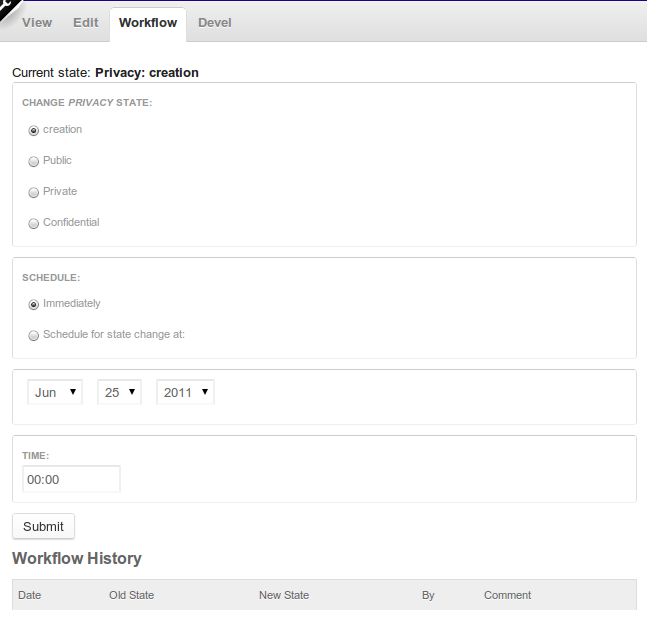
R.J. Steinert commentedYou should give roles that you just want to change the workflow state the "access workflow summary views" permission at admin/user/permissions. It will give add a tab to every node (see attached screenshot) with the following form for seeing past transitions, scheduling, and changing the node state.
Comment #2
Bastlynn commentedAs #1 described. That's what that permission is for.