

Closed (outdated)
Project:
Panels
Version:
7.x-3.x-dev
Component:
Code
Priority:
Major
Category:
Bug report
Assigned:
Unassigned
Reporter:
Created:
23 Jun 2011 at 16:57 UTC
Updated:
13 Jul 2026 at 16:42 UTC
Jump to comment: Most recent, Most recent file

Comments
Comment #1
Headache commentedComment #2
kars-t commentedHi
needs review means there is a patch. So I am resetting the issue to active. Please take a look at http://drupal.org/node/156119
Comment #3
Letharion commentedCan't reproduce this on a normal page, so it's related to the site template.
The file plugins/arguments/page_content.inc in D7 seems to be a straight copy from D6, so there's probably some kind of conversion needed here that hasn't been done yet.
In D6 there's a URL field for choosing which page to render for preview, the same field is missing in D7.
Unlike Headache, I see the notice 5 times on each page load.
Comment #4
tgriswold commentedAs with Letharion i get message 5 times as well. I built a clean site and only enabled Ctools Page Mamager, Panels, & Panels Everywhere. Tried it with Bartik and also tried switching over to Precision Theme (on a new clean build) and created a single column variant then tried to use preview. This generated the error. I also tried the Create Sample Variant" method and get the same results.
I am running Drupal 7.4 on localhost.
Same error with Jul 3 dev version
Comment #5
bryancasler commentedsubscribe
Comment #6
comicat commentedMe too encounterd this error.
Comment #7
marshallexcavating commentedme too,
Same error with:
1. Drupal 7.7 on localhost.
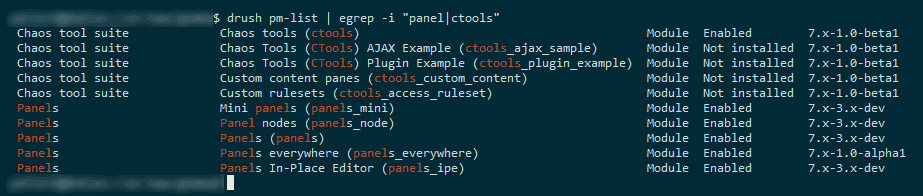
2. Chaos tool suite (ctools) 7.x-1.0-rc1
3. Panels 7.x-3.0-alpha3
4. Panels Everywhere 7.x-1.0-alpha1
I see the notice 5 times on each page load.
Comment #8
benasplentas commentedthe same here - just tried not on clean install with various themes: Bartik, Fusion, Aqua Marina - with all i'm getting the same errors (not one, but 6 times the same).
Comment #9
merlinofchaos commentedThis isn't PE's bug, this is Panels itself (or maybe CTools but start with Panels) having problems with preview.
Comment #10
benasplentas commentedBut I don't understand - does it work at all (could be without preview for some time)? I'm getting errors when trying to preview, but I can't save it at all also.
I mean - is it worth bothering to use it at this stage? I am working on a project where it would be ideal to use Panels Everywhere as I would like to override the theme. Maybe there is another module that does the same (I know Context Layouts and Composite Layouts, but they can't override everything - just central content part).
Comment #11
merlinofchaos commentedNothing in this bug report says anything about saving, only about preview.
Comment #12
benasplentas commentedMy mistake, I've just restarted everything and it is now possible to save, so this part is ok. Sorry for unnecessary fuss.
Comment #13
merlinofchaos commentedOh and yes, I think somehow previews are totally broken. :/
Comment #14
tanitani commentedSubscribed
Comment #15
netcastle commentedsub'd
Comment #16
vanderland commentedSubscribed
Comment #17
kaidawai commentedthis was the closest topic i found to the preview issue.
is there a simple way to make the preview bittons disapear. grepping(not digging any deeper) in the code i found a "no preview" flag somewhere e.g in the layout... something like that. that just makes the links and buttons to preview disapear. ist there a way?
[ i know thats no solution but just cosmetic and i could simple usethe preview buttons ...
its just that such ugly errormessages(no matter how meaningless) are the kind of thing that breaks your neck when you present a work to others... and actually the preview imho is not realy creatical for ther is an outline in tab "content" anyways. ]
Comment #18
mrbrns commentedSubscribed
Comment #19
Gyver06 commentedThe message I have got is this one :
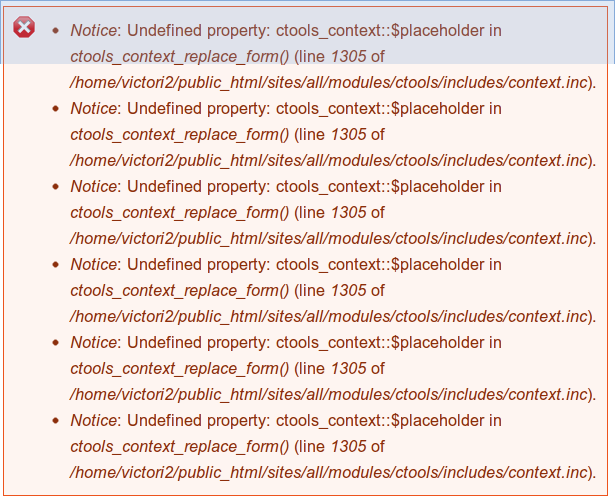
Notice : Undefined property: ctools_context::$placeholder in ctools_context_replace_form() (line 1305 in ../sites/all/modules/ctools/includes/context.inc).
with the exact same steps to reproduce as Headache. Only line number is different.
Any solution ?
Comment #20
drupert55 commentedsubscribed
Comment #21
maxchock commentedsame error here with Ctools, panels, panels everywhere updated to latest DEV version..

Comment #22
iPaw commentedAny solutions yet?
Comment #23
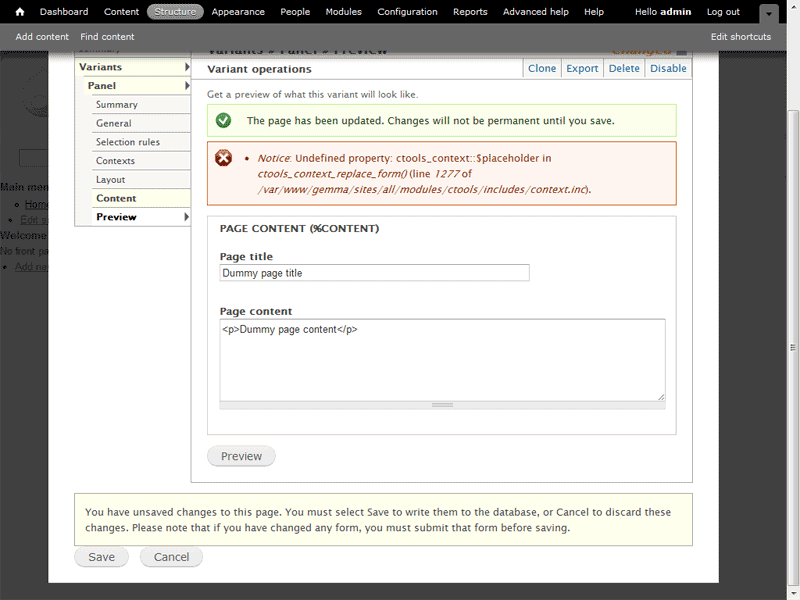
audster commentedGot this trying to preview site template with sample variant enabled only....
Get a preview of what this variant will look like.
Error message
Notice: Undefined property: ctools_context::$placeholder in ctools_context_replace_form() (line 1305 of C:\UniServer\www\pcw\sites\all\modules\ctools\includes\context.inc).
Notice: Undefined property: ctools_context::$placeholder in ctools_context_replace_form() (line 1305 of C:\UniServer\www\pcw\sites\all\modules\ctools\includes\context.inc).
Notice: Undefined property: ctools_context::$placeholder in ctools_context_replace_form() (line 1305 of C:\UniServer\www\pcw\sites\all\modules\ctools\includes\context.inc).
Notice: Undefined property: ctools_context::$placeholder in ctools_context_replace_form() (line 1305 of C:\UniServer\www\pcw\sites\all\modules\ctools\includes\context.inc).
Notice: Undefined property: ctools_context::$placeholder in ctools_context_replace_form() (line 1305 of C:\UniServer\www\pcw\sites\all\modules\ctools\includes\context.inc).
Notice: Undefined property: ctools_context::$placeholder in ctools_context_replace_form() (line 1305 of C:\UniServer\www\pcw\sites\all\modules\ctools\includes\context.inc).
Comment #24
kingfisher64 commentedExactly the same error as #23. What is this error to do with?
I'm running latest ctools & panels. Also adaptivetheme & at_panels_everywhere subtheme. It's obviously not a theme specific issue reading the thread.
Fixes / patches anyone?
Comment #25
SirDrupalot commentedI also got the Notice on HTML5 versatile theme using preview on the sample variant with panels_everywhere and latest ctools&panels
Also changed to different theme ( adaptivetheme & at_panels_everywhere subtheme ) , no difference.
The Notice is the same as #23 has
Comment #26
fischershaw commentedSame error as above continues with current releases.
ctools_context_get_context_from_argument() just does not add a placeholder array if the context is empty.
Comment #27
cnergis commentedgot the same issues here .. using precision, and other themes .. same issue persists
subscribe
Comment #28
oligas commentedSubscribed
Comment #29
kingfisher64 commentedThere is no need to subcribe anymore. once you post a comment you are automatically added to the follow list for that thread. If you make no comment just click the green follow button at top of thread.
Comment #30
SioMwingine commentedJust checking in.
Comment #31
franravi commentedSubscribed.
Comment #32
cs.abdulwahab commentedsame here
Comment #33
cs.abdulwahab commentedany solution ?
Comment #34
Paul D commentedI am having the same problem, the error prints 6X on preview. Have tried every permutation of ctool & panels, with and w/o dev, but no love. I am using PE as well, and Omega 4.
Has this thread gone totally stale? Been almost 2 1/2 yrs since it started. Been over 2 years since this:
Posted by merlinofchaos on August 15, 2011 at 11:24am
Oh and yes, I think somehow previews are totally broken. :/
Comment #35
kjallen commentedJust another data point -- same problem, same error, slightly different line num. 6x on preview. This is with radix, latest release versions of ctools and panels.
Notice: Undefined property: ctools_context::$placeholder in ctools_context_replace_form() (line 1316
We're over 3 years on this and 8 months since last activity. I assume no longer being looked at.
Comment #36
ryan258 commented@kjallen - The line 1316 error 6 times. I'm trying out the panels/pe/omega4 combination and in the Panels Everywhere readme there was a step I had missed that got me unstuck and over the error.
// From the Panels Everywhere readme - the part I missed to get line 1316 errors
Step 3
------
Navigate to Structure >> Pages and edit the site_template
(Default site template) page.
Edit your new variant. Customize it if you like. There are some very
important parts of this sample variant:
o The "Page content" pane is absolutely critical. That is the pane that
will hold the actual content of the page you are looking at. If this
pane does not exist, *no content will be rendered*, only the page
template. Think of this as being the $content variable in your
page.tpl.php -- you need that and cannot live without it.
o The "Title type" is set to "From pane" and the Page content pane is
selected as the title. (That is why that pane has a thicker border).
This is how the title of the content gets to be the title of the
page.
o The Navigation, Header and Messages panes are conveniences that
group common page navigation together. For customized sites it is
highly likely that you will theme these or do away with them and
use the individual pieces.
Comment #37
joelpittetThis only seems to happen with panels_everywhere... non of my other panels preview page have this error.
Comment #38
pvasili commentedNotice: Undefined property: ctools_context::$placeholder in ctools_context_replace_form() (line 1323 of ...\sites\all\modules\ctools\includes\context.inc).Drupal lives > 10 years
This BUG lives > 5 years
Great story!
Comment #39
joelpittet@pvasili Nobody has tracked down the source of the bug yet. If you have reproducible and MVP steps to see this bug it would help a lot!
Comment #40
joelpittetMost of the comments and issue summary say Panels Everywhere is the source... maybe we should move it to the right queue?
Comment #41
kaidawai commentedIirc the problem is not with Panels Everywhere but with Preview function. Sometimes preview is simple not possible along the model used for preview. I had to dig into it again to be more precise(i looked into it 4 Yeas ago - long time....).
see also #9
Comment #42
japerryDrupal 7 is no longer supported, closing.