Bug explanation:
When setting the storage location to a directory and the download method to
"local and remote files", the first update downloads the file(s) to the local
storage location, but the next update will see the local file as newer than the
remote file, choosing the local file. The result is having to update the
translations 2 times!
To recap in one sentence: The first time l10n_update downloads remotely, the
next time it sees the local file (that it just downloaded in the last update) as
an update and updates the system with it.
I think this is what's going on:
When l10n_update downloads a file remotely, it saves the timestamp of this
remote file from its header in the history (the table {l10n_update_file}).
On the next update, it will compare the timestamp set in the history with the
mtime of the local file, seeing that the local file is newer, thinking it's an
update. This leads to a second update from the same file.
Steps to reproduce:
- Download and extract Drupal
$ sudo -u www-data drush dl
- Make translations directory
$ cd drupal-7.2
$ sudo -u www-data mkdir -p sites/all/translations
- Download and extract l10n_update together with some modules for l10n_update
to update translations for
$ sudo -u www-data drush dl l10n_update-1.x-dev wysiwyg admin_menu advanced_help
- Set up databases
$ mysqladmin -u root -p create testsite1
$ mysqladmin -u root -p create testsite2
mysql> GRANT SELECT, INSERT, UPDATE, DELETE, CREATE, DROP, INDEX, ALTER ON testsite1.* TO 'testsite1'@'localhost' IDENTIFIED BY 'password';
mysql> GRANT SELECT, INSERT, UPDATE, DELETE, CREATE, DROP, INDEX, ALTER ON testsite2.* TO 'testsite2'@'localhost' IDENTIFIED BY 'password';
mysql> exit
- Install the sites
$ sudo -u www-data drush site-install standard --db-url="mysql://testsite1:password@localhost/testsite1" --uri=http://testsite1.local --sites-subdir=testsite1.local -v
$ sudo -u www-data drush site-install standard --db-url="mysql://testsite2:password@localhost/testsite2" --uri=http://testsite2.local --sites-subdir=testsite2.local -v
- Enable some modules together with l10n_update for the first site
$ drush en --uri=http://testsite1.local l10n_update admin_menu
- Enable some modules together with l10n_update for the second site, making
sure that it has at least 1 module that the first site hasn't
$ drush en --uri=http://testsite2.local l10n_update admin_menu advanced_help
- Set the storage location for both sites
$ drush vset --uri=http://testsite1.local --yes l10n_update_download_store "sites/all/translations"
$ drush vset --uri=http://testsite2.local --yes l10n_update_download_store "sites/all/translations"
- Add predefined language to first site
The language French has been created and can now be used. More information is available on the help screen.
One translation file imported for the enabled modules.
2 projects updated: admin_menu, drupal.
French translation strings added: 4676, updated: 0, deleted: 0.
$ ls -Al sites/all/translations
-rw-r--r-- 1 www-data www-data  12963 2011-06-25 19:08 admin_menu-7.x-3.0-rc1.fr.po
-rw-r--r-- 1 www-data www-data 701342 2011-06-25 19:08 drupal-7.2.fr.po
- Add predefined language to second site
The language French has been created and can now be used. More information is available on the help screen.
2 translation files imported for the enabled modules.
3 projects updated: admin_menu, advanced_help, drupal.
French translation strings added: 4677, updated: 0, deleted: 0.
$ ls -Al sites/all/translations
-rw-r--r-- 1 www-data www-data  12963 2011-06-25 19:08 admin_menu-7.x-3.0-rc1.fr.po
-rw-r--r-- 1 www-data www-data   1844 2011-06-25 19:18 advanced_help-7.x-1.0-beta1.fr.po
-rw-r--r-- 1 www-data www-data 701342 2011-06-25 19:08 drupal-7.2.fr.po
- Do another check for translation updates for the first site
$ sudo -u www-data drush l10n-update -l http://testsite1.local
Fetching update information for all projects / all languages.
Found 2 projects to update.
Updating translation.
Downloading and importing files.
2 projects updated: admin_menu, drupal.
French translation strings added: 0, updated: 4724, deleted: 0.
$ ls -Al sites/all/translations
-rw-r--r-- 1 www-data www-data  12963 2011-06-25 19:08 admin_menu-7.x-3.0-rc1.fr.po
-rw-r--r-- 1 www-data www-data   1844 2011-06-25 19:18 advanced_help-7.x-1.0-beta1.fr.po
-rw-r--r-- 1 www-data www-data 701342 2011-06-25 19:08 drupal-7.2.fr.po
- Do another check for translation updates for the second site
$ sudo -u www-data drush l10n-update -l http://testsite2.local
Fetching update information for all projects / all languages.
Found 1 projects to update.
Updating translation.
Downloading and importing files.
One project updated: advanced_help.
French translation strings added: 0, updated: 15, deleted: 0.
$ ls -Al sites/all/translations
-rw-r--r-- 1 www-data www-data  12963 2011-06-25 19:08 admin_menu-7.x-3.0-rc1.fr.po
-rw-r--r-- 1 www-data www-data   1844 2011-06-25 19:18 advanced_help-7.x-1.0-beta1.fr.po
-rw-r--r-- 1 www-data www-data 701342 2011-06-25 19:08 drupal-7.2.fr.po
This proves the unintended behaviour of timestamps in the history. The first
site remotely downloaded 2 files. On the second update, these were the local
files that were seen as an update. The second site remotely downloaded 1 file
(using the already downloaded files for the 2 other modules). On the second
update this was the file that was seen as an update.
Possible solution:
When a remote file is downloaded, set the timestamp in the history as the mtime
of the downloaded file, instead of taking the timestamp from the header of the
remote file. This way the timestamp in the history will be the same as the
timestamp of the local file. On the next update, l10n_update will not see these
local files as an update to what is already installed.
I would be happy to provide more information and test further to find a
solution to this.


Comments
Comment #1
sutharsan commentedI found the same an inconsistency between the content of 'timestamp' for files which were downloaded and files which were imported from sites/all/translations. In the first case the timestamp is time/date of the po-file is generated by the packaging script. In the second case the timestamp is the file's mtime. I came to the same conclusion and used the download timestamp instead of the header/packaging script time/date.
Try the attached patch.
Comment #2
Tor Arne Thune commentedOkay, so I followed the steps to reproduce, but applied the patch after step 5.
The results are in steps 10-13 below. As can be seen, l10n_update finds no
updates on the initial enabling of the language or on invoking l10n-update after.
Comment #3
sutharsan commentedRerolled patch against recent dev.
Comment #4
sutharsan commentedFound a small bug in the patch. Added some comment to the part where the magic happens.
Comment #5
sutharsan commentedPatch without trailing spaces.
Comment #6
Tor Arne Thune commentedRepeated my steps to reproduce but applied your new patch in #4. Looks like it worked! Great work.
Comment #7
sutharsan commentedThis patch also fixes this scenario:
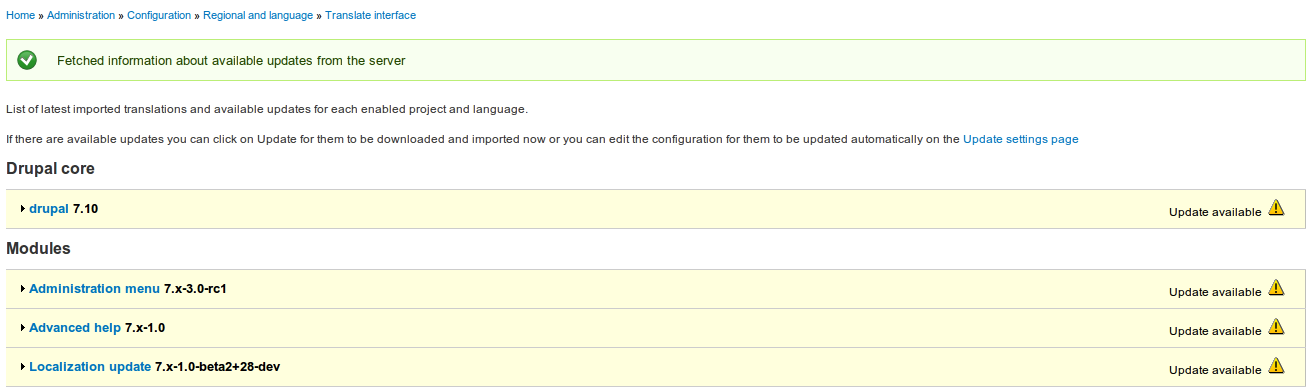
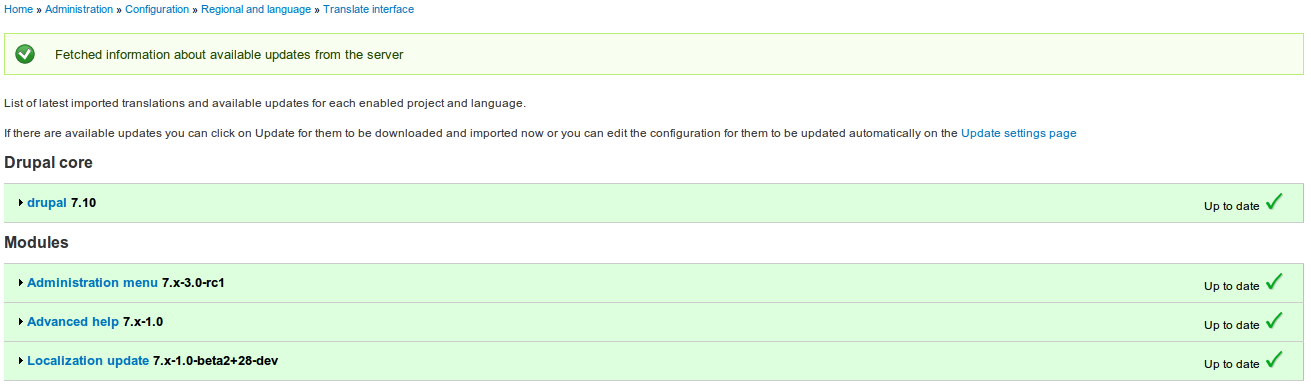
Without the patch the modules turn Yellow (translations available). With the patch they stay green.
Comment #8
Tor Arne Thune commentedYes, works like you described. Installed sites with "Using Local and remote translations" and translations saved to "sites/all/translations".
Installing a new site then adding a predefined language and checking for translation updates after the import (without patch applied): http://drupal.org/files/TranslationUpdatesWithoutPatch.png
Installing a new site then adding a predefined language and checking for translation updates after the import (with patch applied): http://drupal.org/files/TranslationUpdatesWithPatch_0.png
Comment #9
sutharsan commentedThis patch is now committed. Additionally it removes the import_date field which no longer has valuable data.