

Closed (won't fix)
Project:
Views Hacks
Version:
7.x-1.0-alpha2
Component:
Views Filters Selective
Priority:
Major
Category:
Bug report
Assigned:
Unassigned
Reporter:
Created:
29 Jun 2011 at 18:36 UTC
Updated:
31 May 2014 at 03:22 UTC
Jump to comment: Most recent, Most recent file


Comments
Comment #1
neoglez commentedWell, I just retested with the dev view and it seems to work fine.
You still have to donfigure the "Exposed form" and there set the option "Limit "Content: Has taxonomy terms (with depth)" values to result set" for the corresponding filter. So try that at feedback ;-)
Comment #2
webroru commentedI have the latest version of the views 7.x-3.x-dev and the latest version of the views hacks 7.x-1.x-dev. But after I select any value in the filter, the filter is empty.
Comment #3
2eazy commentedI have the same problem. I have installed and applied Views 7.x-3.3 and Views Selective Exposed Filters
7.x-1.x-dev. I have activated the modules and switched to "Selective Exposed Filters" for my exposed form and in settings I have activated Limit "Name of my taxonomy" values to result set" for two taxonomy terms associated with the product.
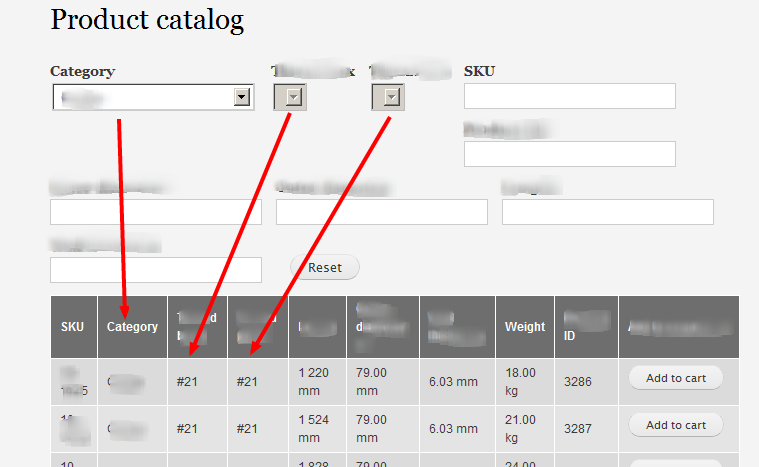
I select a Category and expect the two taxonomy term dropdowns to limit their options to correspond to the result list for the first filter. Instead after first selection (Category) the two taxonomy filters are grayed out as unselectable and "empty" - see attached image (and as per result you can see in the image that there are relevant terms to display).
I would really like to help out it anyway to solve this, just let me know if you need access to test this on the actual site. I am very keen to get this working as I think it is one of the most critical features missing from Views.
Comment #4
sjk413 commentedI seem to gain no functionality at all from this at the moment, it removes all filters (not just the empty ones).
I enable the module
Check the box on my exposed filter "Limit values to result set"
Load the page and all of the filters under "BRAND" have disappeared.
Like #3 I would be happy to help with resolving this in any way I that I can, as without it a list of 30 or so brands is going to appear on every page!
Thanks for a cool module
Comment #5
sjk413 commentedI thought I'd change this back to active, as the problem seems to have re-emerged.
Comment #6
webroru commentedhave any success?
Comment #7
sjk413 commentedI've just downloaded the latest dev version, and still have no option to "Limit list to result set", I have multiple filters based on >15 Taxonomy vocabularies, and also some filters using commerce product relationships. I see no "Limit list to result set".
When I choose Taxonomy (selective) i don't get a choice of taxonomies, just one that says "generate values at runtime". I've pretty much given up on this, I'm using BEF (Better exposed Filters) too. I have tried without BEF to no avail also.
Comment #8
infojunkieI have completely changed the implementation for Views Selective Filters on D7.
The way it now works is that for each existing filter, you get an additional selective filter - e.g. Node: Nid (selective) that displays a drop-down instead of the original input control.
It is functional as far as I can tell, but not as full-featured as the previous approach. Please try it and open new issues to request features or report problems.
Comment #9
davespat commentedHi,
I still don't see any menus at all with this option - although I'm new to drupal so it is probably just me. As it stands I have created a view, and have a drop down filter. I have enabled the 'Views Selective Exposed Filters' module.
If I understand correctly, I have to bring up the view from Home » Administration » Structure » Views and then clicking the filter link under the 'Filter Criteria' section ( a link that looks like 'Content: Field Name(Exposed)' ). This brings up the filter definition pop up window 'Configure filter criterion' and on the right, I have options like 'Expose Operator', 'Allow multiple selections'. What I should is here is an additional check box - "Limit list to result set".
Thanks in advance,
Comment #10
webroru commentedStill no results ...
 I vetrov - vetrov_admin_structure_views_view_reviews_edit.png)

Comment #12
Isostar commentedI can confirm the same issue as #10
Comment #13
kclarkson commentedI too am having issues using this module for D7.
I am using a "Tags" field on various content types. In my dropdown I would only like to show the Taxonomy Terms of that have values for that specific content type. For this example my content type is "News".
1. Under the "filter criteria" I have chose the field "Tags (selective)".
2. For the Filter Criterion options I have left everything blank. My first thought was to select the "actual values will be available at run-time" but that made my view show nothing. I am assuming if this is the option the default value should be set to "any".
3. Once I got everything working the select list now shows numbers and not the name of the term.
Comment #14
spessex commentedDid you ever get this to work? I've looked everywhere and there's no where I can seen the option "Limit list to result set" to get this to work? I have views 7.x-3.3
Comment #15
volker23 commentedI finally got it to work with taxonomy terms, thanks to @kclarkson for pointing out to leave everything blank in the filter options. And to prevent showing the tid numbers instead of terms i used the code-snippet from here: http://drupal.org/node/1608498#comment-6272310
Thanks!
Comment #16
kclarkson commented@Volker22 where did you paste the code snippet and is there a possibility of getting the patch added ?
Thanks,
Comment #17
marcoka commentedi can confirm this using views 7 dev and views_hacks dev
Comment #18
kenorb commentedDoesn't work with:
Views 7.x-3.5 + Views Selective Exposed Filters 7.x-1.0-alpha1
Could be related:
#1574478: Selective filters can't handle fields from a relation
Comment #19
sioux commentedBy using a combination of tips I finally have selective filtering of taxonomy terms working.
1. I (manually) patched the views filters selective file using the #11 tip found here: http://drupal.org/node/1608498#comment-6272310
2. In my view, under filters, I selected content: name-of-my-vocabulary (selective)
3. I exposed the filter & followed tip #13 above - I made 0 selections & volia- I have selective filtering with my taxonomy terms instead of IDs!
Comment #20
vivdrupal commentedConfirming it works with Views 7.x-3.5, along with Better Exposed filters 7.x-3.0-beta3.
But is incompatible with the 'Views dependent filters' module ver 7.x-1.1 . With this module the dependent drop-down is invisible until the first drop-down has a value. This part works fine.
Though the filter in the dependent drop-down shows filtered result (based on the value selected in the first drop-down) but it becomes inactive. Meaning the search can not be refined further based on the value selected in the (dependent) drop-down.
Comment #21
kenorb commented@vivdrupal:
You're confirming that it works with patch mentioned in #19?
Or just confirming that it works with the versions which you mentioned?
Which version of Views Hacks are you using?
Patch:
http://drupal.org/files/views_hacks-show_term_titles-1608498-11.patch
http://drupal.org/node/1608498#comment-6332198
Or this thread is just simply duplicate of #1608498: Selective filters show node id instead of title when filtering on node reference fields?
Comment #22
vivdrupal commentedAlso, for 'Exposed form style: Input required', at run time all the filters have the text" Actual values will be available at run-time".
And clicking on 'Apply', all the filter values return but so do all the values without any filters - thus defeating the purpose of the "Exposed form style: Input required"
Comment #23
vivdrupal commented@kenorb:
Views Hacks
Version: 7.x-1.0-alpha1
Just confirming 'Views Filters Selective' works for text fields - no patches applied.
Comment #24
aendra commentedConfirming what vivdrupal is saying in #22 -- the values change to "Actual values will be available at run-time" if "Required" is selected (Or if the exposed form type is set to "Input required").
Similar to this (D6) issue: http://drupal.org/node/1292998
Let me know if I should reopen this as a separate issue.
Comment #25
trumanru commentedWhich version of Views module do you use?
I've been used Views version 3.5 but Views Filters Selective doesn't work on my site.upd (2013-03-14): Works good! I think it was my bad.
Comment #26
essenceofginger commentedFollowed #19 (I was trying to do the same thing) - and it worked perfectly, thankyou sioux (and everyone else in the chain!).
For info, I'm using Views 7.x-3.5 and Selective Filters 7.x-1.0-alpha1.
Comment #27
miccelito commentedI'm using
Views Hacks 7.x-1.0-alpha2
Views 7.x-3.7
For the view page, under filters, I selected content: name-of-vocabulary (selective).
But the exposed filter - select list - shows TIDs instead of the term names.
Still don't see any solution. Any progress of solving this issue?
Comment #28
gynekolog commented@miccelito
Try http://drupal.org/node/1608498
Comment #29
miccelito commented@gynekolog
I have read that page you're linking to, but I didn't find a working solution there, I have tried the patches but none of them solve the issue with term IDs are shown instead of term names.
Comment #30
gerson.analista commentedI had the same problem of kclarkson #13.
In the final of the function "function get_value_options()" of the file "views_handler_filter_selective.inc" I added the code below:
I didn't test in all cases, but on select fieds worked.
Comment #31
zilla commentedi also followed 13 and it works like a charm - including full cooperation with ajax refreshes and so on.
even though this is pretty easy to document for users, doesn't it seem like an odd way to configure? there's a lot of trial and error in store for people who don't find this thread, and in turn will likely select "at runtime" or something like that...
Comment #32
geek-merlinSo if i get it right and is indicated on the project page the rewrite now lives here:
https://drupal.org/sandbox/david_garcia_garcia/2162097
Comment #33
gratefulsk commented#13 worked. Simply do not select the "Select All" or the "Actual values will be available at run-time" check boxes in the filter options.
Comment #34
infojunkieThis module has been deprecated in favour of https://drupal.org/project/views_selective_filters. Please test there and reopen if necessary.