

Closed (fixed)
Project:
Commerce Product Option
Version:
7.x-1.x-dev
Component:
Code
Priority:
Normal
Category:
Task
Assigned:
Unassigned
Reporter:
Created:
30 Jun 2011 at 20:45 UTC
Updated:
14 Jun 2017 at 16:19 UTC
Jump to comment: Most recent, Most recent file

Comments
Comment #1
hunziker commentedCan you explain a bit how you use them? Can you give me a use case?
Comment #2
kbalderson commentedI am currently using these rules to change price in cart based on boolean selections.
So, if a product has a boolean set to giftwrap a product, add $5 to the price.
It seems that this might have been possible using product bundle, but I couldn't get that module to install because of #1190208: Error when enabling product bundle
Comment #3
hunziker commentedI didn't like the approach to use for all checkbox things the bundle product, because this can lead to a huge list of products.
So your approach is absolutly viable. The reason why do not really understand, why we need here separate condition is simple. Because the commerce_option is implemented by the Entity API all the functionality of it is available also for the options. So you could check if some fields are set etc.
So what do your conditions ahead to the default conditions? This is not really clear to me.
Comment #4
kbalderson commentedMy conditions make the fields easily accessible through rules.
Prior to creating this file, I couldn't figure out how to access the data added through this module within Drupal Commerce's pricing rules.
I came across this issue: #1053850: Fix metadata-assertions for referenced entities. which made it seem that i couldn't easily access the fields within the Commerce Option entity.
If there is a way to do this that i have missed, without giving Commerce Options special Rules integration, then leaving this out may be the best option as not to duplicate functionality.
Comment #5
hunziker commentedYou could access the options by using a second rule. There you can add some assertion to access the fields. This is the general solution.
For options you could use "fetch entity by property". As the property to filter you need to use the line item. Then you can loop over the options and depending on the found option you could change the line item.
I know we can elaborate this by adding more sophisticated events / actions / conditions, but since Drupal Commerce is not really stable, we are more stable if we are using rules. (Rules complains at least if something is wrong.)
Comment #6
hunziker commentedComment #7
chrisnovak commentedThanks for the rules integration piece orbface9. I created a checkbox attribute and when checked it will add an amount to the product price thanks to your code put in a custom module. I could not figure out any other way to get this to work.
Comment #8
imp7 commented@hunziker thanks for explaining this, do you think still think Commerce "is not really stable"?
I have been using your method of option based pricing with rules. This may work however it is a level of complexity that makes adding a lot of option specific prices unmanageable. Maybe creating a crud wrapper of some kind for these rules would be an option, (there will still be the issue of updating the display node price and cart) do you plan on integrating this feature into in some form for this module? There seems to be a demand for it.
Comment #9
kristofferwiklund commentedHow comes this is marked as fixed. I can not find any of this code in dev-package or git.
Comment #10
7thkey commentedIt appears this is not clear at all. I've tried to do what it says Hunziker and finally I got some light with this solution and I will try to describe below.
The way I've found to access the options from rules with a simple example (Starting with a Commerce Kickstart setup):
Add and configure an Option Set
Attach Option Set to a product type
Add a product with our selected option set
Track the selected option in Rules
And that's it, when you select an option in subscribe you will get a message with the selected option.
But, what I don't get it to work is to use a conditional with the selected option values.
Any help will be appreciated.
Cheers
Comment #11
rosso69 commentedIs the custom module working for anyone?
I tried to calculate a price based on options. But i cannot find anything usefull.
firtst i tried : based on a custom module
#10 not working, just because i cannot find my field.
then i tried this solution : http://drupal.org/node/1081800#comment-4240420
Comment #12
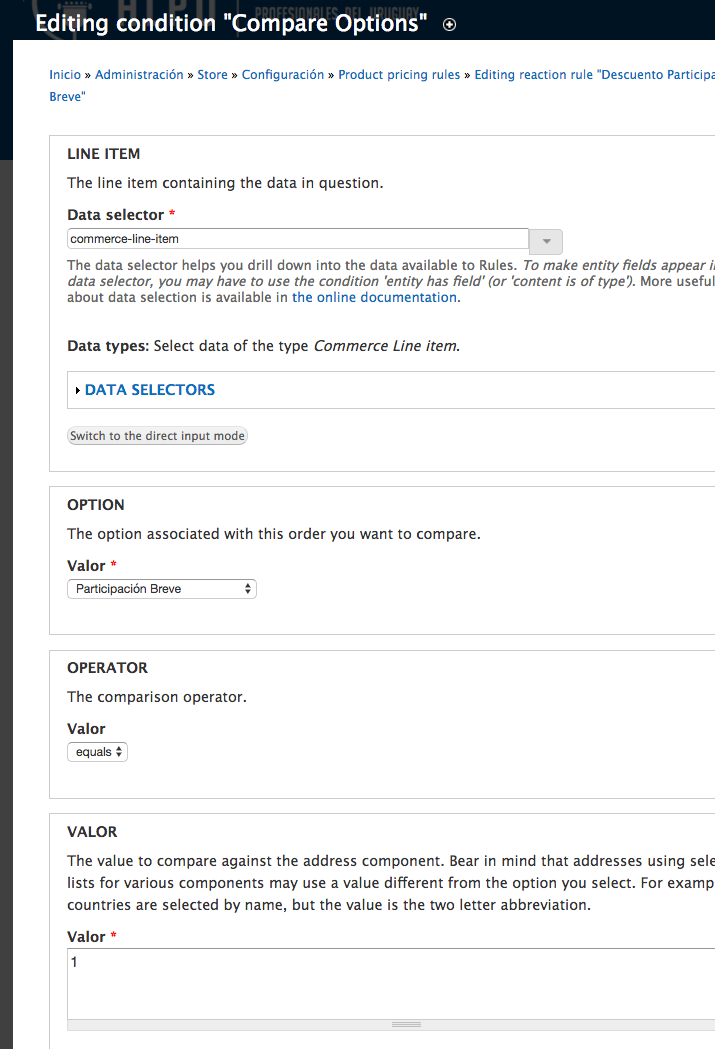
junetellain626 commentedThanks a lot kyle. The commerce_option.rules.inc worked for me.
Tried to solely use rules at first but couldn't manage to drill into the fields I want to fetch in the data selectors. (Tried entity is of type/has a field for a couple of times to no avail)
Cheers. :)
Comment #13
rfulcher commentedI am sorry if this is a stupid question but what do you do with that file to make this work. I have the exact scenario that Kyle did but not sure where to place the file. Thanks for your help.
Comment #14
georgemastro commentedCheck this new module http://drupal.org/project/commerce_pricing_attributes
It handles a lot of the missing features.
Comment #15
powersurge commented@rfulcher #13
Just copy this file http://drupal.org/files/issues/commerce_option.rules_.inc_.txt to the commerce_option folder, which is most likely located in the sites/all/modules folder, and then rename the file from "commerce_option.rules_.inc_.txt" to "commerce_option.rules.inc".
Then go to http://drupal.org/node/1394624#comment-5742254 and complete the remaining steps starting with step 3 (ignore steps 1-2).
If the new condition doesn't appear in Rules, then try clearing your cache before proceeding with step 3.
Comment #16
enorniel commentedI use http://drupal.org/project/commerce_pricing_attributes
but it doesn't work for numeric fields. So I would like to create a rule for that.
I would like to know how to use the values of fields called by a pricing attribute field in rules.
I tried https://drupal.org/node/1205628#comment-6102112
but when I look at the values given in the loop, I don't see anything about the fields I put in the option set.
How can I use the values of these fields to do operations on them in rules ?
Thanks.
Comment #17
Anonymous (not verified) commentedRules integration is on the way.
Comment #18
Anonymous (not verified) commentedBasic rules integration added through proper use of Entity API.
If this is not sufficient, please open up a new issue and describe what other Rules options you lack.
Comment #19
Anonymous (not verified) commentedComment #20
NatiNog commented@powersurge #15
I added the commerce_options_rules.inc to the module but I hace one problem, on the
function commerce_option_rules_compare_options($lineitem, $field, $operator, $value)I get
NULLforSo the condition always returns FALSE.
I tried to fix it but couldn't. Any suggestions?