

Closed (outdated)
Project:
Mailchimp
Version:
7.x-2.0-rc1
Component:
General
Priority:
Minor
Category:
Support request
Assigned:
Unassigned
Reporter:
Created:
5 Jul 2011 at 20:09 UTC
Updated:
8 Jul 2016 at 19:31 UTC
Jump to comment: Most recent, Most recent file

Comments
Comment #1
dboulet commentedIf I understand correctly, you can do this already—just enter your headline into the 'Block Title' field on the block settings page.
Comment #2
levelos commenteddboulet is correct
Comment #3
lsolesen commentedYou are right. But if I leave the title blank it default to "Subscribe to newsletter", which does not make sense. I do not want a title on the block, and I should decide, not some default :)
Comment #4
dboulet commentedHi lsolesen, that is how all blocks work in Drupal—they all have default, or "suggested" titles. You can turn it off by entering "<none>" as the title for the block.
Comment #5
lsolesen commentedDoh!
Comment #6
KoCo commentedIt still is somewhat valid, if you want do downsize the form.
In the list settings page, the label is required. Which acts as title for the form.
When using the form in a block, you can choose the block title.
But many themes use different css tags and styling for different titles.
In this case the title for a block or form could be totally different.
A lay-out with several blocks in a row, ...
Off course, you could css the title away, but wouldn't it be nicer to leave out un-needed html code.
So, Is it possible to create a simple switch, that triggers some form hook to delete the title?
Sorry, but I'm fairly new at working with entities and the form API.
If it's too much of a hassle, please kill the status of this issue again.
thx
Koen
Comment #7
dboulet commentedHi Koen, please see my comment in #4. Does that not accomplish what you are wanting?
Comment #8
KoCo commentedHi dboulet,
Actually it doesn't, both elements get different css classes.
A block title is a standardized element throughout a Drupal site.
The form title maybe styled to look like it, but that's usually a lot of hassle.
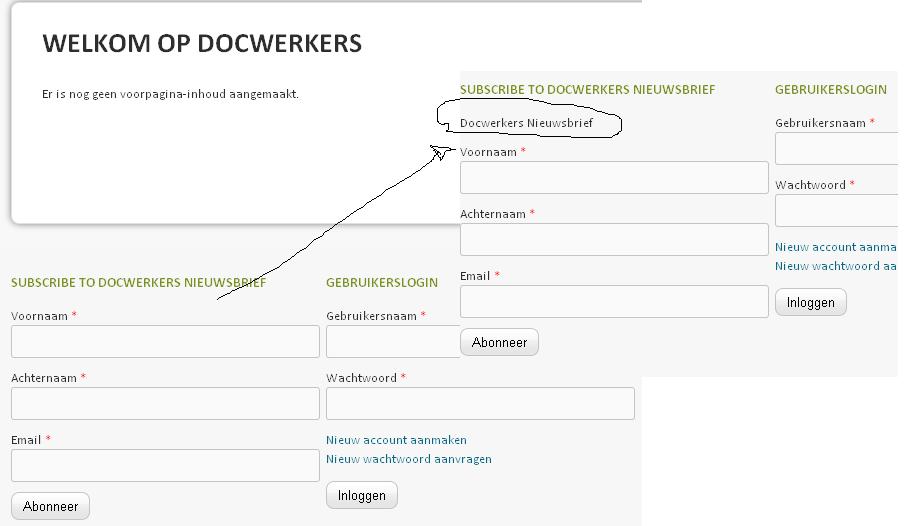
I attached a simple example, when blocks are in a row.
The standardized block title would suffice and lay-out nicely with blocks next to it. The form title would be overkill here.
Off course the simplest of solutions is to set style 'display: none;' on the form title id.
So this is definitely not a major issue ;-)
thx
Koen
Comment #9
perignon commented