I'm trying to find a way for a pager plugin to provide an option to show the pager above the page instead of below, but I can't find any way to get that working. This is for a date pager, since almost anyone (including me) expects date/calendar pagers to appear at the top of the page.
While trying to find a solution for this I stumbled across the area plugin type. I'm wondering if it might be possible to create an area plugin for the pager placement so people could put the pager above, below, or both above and below their content. Not sure how do-able this is currently, since the pager placement seems to be pretty much hard-wired into Views. Any thoughts on the feasibility/wisdom of going this route? And if it makes sense, does this seem like something that should go in Views itself rather than as a separate project?


Comments
Comment #1
merlinofchaos commentedThe pager could put data into $view->attachment_before perhaps?
Comment #2
karens commentedI tried that, but it isn't working. Maybe because there is nothing else there or it is not marked to display if empty. I tried all kinds of places, pre_view, pre_render, post_view, post_render. Couldn't find a way to get it working.
Comment #3
karens commentedAnyway, since it is non-trivial to do, I thought it might make sense for Views to make it easier. It seems like a pretty common sort of thing to do.
Comment #4
merlinofchaos commentedReally? Anything in $view->attachment_before or _after should automatically be part of the view. If it's not, that's kind of a bug.
Comment #5
karens commentedOK, I finally found a way to get this working. I can find no way for the pager to move itself, but a module can do it. So I had the pager add an identifer to the view, then used the following code in a module to find views that have the identifier and move the pager. The pager provides an option to the user to put the pager on 'top', 'bottom' or 'both', and this code moves it. We need the identifier because otherwise we would be moving ALL pagers.
Posting this so others can see how to do it because I spent hours going down rabbit holes that didn't work.
I still think it would be a nice feature if the end user could control it, but in the meantime this is how a module can do it.
Comment #6
mandreato commentedThanks for the suggestion !
I also think it would be great to have an option to set the pager on the top or on the bottom of the view (in 6.x too).
Comment #7
quantos commentedWas this ever implemented guys? I'm looking to do the same thing and can't yet find an easy way, in my case, to place the pager above the paged items. I can probably do it with CSS but I'm surprised this isn't a standard feature.
In my specific use-case I want to create a series of paged (Views) casestudies where each page is deeper than the average viewport depth hence would prefer to have pagers at the top of the page.
Is there really no easily configurable way to do this? Any pointers appreciated.
Q.
Comment #8
stan turyn commentedquantos,
it's very easy to move/display the pager where you want - just place the relevant view template into your theme's templates folder and move/copy this code:
to the desired position.
(the template you want is display output views-view.tpl.php - in Views UI for the relevant view go to Advanced->Other->Theme:Information and copy the code from views-view.tpl.php into a new file, named as suggested in Theme:Information (next name after views-view.tpl.php), place that file in tempalets folder, make your changes and click 'rescan' at the bottom of Theme:Information)
Comment #9
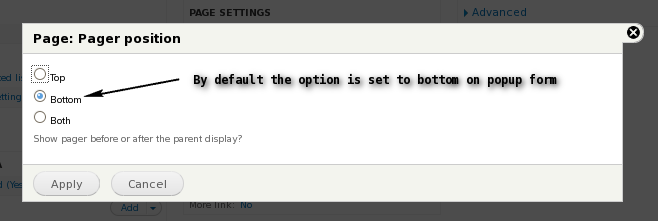
monish_deb commentedI can submit a patch for providing a option like "Attachment position" for "Attachments". So for Pager there will be "Pager Position" with top,bottom,both choices (bottom as default). Will it be ok ?
Comment #10
Exploratus commentedI think this is a fabulous idea. Seems like a simple UI improvement and it provides a lot more flexibility. A lot of sites have pagers on top and bottom. For example, ecommerce sites.
Comment #11
monish_deb commentedI have provided a separate option under PAGER section as "Pager position" which is set to 'bottom' by default. Please check the snapshot and patch.
Thanks,
Monish
Comment #12
mikeker commented@monish_deb, great work on this! Thanks.
I would suggest putting the pager placement option into the "Pager options" dialog (what you get when you click the "1 item" in the screenshot above). The pager details could then say something like "Use pager: Full | Above and below | 1 item". Also since the pager placement is specific to the display and follows the default/override setting of the pager options, it would reduce confusion. (Since there is no "For All displays/This page" option on the pager placement dialog, a user could think they could only place the pager for all displays of a view rather than on a per-display basis).
I'm not sure I'm explaining myself very well -- I'll see if I can roll a patch later today.
(Also, FYI, when you post a patch, set the status to "Needs review". That'll tell the testbot to run automated tests against the patch and get the attention of the module maintainers when the tests pass.)
Comment #13
mikeker commentedRetitled to reflect current options.
Also, this was mentioned as needed in D8's revamp of Views: #2022297: [META] Unified toolset for Views in core.
Comment #14
mikeker commentedI'm not sure what idiot made the comment in #12, but they were way off! :) If I look at the "exposed form in block" as an example, this does not belong in the pager plugin.
Besides, the obvious place to add this would be in
views_plugin_pager, but doing that makes for very convoluted code -- trust me, I just tried. (None of the subclasses, for example, callparent::summary_title()meaning we would have to add the location text to each Views pager plugin as well as any in contrib).My only concern with this patch is the possible confusion between "position" and "location" when it comes to pagers. "Position" might be misinterpreted as the position of the pager (as in page 5 of 10) rather than it's "location" on a page. But that's mostly picking nits...
Comment #16
monish_deb commentedYes you are right it must be location rather than position to be reasonable in its usage. Sorry I overlooked the meaning before implementing it :( On the otherhand I have also tried to introduce the feature for all those basic views display by introducing it in
views_plugin_pagerbut seems more complex. I have improvised my patch, also replaced 'position' with 'location'.Comment #18
damiankloip commentedFirstly, if we are going to fix/action this, I think we should do this in 8.x first. We can then backport when we get consensus?
I think I actually like the idea of providing a container area plugin to render the pager. The patches above look OK but I think they add complexity/workarounds and logic that we shouldn't need. If we go with a patch like this, we then just worry about what else we change to accommodate for this new area plugin.
Here's an initial patch that just adds a really simple area plugin that renders the pager.
Comment #19
damiankloip commentedComment #20
dawehnerI would love to overrule the renderPager method from the display plugin instead, to have all the power to the user.
For sure this does not allow people to just move it to the top, but at least it covers the usecase of having one both at the bottom and the top, so +1 even we said for a long long time that you actually should change the template.
Comment #21
chris pergantis commentedPosted by Stan Shevchuk on April 8, 2013 at 3:11am
quantos,
it's very easy to move/display the pager where you want - just place the relevant view template into your theme's templates folder and move/copy this code:
to the desired position.
(the template you want is display output views-view.tpl.php - in Views UI for the relevant view go to Advanced->Other->Theme:Information and copy the code from views-view.tpl.php into a new file, named as suggested in Theme:Information (next name after views-view.tpl.php), place that file in tempalets folder, make your changes and click 'rescan' at the bottom of Theme:Information)
There is most always a way by module and theme. This worked like a charm in D7. Thanks to post #8
Comment #22
damiankloip commentedYes, we know we can just override templates to put the pager where we want :) This doesn't really do what we want to in this issue. Which is make the pager placement more flexible in configuration.
Comment #23
damiankloip commentedSo I was thinking something like this, where we have an option to not render the pager... Thoughts?
Comment #24
mondrake#23: this is very nice...
With this patch you get an additional 'Global' element, being the pager, and include it in the header and/or footer regions of the view.
Just have a few comments on the UX - I know, I know, that won't be easy to address, but pls let me moonwalk :)
Comment #25
jibran23: 1210980-23.patch queued for re-testing.
Comment #27
DrCord commentedI understand the need for better configuration, it would be great to have it in the UI. However the solution in #21 worked great for me in this situation.
Comment #28
dawehnerDoes this help to make sites more mobile friendly?
Comment #30
mikl#28: I'd say so, at least.
Comment #31
mariocantor commentedThanks # 8 and #21 works fine. is important to write solutions in detail. think as person who have a just basic concepts.. and explain where you can find the files to modify.
Comment #33
Yzmir Ramirez commentedCan this make it in 8.2.1? I'm looking at placing my pager above my Comment's field.
Comment #34
mikl#33: Since 8.2.1 has already been released, no. It would at the very earliest go into the next release, but given that the patch currently breaks the tests (and thus needs more work before it can be merged), that is unlikely to happen, so don't hold your breath.
Comment #37
websiteworkspace commentedA Views UI setting to to have the pager: above, below, or both, would be fantastic.
This is a very much a needed feature.
Comment #40
mrpauldriver commentedI would like to see this. Anyone else?